- Reference
- Version · 5.1
- Reference guide
generate-changelog
Last updated: October 7, 2026
The generate-changelog command creates a changelog file that has a sequence of changesets which describe how to re-create the current state of the database.
Uses
The generate-changelog command is typically used when you want to capture the current state of a database, then apply those changes to any number of databases. This is typically only done when a project has an existing database, but hasn't used Liquibase before. See How to set up Liquibase with an Existing Project and Multiple Environments for more details.
Note: When using the update command to apply the changes in the changelog, Liquibase will not create a new database or schema. You must create them before applying the changelog to it.
Run the generate-changelog command
In this example, our sample database has the following content:
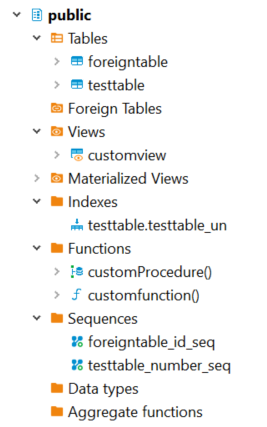
Note: The username and password attributes are not required for connections and systems which use alternate means of authentication. Also, you can specify database credentials as part of the url attribute.
* --include-tablespace only captures the tablespace if it was specified in the create table statement.
Output changelogs
The generate-changelog command generates a changelog that contains all your objects (represented as changesets) and places the file in the same directory where the command was ran.
The extension you provide determines the format of the changelog, so if you specify the filename as changelog.xml, you will get an XML formatted changelog. However, if you specify the filename as changelog.yaml, changelog.json, or changelog.sql, you will get changelogs formatted in YAML, JSON, or SQL, respectively.
Note: By default, Liquibase does not split statements for formatted SQL changelogs because splitStatements is set to false in the changelog. If the generatedSQL has multiple SQL statements, then Liquibase adds splitStatements:true to the changelog.
Learn more about split statements here: sql
Default diff types
Specific diff types
Parameters
Global parameters
Attribute | Definition | Requirement |
| Your Liquibase Secure license key | Required |
Command parameters
Attribute | Definition | Requirement |
| The JDBC database connection URL. | Required |
| Specifies the author for changesets in the generated changelog. | Optional |
| Changelog file to write results | Optional |
| Specifies the context filter to generate and apply to all changesets in your changelog. Useful to set many contexts quickly. Similar to the set-contexts command. Available in Liquibase 4.24.0 and later. Contexts are tags you can add to changesets to control which changesets will be executed in any particular migration run. After generating changesets with contexts, to deploy specific changes according to these contexts, you must run a command that specifies a context filter. For example, | Optional |
| Specifies a directory to send the loadData output to a CSV file which is generated by running the | Optional |
| Name of the default catalog to use for the database connection | Optional |
| Name of the default schema to use for the database connection. If Note: In the properties file and Note: In Liquibase 4.12.0 and later, you can use mixed-case schema names if you set | Optional |
| Specifies the types of objects to compare. Specify multiple values as a comma-separated list (without spaces). Valid values are: If null, default types are Liquibase Secure 5.1.0+. Snowflake accepted values are: Note: For Snowflake, unique constraints are not snapshotted as standalone objects. Instead, uniqueness is captured as the Snowflake view and table support has been enhanced with four Snowflake-specific view and table objects: Snowflake standard views, Snowflake materialized views, Snowflake standard tables, and Snowflake dynamic tables. The generic Liquibase VIEW and TABLE objects are supported for backward compatibility in CRUD operations only and do not support database inspection. For full Snowflake functionality, use the Snowflake standard view, Snowflake standard table, and Snowflake dynamic table objects. The Snowflake materialized view objects support CRUD operations. Note: The diff types | Optional |
| The JDBC driver class | Optional |
| The JDBC driver properties file | Optional |
| Objects to exclude from diff | Optional |
| Controls behavior when snapshots reference objects from schemas not included in the snapshot (like cross-schema triggers or foreign keys)
Default: | Optional |
| If | Optional |
| Objects to include in diff | Optional |
| If | Optional |
| Includes the tablespace of tables and indexes in a generated changesets if the value is | Optional * |
| Specifies the label filter to generate and apply to all changesets in your changelog. Useful to set many labels quickly. Similar to the set-labels command. Available in Liquibase 4.24.0 and later. Labels are tags you can add to changesets to control which changeset will be executed in any migration run. After generating changesets with labels, to deploy specific changes according to these labels, you must run a command that specifies a label filter. For example, | Optional |
| Generates a separate changelog for each object. Valid values: | Optional |
| Lets you replace the schemas in the output changelog. This is a CSV list. The parameter size must match Example: | Optional |
| Determines whether | Optional |
| Password to connect to the target database. | Optional |
| Specify Change Types you want to target. Liquibase sets | Optional |
| Specify Change Types you want to target. Liquibase sets | Optional |
| Specifies database schemas you want to include | Optional |
| Liquibase 4.27.0+. Specifies how Liquibase sorts a list of objects in your database to generate a changelog. When Note: If you set this parameter to | Optional |
| Username to connect to the target database. | Optional |
Global parameters
Attribute | Definition | Requirement |
| Your Liquibase Secure license key | Required |
Command parameters
Attribute | Definition | Requirement |
| The JDBC database connection URL. | Required |
| Specifies the author for changesets in the generated changelog. | Optional |
| Changelog file to write results | Optional |
| Specifies the context filter to generate and apply to all changesets in your changelog. Useful to set many contexts quickly. Similar to the set-contexts command. Available in Liquibase 4.24.0 and later. Contexts are tags you can add to changesets to control which changesets will be executed in any particular migration run. After generating changesets with contexts, to deploy specific changes according to these contexts, you must run a command that specifies a context filter. For example, | Optional |
| Specifies a directory to send the loadData output to a CSV file which is generated by running the | Optional |
| Name of the default catalog to use for the database connection | Optional |
| Name of the default schema to use for the database connection. If Note: In the properties file and Note: In Liquibase 4.12.0 and later, you can use mixed-case schema names if you set | Optional |
| Specifies the types of objects to compare. Specify multiple values as a comma-separated list (without spaces). Valid values are: If null, default types are Liquibase Secure 5.1.0+. Snowflake accepted values are: Note: For Snowflake, unique constraints are not snapshotted as standalone objects. Instead, uniqueness is captured as the Snowflake view and table support has been enhanced with four Snowflake-specific view and table objects: Snowflake standard views, Snowflake materialized views, Snowflake standard tables, and Snowflake dynamic tables. The generic Liquibase VIEW and TABLE objects are supported for backward compatibility in CRUD operations only and do not support database inspection. For full Snowflake functionality, use the Snowflake standard view, Snowflake standard table, and Snowflake dynamic table objects. The Snowflake materialized view objects support CRUD operations. Note: The diff types | Optional |
| The JDBC driver class | Optional |
| The JDBC driver properties file | Optional |
| Objects to exclude from diff | Optional |
| Controls behavior when snapshots reference objects from schemas not included in the snapshot (like cross-schema triggers or foreign keys)
Default: | Optional |
| If | Optional |
| Objects to include in diff | Optional |
| If | Optional |
| Includes the tablespace of tables and indexes in a generated changesets if the value is | Optional * |
| Specifies the label filter to generate and apply to all changesets in your changelog. Useful to set many labels quickly. Similar to the set-labels command. Available in Liquibase 4.24.0 and later. Labels are tags you can add to changesets to control which changeset will be executed in any migration run. After generating changesets with labels, to deploy specific changes according to these labels, you must run a command that specifies a label filter. For example, | Optional |
| Generates a separate changelog for each object. Valid values: | Optional |
| Lets you replace the schemas in the output changelog. This is a CSV list. The parameter size must match Example: | Optional |
| Determines whether | Optional |
| Password to connect to the target database. | Optional |
| Specify Change Types you want to target. Liquibase sets | Optional |
| Specify Change Types you want to target. Liquibase sets | Optional |
| Specifies database schemas you want to include | Optional |
| Liquibase 4.27.0+. Specifies how Liquibase sorts a list of objects in your database to generate a changelog. When Note: If you set this parameter to | Optional |
| Username to connect to the target database. | Optional |
Global parameters
Attribute | Definition | Requirement |
| Your Liquibase Secure license key | Required |
Command parameters
Attribute | Definition | Requirement |
| The JDBC database connection URL. | Required |
| Specifies the author for changesets in the generated changelog. | Optional |
| Changelog file to write results | Optional |
| Specifies the context filter to generate and apply to all changesets in your changelog. Useful to set many contexts quickly. Similar to the set-contexts command. Available in Liquibase 4.24.0 and later. Contexts are tags you can add to changesets to control which changesets will be executed in any particular migration run. After generating changesets with contexts, to deploy specific changes according to these contexts, you must run a command that specifies a context filter. For example, | Optional |
| Specifies a directory to send the loadData output to a CSV file which is generated by running the | Optional |
| Name of the default catalog to use for the database connection | Optional |
| Name of the default schema to use for the database connection. If Note: In the properties file and Note: In Liquibase 4.12.0 and later, you can use mixed-case schema names if you set | Optional |
| Specifies the types of objects to compare. Specify multiple values as a comma-separated list (without spaces). Valid values are: If null, default types are Liquibase Secure 5.1.0+. Snowflake accepted values are: Snowflake view and table support has been enhanced with four Snowflake-specific view and table objects: Snowflake standard views, Snowflake materialized views, Snowflake standard tables, and Snowflake dynamic tables. The generic Liquibase VIEW and TABLE objects are supported for backward compatibility in CRUD operations only and do not support database inspection. For full Snowflake functionality, use the Snowflake standard view, Snowflake standard table, and Snowflake dynamic table objects. The Snowflake materialized view objects support CRUD operations. Note: The diff types | Optional |
| The JDBC driver class | Optional |
| The JDBC driver properties file | Optional |
| Objects to exclude from diff | Optional |
| Controls behavior when snapshots reference objects from schemas not included in the snapshot (like cross-schema triggers or foreign keys)
Default: | Optional |
| If | Optional |
| Objects to include in diff | Optional |
| If When specifying multiple schemas see Diff multiple schemas in Liquibase for file path considerations when same-named objects exist across schemas. | Optional |
| Includes the tablespace of tables and indexes in a generated changesets if the value is | Optional * |
| Specifies the label filter to generate and apply to all changesets in your changelog. Useful to set many labels quickly. Similar to the set-labels command. Available in Liquibase 4.24.0 and later. Labels are tags you can add to changesets to control which changeset will be executed in any migration run. After generating changesets with labels, to deploy specific changes according to these labels, you must run a command that specifies a label filter. For example, | Optional |
| Generates a separate changelog for each object. Valid values: Supported for: Oracle, Postgres, SQL Server, MySQL, MariaDB, DB2, Snowflake, Databricks, MongoDB, and BigQuery. | Optional |
| Lets you replace the schemas in the output changelog. This is a CSV list. The parameter size must match Example: | Optional |
| Determines whether | Optional |
| Password to connect to the target database. | Optional |
| Specify Change Types you want to target. Liquibase sets | Optional |
| Specify Change Types you want to target. Liquibase sets | Optional |
| Specifies database schemas you want to include | Optional |
| When Supported for: Oracle, Postgres, SQL Server, MySQL, MariaDB, DB2, Snowflake, Databricks, MongoDB, and BigQuery. | Optional |
| Username to connect to the target database. | Optional |
Global parameters
Attribute | Definition | Requirement |
| Your Liquibase Secure license key | Required |
Command parameters
Attribute | Definition | Requirement |
| The JDBC database connection URL. | Required |
| Specifies the author for changesets in the generated changelog. | Optional |
| Changelog file to write results | Optional |
| Specifies the context filter to generate and apply to all changesets in your changelog. Useful to set many contexts quickly. Similar to the set-contexts command. Available in Liquibase 4.24.0 and later. Contexts are tags you can add to changesets to control which changesets will be executed in any particular migration run. After generating changesets with contexts, to deploy specific changes according to these contexts, you must run a command that specifies a context filter. For example, | Optional |
| Specifies a directory to send the loadData output to a CSV file which is generated by running the | Optional |
| Name of the default catalog to use for the database connection | Optional |
| Name of the default schema to use for the database connection. If Note: In the properties file and Note: In Liquibase 4.12.0 and later, you can use mixed-case schema names if you set | Optional |
| Specifies the types of objects to compare. Specify multiple values as a comma-separated list (without spaces). Valid values are: If null, default types are Liquibase Secure 5.1.0+. Snowflake accepted values are: Snowflake view and table support has been enhanced with four Snowflake-specific view and table objects: Snowflake standard views, Snowflake materialized views, Snowflake standard tables, and Snowflake dynamic tables. The generic Liquibase VIEW and TABLE objects are supported for backward compatibility in CRUD operations only and do not support database inspection. For full Snowflake functionality, use the Snowflake standard view, Snowflake standard table, and Snowflake dynamic table objects. The Snowflake materialized view objects support CRUD operations. Note: The diff types | Optional |
| The JDBC driver class | Optional |
| The JDBC driver properties file | Optional |
| Objects to exclude from diff | Optional |
Unix
| Controls behavior when snapshots reference objects from schemas not included in the snapshot (like cross-schema triggers or foreign keys)
Default: | Optional |
| If | Optional |
| Objects to include in diff | Optional |
| If When specifying multiple schemas see Diff multiple schemas in Liquibase for file path considerations when same-named objects exist across schemas. | Optional |
| Includes the tablespace of tables and indexes in a generated changesets if the value is | Optional * |
| Specifies the label filter to generate and apply to all changesets in your changelog. Useful to set many labels quickly. Similar to the set-labels command. Available in Liquibase 4.24.0 and later. Labels are tags you can add to changesets to control which changeset will be executed in any migration run. After generating changesets with labels, to deploy specific changes according to these labels, you must run a command that specifies a label filter. For example, | Optional |
| Generates a separate changelog for each object. Valid values: Supported for: Oracle, Postgres, SQL Server, MySQL, MariaDB, DB2, Snowflake, Databricks, MongoDB, and BigQuery. | Optional |
| Lets you replace the schemas in the output changelog. This is a CSV list. The parameter size must match Example: | Optional |
| Determines whether | Optional |
| Password to connect to the target database. | Optional |
| Specify Change Types you want to target. Liquibase sets | Optional |
| Specify Change Types you want to target. Liquibase sets | Optional |
| Specifies database schemas you want to include | Optional |
| When Supported for: Oracle, Postgres, SQL Server, MySQL, MariaDB, DB2, Snowflake, Databricks, MongoDB, and BigQuery. | Optional |
Unix:
Windows:
| Liquibase Secure 5.1+
This is a JVM system property that controls how the Oracle JDBC driver handles fetch sizes when querying tables containing LONG or LONG RAW columns. It is available in Liquibase 5.1.0 and later. The default value is You might want to set this property to | Optional |
| Username to connect to the target database. | Optional |
Global parameters
Attribute | Definition | Requirement |
| Your Liquibase Secure license key | Required |
Command parameters
Attribute | Definition | Requirement |
| The JDBC database connection URL. | Required |
| Specifies the author for changesets in the generated changelog. | Optional |
| Changelog file to write results | Optional |
| Specifies the context filter to generate and apply to all changesets in your changelog. Useful to set many contexts quickly. Similar to the set-contexts command. Available in Liquibase 4.24.0 and later. Contexts are tags you can add to changesets to control which changesets will be executed in any particular migration run. After generating changesets with contexts, to deploy specific changes according to these contexts, you must run a command that specifies a context filter. For example, | Optional |
| Specifies a directory to send the loadData output to a CSV file which is generated by running the | Optional |
| Name of the default catalog to use for the database connection | Optional |
| Name of the default schema to use for the database connection. If Note: In the properties file and Note: In Liquibase 4.12.0 and later, you can use mixed-case schema names if you set | Optional |
| Specifies the types of objects to compare. Specify multiple values as a comma-separated list (without spaces). Valid values are: If null, default types are Liquibase Secure 5.1.0+. Snowflake accepted values are: Snowflake view and table support has been enhanced with four Snowflake-specific view and table objects: Snowflake standard views, Snowflake materialized views, Snowflake standard tables, and Snowflake dynamic tables. The generic Liquibase VIEW and TABLE objects are supported for backward compatibility in CRUD operations only and do not support database inspection. For full Snowflake functionality, use the Snowflake standard view, Snowflake standard table, and Snowflake dynamic table objects. The Snowflake materialized view objects support CRUD operations. Note: The diff types | Optional |
| The JDBC driver class | Optional |
| The JDBC driver properties file | Optional |
| Objects to exclude from diff | Optional |
| Controls behavior when snapshots reference objects from schemas not included in the snapshot (like cross-schema triggers or foreign keys)
Default: | Optional |
| If | Optional |
| Objects to include in diff | Optional |
| If When specifying multiple schemas see Diff multiple schemas in Liquibase for file path considerations when same-named objects exist across schemas. | Optional |
| Includes the tablespace of tables and indexes in a generated changesets if the value is | Optional * |
| Specifies the label filter to generate and apply to all changesets in your changelog. Useful to set many labels quickly. Similar to the set-labels command. Available in Liquibase 4.24.0 and later. Labels are tags you can add to changesets to control which changeset will be executed in any migration run. After generating changesets with labels, to deploy specific changes according to these labels, you must run a command that specifies a label filter. For example, | Optional |
| Generates a separate changelog for each object. Valid values: Supported for: Oracle, Postgres, SQL Server, MySQL, MariaDB, DB2, Snowflake, Databricks, MongoDB, and BigQuery. | Optional |
| Lets you replace the schemas in the output changelog. This is a CSV list. The parameter size must match Example: | Optional |
| Determines whether | Optional |
| Password to connect to the target database. | Optional |
| Specify Change Types you want to target. Liquibase sets | Optional |
| Specify Change Types you want to target. Liquibase sets | Optional |
| Specifies database schemas you want to include | Optional |
| When Supported for: Oracle, Postgres, SQL Server, MySQL, MariaDB, DB2, Snowflake, Databricks, MongoDB, and BigQuery. | Optional |
| Username to connect to the target database. | Optional |
The generate-changelog command supports formatted SQL output. To use it, specify a changelog filename in the format changelog.<database short name>.sql. Liquibase infers the target database from the short name embedded in the filename. If you are connected to PostgreSQL, the short name segment is optional and a filename such as changelog.sql works. Every other database requires the segment, as does PostgreSQL over an offline connection.
Database short names
Database | Short name | Example filename |
Oracle | oracle | changelog.oracle.sql |
MySQL | mysql | changelog.mysql.sql |
MariaDB | mariadb | changelog.mariadb.sql |
PostgreSQL | postgresql | changelog.postgresql.sql |
SQL Server | mssql | changelog.mssql.sql |
DB2 (LUW) | db2 | changelog.db2.sql |
DB2 (z/OS) | db2z | changelog.db2z.sql |
H2 | h2 | changelog.h2.sql |
HSQLDB | hsqldb | changelog.hsqldb.sql |
SQLite | sqlite | changelog.sqlite.sql |
Derby | derby | changelog.derby.sql |
Firebird | firebird | changelog.firebird.sql |
Informix | informix | changelog.informix.sql |
Ingres | ingres | changelog.ingres.sql |
Sybase | sybase | changelog.sybase.sql |
Sybase ASA (SQL Anywhere) | asany | changelog.asany.sql |
CockroachDB | cockroachdb | changelog.cockroachdb.sql |
EnterpriseDB | edb | changelog.edb.sql |
Snowflake | snowflake | changelog.snowflake.sql |
Databricks | databricks | changelog.databricks.sql |
BigQuery | bigquery | changelog.bigquery.sql |
Cassandra | cassandra | changelog.cassandra.sql |
Database objects supported by Liquibase
You can use the following object types in Liquibase:
Object type |
syntax | Liquibase edition |
Catalog |
| Liquibase Open Source |
Column |
| Liquibase Open Source |
Data |
| Liquibase Open Source |
Foreign key |
| Liquibase Open Source |
Index |
| Liquibase Open Source |
NOT NULL constraint | N/A | Liquibase Open Source |
Primary key |
| Liquibase Open Source |
Schema | N/A | Liquibase Open Source |
Sequence |
| Liquibase Open Source |
Table |
| Liquibase Open Source |
Unique constraint |
| Liquibase Open Source |
View |
| Liquibase Open Source |
Check constraint |
| Liquibase Secure |
Function |
| Liquibase Secure |
Package |
| Liquibase Secure |
Package body |
| Liquibase Secure |
Stored procedure |
| Liquibase Secure |
Trigger |
| Liquibase Secure |
Liquibase Secure stored logic behavior
While Liquibase Open Source stores all changesets in a changelog, Liquibase Secure creates a directory called Objects and places the directory at the same level as your changelog.
The Objects directory contains subdirectories for each of the stored logic types:
packagepackagebodyfunctionstored proceduretrigger
Note: Some database platforms may not support all of these stored logic types.
The generate-changelog command will not create the Objects directory if:
You don't have a valid Liquibase Secure license key.
Stored logic is not present in the database.
The target database does not support the
generate-changelogcommand and stored logic objects.The changelog file is written in formatted SQL. The
Objectsfolder can only be created when generating XML, JSON, or YAML changelogs.There is a pre-existing directory called
Objectsthat was created outside Liquibase.
If your database contains Stored Logic objects, you may have issues attempting to run the generate-changelog command more than once, even with a new changelog name, because the stored logic files already exist in the Objects directory.
To generate a newer version of the changelog file with stored logic objects based on the current database state, you need to delete, rename, or move the Objects directory that was created by running the generate-changelog command previously. Then, you can run the generate-changelog command again.
Note: If there is a pre-existing Objects directory that is not related to Liquibase, you need to delete, rename, or move it to run the generate-changelog command.
If you want to track the history of stored logic objects, use the diff-changelog command. The diff-changelog command structures stored logic files into timestamped directories every time you run the command.