- Concept
- Version · 5.1
- Integration guide
Maven rollbackOneUpdate
Last updated: October 7, 2026
The Maven rollbackOneUpdate goal rolls back all changesets related to a specific deploymentId that was made during a specific change to your database.
Uses
The Maven rollbackOneUpdate goal is typically used when you want to undo a series of changes made to your database during a specific deployment and revert those changesets to their previous state without affecting any other changes made to your database.
The rollbackOneUpdate goal allows you to target a specific deploymentId without impacting other changes or deployments that came before or after it.
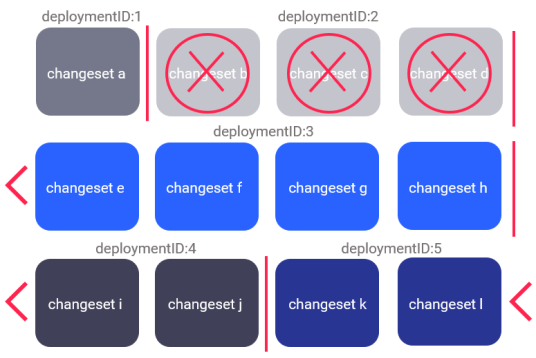
The image shows deploymentIds 1 through 5, with deploymentId 2 incorporating all the changesets to roll back. As you can see, the rollbackOneUpdate goal allows you to target deploymentId 2 and revert all changesets associated with the same deploymentId to its previous state without impacting the others.
The impacts of rollbackOneUpdate
Using the rollbackOneUpdate goal comes with risks of unintended consequences. For this reason, it is best practice to run the Maven rollbackOneUpdateSQL goal because it allows you to inspect the rollback SQL and search for any potential mistakes before you execute rollbackOneUpdate.
Also, as the use of rollbackOneUpdate comes with risks of unintended consequences, the goal requires a liquibase.force attribute to specify that you intend to run the goal.
Additional impacts to the DATABASECHANGELOG table
Running the rollbackOneUpdate goal will remove the deployment record from the DATABASECHANGELOG table. For this reason, you must decide on what to do with your changesets after the rollbackOneUpdate goal has been run.
Depending on your desired outcome, consider doing one of the following:
Modify the changeset in the changelog file and re-deploy it.
Do nothing to the changeset in the changelog file and have it be re-deployed.
Delete the changeset in the changelog file.
Maven configuration
You can configure Liquibase Maven in multiple ways. You can pass arguments like <changeLogFile> in Maven directly in your pom.xml file, in a liquibase.properties file referenced in your POM, as environment variables, or as JVM system properties. To learn about each file's syntax, see Maven Properties.
For more information about the Maven configuration, see Configuring Maven.
Ensure you add <ProLicenseKey>specify your Liquibase Secure license key here</ProLicenseKey> to pom.xml or specify it in another valid way.
Running the rollbackOneUpdate Maven goal
Before running the rollbackOneUpdate goal, you can get the deploymentId of the deployment you want to revert by running the Maven history goal: mvn liquibase:history
Note: If you don't specify the deploymentId, by default, Liquibase Secure will look up the most recent deploymentId from the DATABASECHANGELOG table and use it for the rollback.
Next, run the rollbackOneUpdate goal, with your information:
mvn liquibase:rollbackOneUpdate -Dliquibase.deploymentId=6477021518
Note: Enter the name of the deploymentId that you want to use in place of 6477021518. For more information, run mvn liquibase:help -Ddetail=true -Dgoal=rollbackOneUpdate.
Required Maven rollbackOneUpdate configuration attributes
Definition | |
|---|---|
| Specifies the update you want to roll back. A list of updates with changesets grouped by their |
| Specifies a required flag that indicates you intend to run this command. |
| Specifies your Liquibase Secure license key. |
Optional Maven rollbackOneUpdate configuration attributes
Attribute | Definition |
|---|---|
| Specifies the path to the directory where Liquibase can find your changelog file. |
| The changelog file for Liquibase to use. |
| Specifies the catalog Liquibase will use to create your changelog tables. |
| Specifies the schema Liquibase will use to create your changelog tables. |
| Boolean. Forces checksums to be cleared from the DATABASECHANGELOG table. Default value is: false. |
| Specifies which contexts Liquibase will execute, which can be separated by a comma if multiple contexts are required. If a context is not specified, then all contexts will be executed. |
| Specifies the table name to use for the DATABASECHANGELOG table. |
| Specifies the table name to use for the DATABASECHANGELOG table. |
| Specifies the database object class. |
| Specifies the default catalog name to use for the database connection. |
| Specifies the default schema name to use for the database connection. |
| Specifies the driver class name to use for the database connection. |
| Specifies the location of a JDBC connection properties file which contains properties the driver will use. |
| Deprecated. Boolean. Use an empty or null value for the password instead. Default value is: false. |
| Specifies a map-based collection of changelog properties to apply. |
| Specifies a property-based collection of changelog properties to apply. |
| Boolean. Includes a Maven project artifact in the class loader, which obtains the Liquibase properties file and changelog files. Default value is |
| Boolean. Includes the Maven test output directory in the class loader which obtains the Liquibase properties file and changelog files. Default value is |
| Specifies which labels Liquibase runs, and which can be separated by a comma if multiple labels are required or you need to designate a more complex expression. If no label is specified, then all labels are run. |
| Specifies your Liquibase Secure license key. |
| Boolean. Specifies whether to ignore the catalog or database name. Default value is: false. |
| Boolean. Specifies whether to ignore the schema name. Default value is: false. |
| Indicates that you want to set the character encoding of the output file during the |
| Specifies the database password for the database connection. |
| Deprecated. Boolean. Controls whether users are prompted before executing changesets to a non-local database. Default value is: true. |
| Specifies the Liquibase properties file to use for configuration, like |
| Boolean. Indicates that you want the |
| Specifies the property provider, which must be a |
| Specifies the path to a rollback script. |
| Specifies the server ID in the Maven |
| Boolean. Specifies whether to skip running Liquibase. The use of this attribute is not recommended but can be used when needed. Default value is: false. |
| Specifies a list of system properties you want to pass to the database. |
| Specifies the database URL you want to use to execute Liquibase. |
| Specifies the database username for the database connection. |
| Boolean. Controls the amount of output detail when you call the plugin. Default value is: false. |
Maven rollbackOneUpdate output
Starting Liquibase at 08:06:54 (version 4.1.1 #10 built at 2020-10-12 19:24+0000)
[INFO] Parsing Liquibase Properties File local.liquibase.properties for changeLog parameters
[INFO] Executing on Database: jdbc:oracle:thin:@localhost:1521/ORCL
[INFO] Successfully installed license from Base64 string starting with 'ABwwGgQUvH' (property liquibaseProLicenseKey).
[INFO] Liquibase Secure 4.1.1 by Liquibase licensed to support until Wed Sep 22 23:59:59 CDT 2021
[INFO] Liquibase Secure 4.1.1 by Liquibase licensed to support until Wed Sep 22 23:59:59 CDT 2021
[INFO] Reading from DATABASECHANGELOG
[INFO] Successfully acquired change log lock
Rolling Back Changeset:dbchangelog.xml::1606322157619-17::Nataliya (generated)
Rolling Back Changeset:dbchangelog.xml::1606322157619-16::Nataliya (generated)
[INFO] Successfully released change log lock
[INFO] ------------------------------------------------------------------------
[INFO]
[INFO] ------------------------------------------------------------------------
[INFO] BUILD SUCCESS
[INFO] ------------------------------------------------------------------------
[INFO] Total time:  5.202 s
[INFO] Finished at: 2020-11-27T08:06:56-06:00
[INFO] ------------------------------------------------------------------------