- Reference
- Version · 5.0
- Reference guide
rollback
Last updated: August 21, 2026
The rollback command rolls back changes made to the database based on the specified tag.
Before you can use rollback, you need to have your Liquibase project set up. You'll need to make sure you have a liquibase.properties file that specifies the driver, classpath, and URL. You may also need to set up any needed authentication so Liquibase is connected to your database.
Uses
The rollback command is typically used to revert all changes that were made to the database after the tag you specify.
Liquibase provides significant value for managing rollbacks by creating a framework that encourages you to consider rollback scenarios during development, simplifies executing rollbacks with straightforward commands, and maintains a complete history of rollback operations for audit and troubleshooting purposes. We recommend that you write rollback logic for every changeset. You can use the RollbackRequired policy check to ensure that every changeset contains rollback logic.
Rollback and changelog format
If you are using formatted SQL changelogs, you must manually define rollback logic for all changesets. SQL changelogs do not support automatic rollback generation.
If you are using modeled changelogs (XML, YAML, JSON), Liquibase automatically generates rollback SQL for many change types, including createTable, renameColumn, and addColumn. For change types that do not support automatic rollback, you must define manual rollback logic. See What change types can I use auto rollback with? for a complete list.
Command behavior
When you run rollback, Liquibase will roll back sequentially all the deployed changes until it reaches the tag row in the DATABASECHANGELOG table. For example, you can use the rollback command when you want to undo a series of changes made to your database related to a specific tag such as a numbered release. If you have tags for release 1, release 2, and release 3, and need to make a correction in release 2, the rollback command will rollback release 3 first.
You must specify a tag with the tag command or the tagDatabase Change Type in your changelog file for rollback to work. If Liquibase cannot find your tag, it halts and displays the following message:
rollback: Unexpected error running Liquibase: Could not find tag 'doesntexist' in the database
Before running this command, it is best practice to run tag-exists to check whether your tag syntax is correct. It is also a best practice to copy and paste the name of the tag into the CLI so that you are less likely to misspell it.
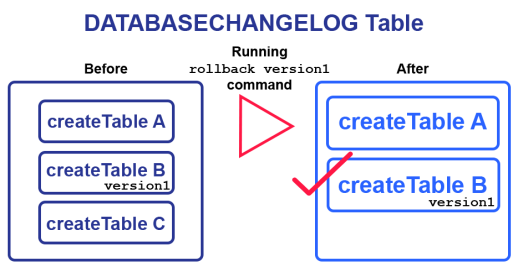
The following image shows that if we deploy the createTable C changeset and run the rollback --tag=version1 command to revert changes, Liquibase will roll back only createTable C value:
In Liquibase Secure 4.27.0 and later, you can automatically generate a database Rollback Report summarizing this command.
Important: If you need to roll back a changeset that contains an error, perform the rollback before editing the changeset. Editing the changeset first causes a checksum mismatch, which prevents the rollback from executing.
Impact
Using the rollback command comes with risks to your database, so it's important to look for potential unintended consequences before executing it. You can do this with the rollback-sql command.
Destructive operations
For rollbacks that reverse destructive operations (DROP, DELETE, TRUNCATE), ensure that you maintain the data and implement logic for its recovery. The operation can be rolled back by recreating the objects, but the original data will not be restored.
To mitigate destructive operations, we recommend using policy checks. Depending on your use case, Liquibase offers several policy checks to assist you:
Tags and rollback
There are two ways to create a tag for rollback: the tag command and the tagDatabase Change Type. The tag command applies a tag to the last row in the DATABASECHANGELOG table. The tagDatabase Change Type creates a tag changeset directly in your changelog file.
The method you use affects how rollback behaves. When you roll back to a tag created with tagDatabase, rollback removes all deployed changesets after that tag row and the tag row itself. When you roll back to a tag applied with the tag command, only the deployed changesets are removed.
If you don't know a tag name, you can find existing tags in the DATABASECHANGELOG table.
liquibase rollback --tag=myTag --changelog-file=example-changelog.xml
Note: The --tag=myTag syntax was added in Liquibase 4.4. If you use an older version, specify your tag as a positional argument: <command> myTag.
Command parameters
Attribute | Definition | Requirement |
| The root changelog | Required |
| The tag identifies which tagged changesets in the changelog to evaluate. Specify as | Required |
| The JDBC database connection URL. | Required |
| Fully-qualified class that specifies a | Optional |
| Path to a properties file for the | Optional |
| Specifies the changeset contexts to match. Contexts are tags you can add to changesets to control which changesets are executed in any particular migration run. Note: If you use Liquibase 4.23.0 or earlier, use the syntax | Optional |
| Name of the default catalog to use for the database connection | Optional |
| Name of the default schema to use for the database connection. If Note: In the properties file and Note: In Liquibase 4.12.0 and later, you can use mixed-case schema names if you set | Optional |
| The JDBC driver class | Optional |
| The JDBC driver properties file | Optional |
| Specifies the changeset labels to match. Labels are tags you can add to changesets to control which changesets will be executed in any migration run. | Optional |
| Password to connect to the target database. | Optional |
| Enables a report at the command level. Overrides the global parameter | Optional |
| Specifies the name of the report file at the command level. Overrides the global parameter | Optional |
| Specifies the file path to the report file at the command level. Overrides the global parameter | Optional |
| Liquibase 4.31.0+. Specifies whether to hide exceptions (which may contain SQL) from the operation report at the command level. Overrides the global parameter If If | Optional |
| Liquibase 4.31.0+. Specifies whether to hide changeset SQL in operation reports at the command level. Overridden by the global parameter | Optional |
| The path to the script to use to perform the rollback. Only needed if the rollback is not already defined in the changelog, and if it is not a rollback statement that is automatically generated by Liquibase. | Optional |
| Tag version to use for multiple occurrences of a tag. Valid values are | Optional |
| Username to connect to the target database. | Optional |
Attribute | Definition | Requirement |
| The root changelog | Required |
| The tag identifies which tagged changesets in the changelog to evaluate. Specify as | Required |
| The JDBC database connection URL. | Required |
| Fully-qualified class that specifies a | Optional |
| Path to a properties file for the | Optional |
| Specifies the changeset contexts to match. Contexts are tags you can add to changesets to control which changesets are executed in any particular migration run. Note: If you use Liquibase 4.23.0 or earlier, use the syntax | Optional |
| Name of the default catalog to use for the database connection | Optional |
| Name of the default schema to use for the database connection. If Note: In the properties file and Note: In Liquibase 4.12.0 and later, you can use mixed-case schema names if you set | Optional |
| The JDBC driver class | Optional |
| The JDBC driver properties file | Optional |
| Specifies the changeset labels to match. Labels are tags you can add to changesets to control which changesets will be executed in any migration run. | Optional |
| Password to connect to the target database. | Optional |
| Enables a report at the command level. Overrides the global parameter | Optional |
| Specifies the name of the report file at the command level. Overrides the global parameter | Optional |
| Specifies the file path to the report file at the command level. Overrides the global parameter | Optional |
| Liquibase 4.31.0+. Specifies whether to hide exceptions (which may contain SQL) from the operation report at the command level. Overrides the global parameter --reports-suppress-exception. Default: false. However: If --report-suppress-exception is not set and --report-suppress-sql=true, Liquibase suppresses all SQL, including exception SQL. If --report-suppress-exception=false and --report-suppress-sql=true, Liquibase suppresses most SQL but shows exception SQL. | Optional |
| Liquibase 4.31.0+. Specifies whether to hide changeset SQL in operation reports at the command level. Overridden by the global parameter | Optional |
| The path to the script to use to perform the rollback. Only needed if the rollback is not already defined in the changelog, and if it is not a rollback statement that is automatically generated by Liquibase. | Optional |
| Tag version to use for multiple occurrences of a tag. Valid values are | Optional |
| Username to connect to the target database. | Optional |
Attribute | Definition | Requirement |
| The root changelog | Required |
| The tag identifies which tagged changesets in the changelog to evaluate. Specify as | Required |
| The JDBC database connection URL. | Required |
| Fully-qualified class that specifies a | Optional |
| Path to a properties file for the | Optional |
| Specifies the changeset contexts to match. Contexts are tags you can add to changesets to control which changesets are executed in any particular migration run. Note: If you use Liquibase 4.23.0 or earlier, use the syntax | Optional |
| Name of the default catalog to use for the database connection | Optional |
| Name of the default schema to use for the database connection. If Note: In the properties file and Note: In Liquibase 4.12.0 and later, you can use mixed-case schema names if you set | Optional |
| The JDBC driver class | Optional |
| The JDBC driver properties file | Optional |
| Specifies the changeset labels to match. Labels are tags you can add to changesets to control which changesets will be executed in any migration run. | Optional |
| Password to connect to the target database. | Optional |
| Enables a report at the command level. Overrides the global parameter | Optional |
| Specifies the name of the report file at the command level. Overrides the global parameter | Optional |
| Specifies the file path to the report file at the command level. Overrides the global parameter | Optional |
| 4.31.0+. Specifies whether to hide exceptions (which may contain SQL) from the operation report at the command level. Overrides the global parameter --reports-suppress-exception. Default: false. However: If --report-suppress-exception is not set and --report-suppress-sql=true, Liquibase suppresses all SQL, including exception SQL. If --report-suppress-exception=false and --report-suppress-sql=true, Liquibase suppresses most SQL but shows exception SQL. | Optional |
| Liquibase 4.31.0+. Specifies whether to hide changeset SQL in operation reports at the command level. Overridden by the global parameter | Optional |
| The path to the script to use to perform the rollback. Only needed if the rollback is not already defined in the changelog, and if it is not a rollback statement that is automatically generated by Liquibase. | Optional |
| Tag version to use for multiple occurrences of a tag. Valid values are | Optional |
| Username to connect to the target database. | Optional |
Attribute | Definition | Requirement |
| The root changelog | Required |
| The tag identifies which tagged changesets in the changelog to evaluate. Specify as | Required |
| The JDBC database connection URL. | Required |
| Fully-qualified class that specifies a | Optional |
| Path to a properties file for the | Optional |
| Specifies the changeset contexts to match. Contexts are tags you can add to changesets to control which changesets are executed in any particular migration run. Note: If you use Liquibase 4.23.0 or earlier, use the syntax | Optional |
| Name of the default catalog to use for the database connection | Optional |
| Name of the default schema to use for the database connection. If Note: In the properties file and Note: In Liquibase 4.12.0 and later, you can use mixed-case schema names if you set | Optional |
| The JDBC driver class | Optional |
| The JDBC driver properties file | Optional |
| Specifies the changeset labels to match. Labels are tags you can add to changesets to control which changesets will be executed in any migration run. | Optional |
| Password to connect to the target database. | Optional |
| Enables a report at the command level. Overrides the global parameter | Optional |
| Specifies the name of the report file at the command level. Overrides the global parameter | Optional |
| Specifies the file path to the report file at the command level. Overrides the global parameter | Optional |
| Liquibase 4.31.0+. Specifies whether to hide exceptions (which may contain SQL) from the operation report at the command level. Overrides the global parameter --reports-suppress-exception. Default: false. However: If --report-suppress-exception is not set and --report-suppress-sql=true, Liquibase suppresses all SQL, including exception SQL. If --report-suppress-exception=false and --report-suppress-sql=true, Liquibase suppresses most SQL but shows exception SQL. | Optional |
| Liquibase 4.31.0+. Specifies whether to hide changeset SQL in operation reports at the command level. Overridden by the global parameter | Optional |
| The path to the script to use to perform the rollback. Only needed if the rollback is not already defined in the changelog, and if it is not a rollback statement that is automatically generated by Liquibase. | Optional |
| Tag version to use for multiple occurrences of a tag. Valid values are | Optional |
| Username to connect to the target database. | Optional |
Attribute | Definition | Requirement |
| The root changelog | Required |
| The tag identifies which tagged changesets in the changelog to evaluate. Specify as | Required |
| The JDBC database connection URL. | Required |
| Fully-qualified class that specifies a | Optional |
| Path to a properties file for the | Optional |
| Specifies the changeset contexts to match. Contexts are tags you can add to changesets to control which changesets are executed in any particular migration run. Note: If you use Liquibase 4.23.0 or earlier, use the syntax | Optional |
| Name of the default catalog to use for the database connection | Optional |
| Name of the default schema to use for the database connection. If Note: In the properties file and Note: In Liquibase 4.12.0 and later, you can use mixed-case schema names if you set | Optional |
| The JDBC driver class | Optional |
| The JDBC driver properties file | Optional |
| Specifies the changeset labels to match. Labels are tags you can add to changesets to control which changesets will be executed in any migration run. | Optional |
| Password to connect to the target database. | Optional |
| Enables a report at the command level. Overrides the global parameter | Optional |
| Specifies the name of the report file at the command level. Overrides the global parameter | Optional |
| Specifies the file path to the report file at the command level. Overrides the global parameter | Optional |
| Liquibase 4.31.0+. Specifies whether to hide exceptions (which may contain SQL) from the operation report at the command level. Overrides the global parameter --reports-suppress-exception. Default: false. However: If --report-suppress-exception is not set and --report-suppress-sql=true, Liquibase suppresses all SQL, including exception SQL. If --report-suppress-exception=false and --report-suppress-sql=true, Liquibase suppresses most SQL but shows exception SQL. | Optional |
| Liquibase 4.31.0+. Specifies whether to hide changeset SQL in operation reports at the command level. Overridden by the global parameter | Optional |
| The path to the script to use to perform the rollback. Only needed if the rollback is not already defined in the changelog, and if it is not a rollback statement that is automatically generated by Liquibase. | Optional |
| Tag version to use for multiple occurrences of a tag. Valid values are | Optional |
| Username to connect to the target database. | Optional |
For each changeset in your changelog, include rollback logic that defines the inverse operations. Your rollback instructions must be specific to the command you wish to roll back.
Single rollback statement example
This is an example of how you would create a rollback for creating a table by setting your rollback to drop the table, which is the reverse operation.
Multiple rollback statements example
For complex changesets that require multiple rollback operations, you can specify multiple rollback elements.
Understanding rollback order is important:
Within a single changeset:
Rollback statements execute from top to bottom, in the order they appear.
Across a changelog file with multiple changesets:
Changesets roll back from bottom to top, starting with the most recently deployed changeset and working backward to the oldest.
For example, if you deploy changesets 1, 2, and 3 in that order, a rollback operation processes them as 3, 2, 1.
Important: When writing multiple rollback statements within a changeset, list them in the order they should execute. In the example below, the foreign key constraint must be dropped before the table can be dropped, so the constraint rollback appears first.
Using external rollback files
For complex rollback logic like stored procedures, you can reference external rollback script files using --rollbackSqlFile. This approach is beneficial when rollback logic is extensive or when you want to keep rollback scripts organized in separate files.
In this example, you would replace my_path/my_rollback.sql with the path to a SQL file containing your rollback instructions for that changeset.
Directly reference changeset
The following example shows how you can use a <rollback> tag to reference the changeset that originally created a statement. This example uses changeset 2 to implement rollback logic against changeset 1:
Empty rollback statements
If you do not want to revert a change in a rollback mode, use either the keyword empty or the keyword not required inside the rollback tag. In XML, YAML, and JSON changelogs, you can also use an empty string inside the rollback tag.
You can also use an empty string (<rollback></rollback>) or a self-closing tag (<rollback/>).
- changeSet:
    id: 1
    author: liquibase
    changes:
      - createTable:
          tableName: testTable
          columns:
            - column:
                name: id
                type: int
    rollback: empty
You can also use an empty string (rollback: "") or an empty array (rollback: []).
{
  "changeSet": {
    "id": 1,
    "author": "example",
    "changes": [
      {
        "createTable": {
          "tableName": "testTable",
          "columns": [
            {
              "column": {
                "name": "id",
                "type": "int"
              }
            }
          ]
        }
      }
    ],
    "rollback": "empty"
  }
}
You can also use an empty string ("rollback": "") or an empty array ("rollback": []).
<changeSet id="3" author="liquibaseuser">
    <createTable tableName="testTable">
        <column name="id" type="int"/>
    </createTable>
    <rollback>empty</rollback>
</changeSet>
You can also use an empty string (<rollback></rollback>) or a self-closing-tag (<rollback/>).
Output
When successful, the rollback command produces the following output:
Liquibase Version: 4.9.1
Rolling Back Changeset: example-changelog.sql::2::Amber.Williams
Rolling Back Changeset: example-changelog.sql::1::Amber.Williams
Liquibase command 'rollback' was executed successfully.
Liquibase: Rollback has been successful.