- Task
- Version · 5.1
- User guide
Produce the Liquibase Secure License Tracking Report
Last updated: August 11, 2026
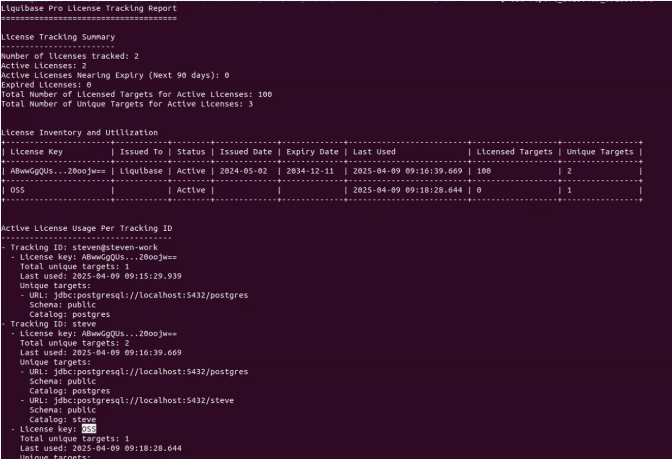
Liquibase License Tracking is currently in Public Preview. Features and capabilities may change based on customer feedback. For assistance or updates, contact Liquibase Support. The Liquibase Secure License Tracking report allows you to produce all of the data retrieved by Liquibase License Tracking (LLT). The License Tracking Summary includes the number of licenses tracked, active licenses, active licenses nearing expiry, expired licenses, total number of licenses, and total number of unique targets for active licenses. It also includes the License inventory and utilization, and the active license usage per tracking ID breakdown.
Users must configure Liquibase to transmit license data to the LLU; it is not enabled automatically.
Prerequisites
Procedure
Open the CLI and navigate to where your Liquibase project is located.
Run this command in the CLI:
Navigate to the location that LLU is running in the CLI.
Produce a list of files in your directory.
Depending on your operating system, run the ls or dir command to produce the directory file list.
In that list, you will see that we have two report files:
report.sh for Linux users
report.bat for Windows users
Save a text file of the report.
Linux: Run $ ./report.sh
Windows: Run $ ./report.bat
A unique report name will appear, such as: report_203948573948_234985.txt
(Optional) Save a JSON or HTML file of the report.
To produce an HTML or JSON file, specify the format in the command.
Linux: Run $ ./report.sh --format=json or ./report.sh --format=html
Windows: Run $ ./report.bat --format=json or ./report.bat --format=html
A unique report name will appear, such as:report_203948573948_234985.json
Produce the Liquibase Secure License Tracking Report.
Run $ cat report_<unique_id>.txt
Results
Notice the License Tracking Summary includes the number of licenses tracked, active licenses, active licenses nearing expiry, expired licenses, total number of licenses, and total number of unique targets for active licenses. It also includes the License inventory and utilization, and the active license usage per tracking ID breakdown.
Note: An error will appear in the logs if the endpoint is not reachable.