What is Liquibase License Tracking?
Last updated: July 13, 2026
Liquibase License Tracking is currently in Public Preview. Features and capabilities may change based on customer feedback. For assistance or updates, contact Liquibase Support.
Liquibase License Tracking (LLT) allows you to monitor and report on your license utilization locally across teams, environments, and CI/CD pipelines. This feature provides visibility into active vs expired licenses, compliance risks, operational inefficiencies, and historical insights.
Note: License tracking is not currently supported for Amazon Redshift, SAP HANA, Neo4j Graph Database, and Google Cloud Spanner.
Once enabled, this functionality allows you to produce an easy-to-analyze License Tracking report that contains:
The number of licenses tracked
Active licenses
Active licenses nearing expiry
Expired licenses
Total number of licenses
Total number of unique targets for active licenses
License inventory and utilization
A breakdown of the active license usage per tracking ID
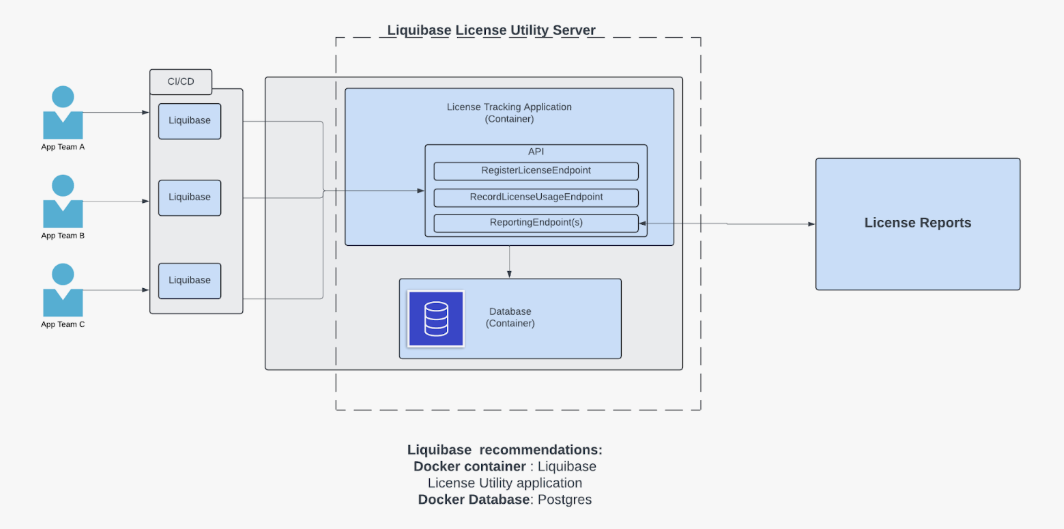
How Liquibase counts Unique Targets
Our License Tracking Report shows the Unique Targets count: the number of distinct database targets tracked by Liquibase.
What counts as one target depends on the database type. For example, two schemas on the same Oracle instance count as two separate targets, while all schemas within a single PostgreSQL database count as one target.
Supported databases include Oracle, PostgreSQL and PostgreSQL-compatible platforms, SQL Server, Databricks, MySQL and MySQL-compatible platforms, Snowflake, DB2 LUW/z/OS, DB2 iSeries, Sybase ASE, SQL Anywhere, SAP HANA, MongoDB, Neo4j, Couchbase, Cosmos DB, Cassandra, BigQuery, DynamoDB, Teradata, Informix, and Actian Ingres.
For details on how unique targets are counted for a specific database platform, please contact Liquibase Support.
Known Limitations
Connecting via aliases or load balancers
If your team connects to the same database through different hostnames (such as a direct hostname, a TNS alias, or a load balancer), LLT may count each connection method as a separate target. This can lead to over-counting, but never under-counting.
Cloud databases and read replicas
Liquibase identifies cloud-hosted databases (such as Amazon RDS or Azure SQL) the same way as their on-premise equivalents. Read replicas and multi-region endpoints have different hostnames, so they each count as separate targets.
NoSQL databases
MongoDB, Couchbase, DynamoDB, and Cosmos DB use connection formats that differ from standard SQL databases. Target identification works the same way, but you may see unexpected target counts in some configurations.
License Tracking Report
After running a Liquibase command with license tracking enabled, open the License Tracking Report in your browser at http://[llt-server-address]/v1/report. For example, http://localhost:8080/v1/report. The LLT server must be running for the report to be available.
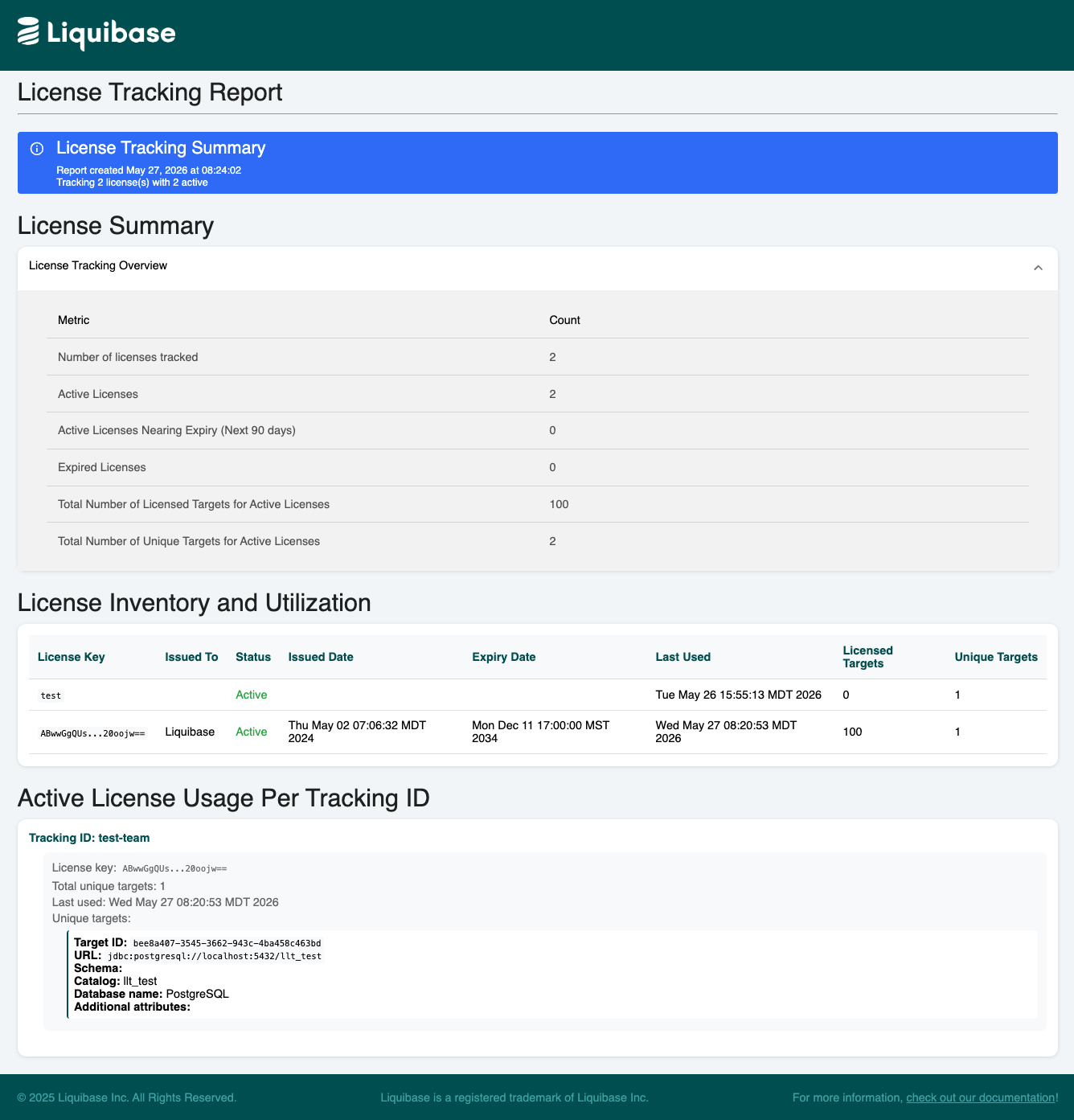
License Tracking Summary
The banner at the top of the report shows when the report was generated and how many licenses are currently being tracked.
License Summary
The License Summary section shows high-level metrics across all your licenses:
Number of licenses tracked: The total number of distinct license keys that have reported activity to the LLT server.
Active Licenses: Licenses that are currently valid and within their expiry date.
Active Licenses Nearing Expiry (Next 90 days): Active licenses that will expire within 90 days.
Expired Licenses: Licenses that have passed their expiry date.
Total Number of Licensed Targets for Active Licenses: The combined target capacity across all your active licenses.
Total Number of Unique Targets for Active Licenses: The number of distinct databases Liquibase has connected to using active licenses. Compare this to your licensed target count to check for overuse.
License Inventory and Utilization
This section shows a row for each license key, so you can verify each license is active and see how many targets it has used:
License Key: A truncated version of the license key.
Issued To: The organization the license was issued to.
Status: Whether the license is
Active,Expiring Soon, orExpired.Issued Date: When the license was issued.
Expiry Date: When the license expires.
Last Used: The most recent time Liquibase reported activity using this license.
Licensed Targets: The maximum number of Unique Targets this license allows.
Unique Targets: The number of distinct databases tracked under this license. If this number approaches or exceeds Licensed Targets, you may need to upgrade your license.
Active License Usage Per Tracking ID
This section groups target activity by tracking ID, configured with liquibase.license.tracking.trackingId. For each tracking ID, you can see the individual databases that were accessed:
Target ID: A unique identifier generated from the database connection details.
URL: The JDBC connection URL for the target database.
Schema / Catalog / Database name: Connection identifiers that distinguish this target from others on the same server.
Additional attributes: Any extra connection attributes captured from the Liquibase run.