- Task
- Version · 4.33
- Get started
Upgrade to Liquibase Pro 4.32
Last updated: July 13, 2026
In Liquibase 4.32 we provide two distinct distributions of Liquibase OSS and Liquibase Pro.This differentiation provides a holistic setup experience that supports purposeful releases and reduces the risk of regressions. This experience is specifically tailored to the workflows of our Pro users. It is important to know that the Pro distribution requires a valid license key to utilize all OSS and PRO features.
Before you begin
To use Liquibase, Java must be installed on your host machine.
Be sure your machine meets our System Requirements.
Procedure
Navigate to your preferred Liquibase installer.
You can use our Pro-only installer.
Extract the installer to a location on your machine.
Example:
On Linux, extract the zip file into
/opt/liquibase/liquibase-<version>directory.On Windows, extract the zip file into the
C:\liquibase\liquibase-<version>directory.On MacOS, extract the zip file into
~/liquibase/liquibase-<version>directory.
Run the CLI as an Administrator.
Note: The Symbolic link will not work unless you are in Administrator mode.
Navigate to the location of the new Liquibase download.
Create a symbolic link to Liquibase.
Symbolic links allow DevOps engineers to control which version of Liquibase executes upon installation. This method allows the pipeline maintainer to link a specific version of Liquibase that has been tested and vetted by the DevOps engineer prior to using it widely on the dev environment.
Linux:
On one end of this link, we have the liquibase-<version> component where the DevOps engineer will place the latest version of Liquibase. On the other end, we have the DBAs with the ./liquibase component that looks at the DevOps' end and finds the latest version. So, once the DevOps Engineer is ready for the DBAs to release this to the development environment, they can just create this symbolic link, and the DBAs automatically get the latest version.
In this example, we will use /opt/liquibase/liquibase to link to the /opt/liquibase/liquibase-<version> ./liquibase by entering the below command in the CLI:
sudo ln -sf ./liquibase-version> ./liquibase
Windows:
On one end of this link, we have the liquibase-<version> component where the DevOps engineer will place the latest version of Liquibase. On the other end, we have the DBAs with the C:\liquibase\liquibase component that looks at the DevOps' end and finds the latest version. So, once the DevOps Engineer is ready for the DBAs to release this to the development environment, they can just create this symbolic link, and the DBAs automatically get the latest version.
In this example, we will use C:\liquibase\liquibase to link to the C:\opt\liquibase\liquibase-<version> directory by entering the below command in the CLI:
mklink/d C:\liquibase\liquibase C:\liquibase\liquibase-<version>
Update the environment variable so it points to the Liquibase symbolic link
Linux: If Liquibase is installed in /opt/liquibase/liquibase-4.29.2 with a symbolic link created at /opt/liquibase/liquibase, run this in the CLI:
export PATH=/opt/liquibase/liquibase:$PATH
Windows: If Liquibase is installed in C:\liquibase\liquibase-4.29.2 with a symbolic link created at C:\liquibase\liquibase, run this in the CLI:
SET PATH=C:\liquibase\liquibase;%PATH%
Open another instance of the CLI to load the new changes.
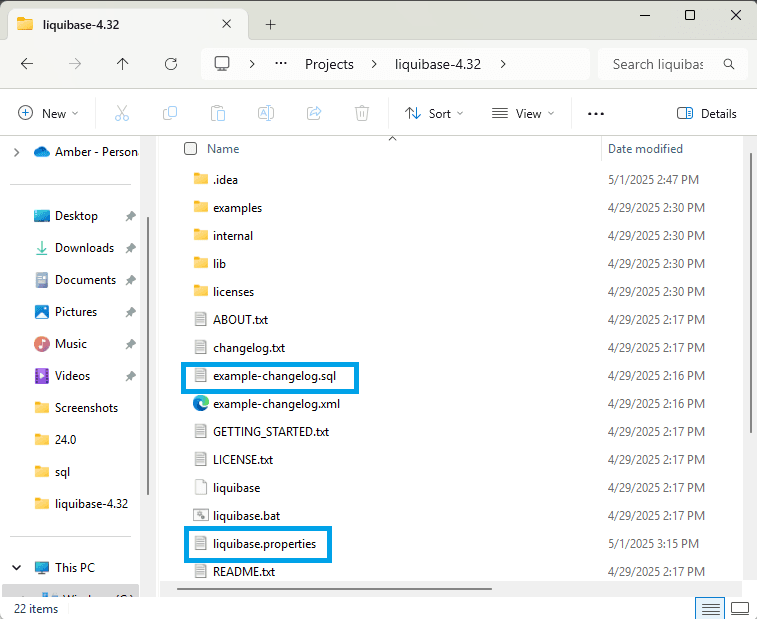
Ensure that the liquibase.properties file is available in your liquibase-4.32 directory.
As an existing user, copy your existing properties file and paste it into your 4.32 directory folder.
In this example, you can see the liquibase.properties in the main liquibase-4.32 directory.
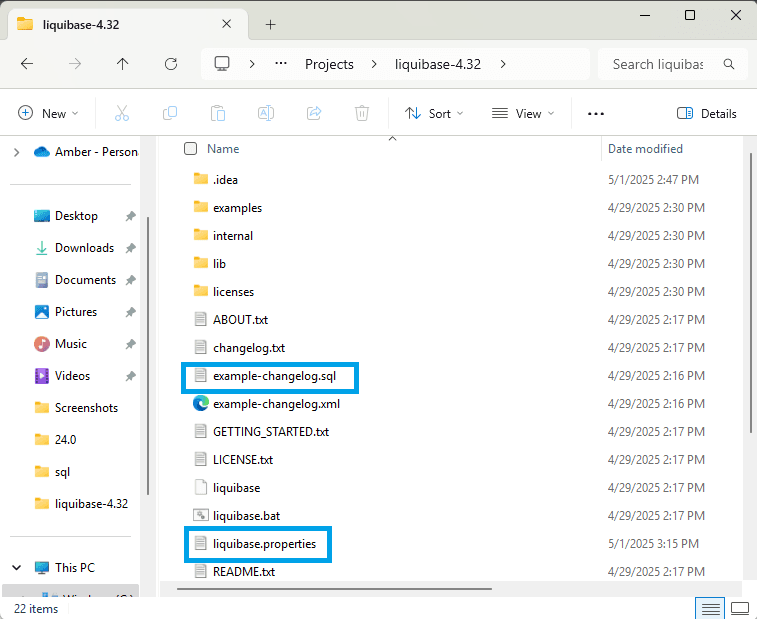
Ensure that your changelog is available in your liquibase-4.32 directory.
As an existing user, copy your existing changelog file and paste it into your 4.32 directory folder.
In this example, you can see the example-changelog.sql file in the main liquibase-4.32 directory.
Apply your Liquibase Pro license key.
It is best to use a secrets management tool like Hashicorp Vault or AWS Secrets Manager to keep Liquibase license keys secure.
There are several ways to apply the Liquibase Pro license key. Below we provide an example using the liquibase.properties file. You can also choose to add the license key through the CLI, environment variables, JAVA_OPTS, Docker, or Azure DevOps.
liquibase.licenseKey: aei76ou32thp785463214
Note: The Liquibase installation comes with JDBC drivers for popular database platforms such as Oracle, SQL Server, PostgreSQL, MariaDB, Snowflake, and H2.
If you are working with a different Liquibase-supported database, visit the Liquibase Database Tutorials documentation to download the JDBC driver specific to your database.
In a new CLI instance, navigate to the location where you downloaded the Liquibase Pro.
Validate that your Liquibase Pro license key works as expected.
Run liquibase update. A successful update message will appear if the Pro license key has been applied. This will include the expiration date for your license.