- Concept
- What is Liquibase Secure?
What is Liquibase Secure?
Last updated: September 29, 2026
Liquibase Secure is a Database Change Governance solution. It manages database change the way your team manages application code, so changes are authored as code, checked before they deploy, and tracked after. The workflow does not end at deployment. Every change is governed by the policies your organization defines, and every operation is reported for monitoring, measurement, and compliance.
Why Liquibase is used

Database change governance
Liquibase enforces your organization's standards on every change before it deploys. Policy checks inspect changelogs and SQL for the patterns you do not want in production, and the Liquibase Secure server gives teams one place to define policies and see every deployment, policy result, and drift detection. As AI agents and assistants generate more database changes, this matters more, not less: policy checks inspect every change the same way regardless of who, or what, wrote it.

Database automation
Liquibase is built to work with just about every CI/CD tool, integrating database changes into existing CI/CD automation.

Rollback support
Liquibase has built-in rollback support so teams can thoroughly test and roll back changes before production.
Source control
Liquibase users see the same source control benefits as application code when adding SQL code to a repository.
The Liquibase Secure workflow
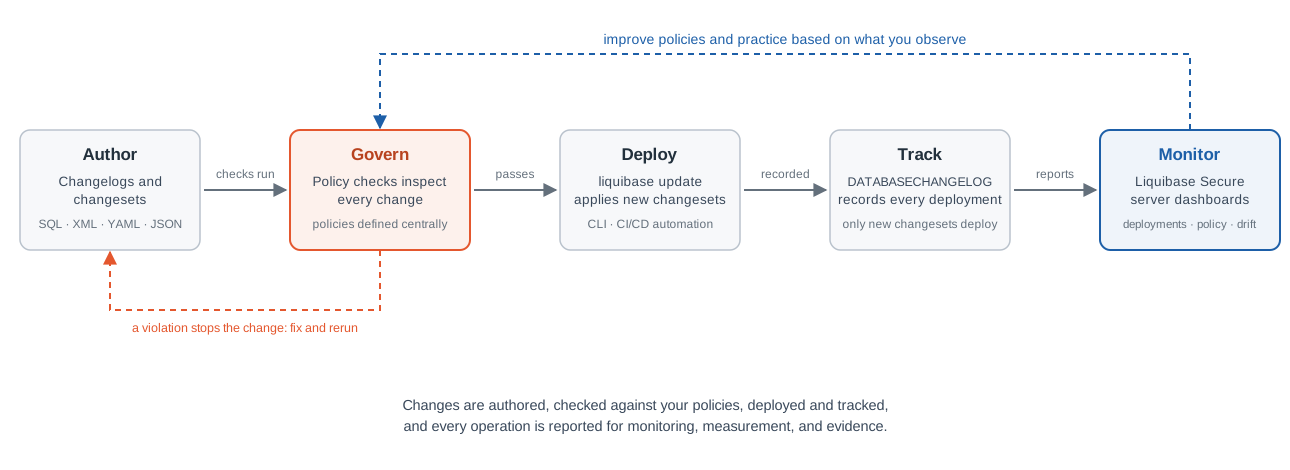
A change moves through five stages:
Authored as changesets in a changelog.
Inspected by policy checks.
Deployed by
liquibase update, from the CLI or your automation.Recorded in the
DATABASECHANGELOGtable.Reported to Liquibase Server, where dashboards show deployments, policy results, and drift across every team.
Changelog organization
Changes are authored as changesets inside changelogs. A changelog is an ordered file that serves as your database’s source of truth, and contexts, labels, and preconditions control when and where each change applies. The full model and the authoring task live in one place: Create a database change.
Liquibase properties file
To set the connection between Liquibase with your database, you need the database connection information and parameters. Liquibase includes a properties file to store database connection information and parameters that rarely change. Setting the parameters as environment variables to handle sensitive database information or running them at the command prompt is an alternative option.
How you operate Liquibase Secure
Liquibase Secure is operated through four surfaces, each with a distinct job:
Liquibase Server is the governance and management experience: dashboards, policy management, projects, pipelines, and registered changelogs and database connections, all used from a browser.
Secure Automation is the execution layer. The Liquibase CLI runs in your CI/CD pipelines, including Maven, Spring Boot, Jenkins, GitHub Actions, and Docker, enforcing your policies at deployment time and reporting every run to the server.
Developer and authoring surfaces are where changes are created: changelogs and SQL in your editor or IDE, moving through version control into the pipeline.
Connectors and APIs are the ecosystem boundary: database connectors, CI/CD connectors, and the APIs and webhooks that link Liquibase Secure to the rest of your tooling.
Liquibase Secure is one solution operated through four surfaces. Each surface has a distinct job, and the same change touches all four on its way from an editor to a governed deployment.
Liquibase Server
The central governance and management experience, hosted inside your own network and used from a browser. It holds the dashboards and Change Intelligence, policy management and assignments, projects, pipelines, database connections, and user and access administration. Nothing in it executes database changes: it defines the rules and shows the results.
Secure Automation
The execution layer: the Liquibase CLI running in your CI/CD pipelines and automation environments. It executes database changes, enforces the governance policies configured for the pipeline, and reports deployment, policy, and drift information to the server. Reporting is non-blocking: a failed report never fails a deployment.
Developer and authoring surfaces
Where changes are created: changelogs and SQL, modeled changes in XML, YAML, or JSON, IDE and developer tooling, and AI-assisted authoring where supported. Changes travel from here through version control and the delivery pipeline to execution.
Connectors and APIs
The ecosystem boundary: database connectors for every supported platform, CI/CD connectors for systems like GitHub Actions and Azure DevOps, and the APIs and webhooks that connect Liquibase Secure to the rest of your delivery tooling.
How the surfaces work together
A change is authored on the developer surface and committed to version control. The pipeline hands it to Secure Automation, which enforces policy at execution time and deploys it. The run reports to the server, where the operation is attributed to a registered changelog and database connection through their identifiers, and appears in the dashboards. Registration in the UI and the identifier configuration in the CLI are the two points where the surfaces meet.
What runs inside your network
The server, the web application, and the operational data all stay inside your boundary. No outbound connection is required, and the stack can run air-gapped. Users need a browser and a URL; nothing is installed on their machines.
Liquibase commands
Liquibase runs six basic types of commands: update, rollback, snapshot, diff, status, and utility commands. When you use the update command to deploy your first changes, Liquibase checks the database connection information, including credentials, database URL, and JDBC driver.
Governance with policy checks
Before a change deploys, policy checks inspect changelogs, changesets, and SQL for the patterns your organization does not want in production, such as a DELETE without a WHERE clause or a naming convention violation. A failing check returns a severity and an exit code, so the pipeline stops the change rather than the database. Enforcement travels with Secure Automation, so the same policies apply wherever Liquibase executes, on a laptop or in a CI/CD pipeline. Policies are defined once and applied across teams: centrally in Liquibase Server, or in checks settings files alongside your project.
Database Changelog and Database Changelog Lock
When you deploy your changes, Liquibase creates two tables in your database: DATABASECHANGELOG (DBCL) and DATABASECHANGELOGLOCK (DBCLL). The DATABASECHANGELOG table tracks deployed changes so that you have a record. Liquibase compares the changesets in the changelog file with the DATABASECHANGELOG tracking table and deploys only new changesets.DATABASECHANGELOGLOCK prevents multiple instances of Liquibase from updating the database simultaneously. The table manages access to the DATABASECHANGELOG table during deployment and ensures that only one instance of Liquibase updates the database.
Monitoring and compliance
Every Liquibase operation can report to Liquibase Server: deployments, policy results, and drift detections, attributed to the changelog and database connection they ran against. Dashboards show what is happening across the organization, trends show how delivery and governance are performing, and the same records that answer what happened also serve as evidence that your controls were enforced. And when something fails, you investigate it, measure how governance is performing, and improve the policies. That loop is what makes this governance rather than reporting. Reporting is non-blocking: a failed report never fails a deployment.
How Liquibase works
Scroll through this microlearning course to learn about the core concepts of Liquibase.