- Concept
- Liquibase Secure Role-Based Access Control
Liquibase Secure Role-Based Access Control
Last updated: September 29, 2026
Liquibase Secure ships with an authorization model designed from a blank sheet against the access control patterns of regulated environments. The model is owned by the platform: one permission catalog, one set of persona-shaped templates, one resolver, and one fixed precedence order. Modules (Change Intelligence today, Change Governance next) implement the model rather than inventing their own: each registers its permissions into the platform catalog and contributes grants to the platform templates.
Access is granted to groups, not individuals. Groups receive access by having a persona-shaped template applied at a scope: the whole workspace, a list of projects, or a list of specific database connections. Customers adjust a group's access with an overlay rather than forking a template, so Liquibase can improve templates in later releases without discarding customer configuration. Exceptions are handled with direct grants and denies on individual entities, which is what makes both cross-team investigation access and sensitive-data containment expressible in the same model.
Enforcement never asks what template a user holds. Every authorization decision in the product resolves against a fine-grained permission name, so overlays, direct grants, direct denies, ownership, and permissions contributed by modules all compose through one primitive with one fixed precedence order. Reads are governed throughout, service principals used by CI/CD pipelines are a separate principal type that cannot read the product at all, and every permission-changing action is captured in an immutable audit log.
One boundary is worth stating at the outset, because it is the thing most easily misread. Liquibase Secure governs access to its own records (the platform's record of database change and governance configuration), not access to the databases themselves. It can show which people could see the deployment history, execution logs, policy results, drift findings, and governance catalogs recorded for a given system, and how that changed over time. It cannot tell you who could connect to that database, or who held privileges on it. That remains the province of the database's own privilege system.
Executive Summary
Organizations that adopt a database change management platform immediately inherit an access control problem. The platform accumulates a complete record of every deployment, every policy violation, every drift finding, and every execution log across the estate. With governance, it also accumulates the catalogs and check packages that encode how change is allowed to happen. That record is exactly what a compliance reviewer wants and exactly what a broad, unsegmented dashboard should not expose to every engineer in the company.
The problem has three parts. First, teams are structured by line of business and application, not by database, so access has to be assignable to org-shaped groups covering many projects at once. Second, the same operational record contains material that is sensitive at the level of a single operation, which means containment has to work on individual entities and not only on whole projects. Third, an access model is only useful to an auditor if it can be read back: who can see which records, how they came to, and what changed.
Liquibase Secure addresses all three. Groups mirror the customer's org structure and carry a template across a list of projects or database connections under one policy. Direct denies contain a single sensitive operation even from principals whose template would otherwise allow it, and a direct grant re-admits a named exception such as an incident responder. A view-permissions surface renders the resulting access for any project or entity, and an immutable audit log records every change to it.
The model is built to grow. Change Intelligence observes deployments today; Change Governance adds policy catalogs and their assignment to projects; a later release is expected to execute deployments, introducing execution rights, environment-narrowed access, step-up authentication, and separation of duties. Each of those is an additive extension of the model shipping now, not a rewrite of it. Customers deploying today configure access once and carry that configuration forward.
Key Outcomes for Enterprise Teams
Adopt in a regulated environment by configuring access that mirrors the organization's real team structure rather than a flat administrator or read-only split.
Contain sensitive exposure at the level of an individual operation, connection, or changelog, with named exemptions where incident response requires them.
Produce compliance evidence on demand about who could see the change record for a given system, and when that changed, without granting reviewers elevated access anywhere else.
Scope CI/CD credentials narrowly, so a leaked pipeline token cannot be repurposed to read the workspace.
Extend without forking, as modules and later Liquibase releases contribute permissions and template updates that customer customizations survive.
General Concepts, Definitions, and Principles
This section defines the model that every part of Liquibase Secure shares. The functional areas that follow (Core platform, Change Intelligence, Change Governance) differ only in which entities and permission names they bring; nothing in them changes how access is granted, composed, or resolved.
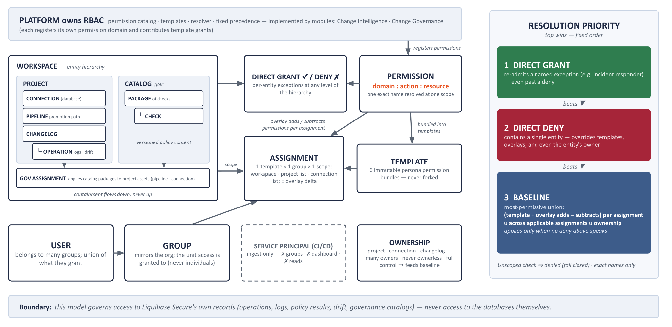
Figure 1 — Liquibase Secure RBAC: entities, how they link, and the fixed resolution priority.
Definitions
Workspace — the top of the entity hierarchy; contains projects, and everything an assignment can reach.
Project — an application-shaped container of connections, changelogs, and pipelines.
Connection — the platform's catalog entry describing a database. A connection is not a session to the database; access to it grants visibility of what is recorded against it, nothing more.
Changelog — the versioned definition of intended change, filed under a project.
Pipeline — a promotion path inside a project: an ordered set of connections a change moves through. Pipelines are created, reordered, and restored with core ops permissions, and are one of the asset scopes a governance assignment applies to.
Operation — a recorded unit of activity (deployment, rollback, policy check, drift detection) with its logs and results, filed under connections and changelogs. Operations are Change Intelligence records.
Catalog — the top-level bullet of a workspace policy collection. Catalogs hold packages, which in turn hold checks.
Package — contained within a policy catalog, packages are bundles of checks.
Check — the specific rules which determine if changesets or database structures are compliant to polices
Policy Assignment — the mapping of policy packages to workspace entities (projects, pipelines, connections, changelogs)
Permission — a three-part name, domain:action:resource. The atom of the model: every authorization decision resolves one exact permission name at one scope.
Template — an immutable, persona-shaped bundle of permissions shipped by Liquibase. Six ship in every workspace.
Group — a workspace-scoped collection of users, mirroring the organization; the unit access is granted to.
Permissions Assignment — one template applied to one group at one scope (workspace, project list, or connection list).
Overlay — an additive and subtractive permission delta attached to a single assignment; the customization mechanism that survives template upgrades.
Direct grant / direct deny — a per-entity exception naming a permission on a single operation, connection, or changelog for a principal.
Ownership — an independent source of access: owners hold full control of the entities they own; projects, connections, changelogs, catalogs, packages, checks and governance assignments are ownable, ownership is many-owner, and an entity is never left ownerless.
Service principal — a distinct machine principal type used by CI/CD pipelines: ingest-only, cannot join groups, cannot sign in, cannot read.
Module — a licensed unit of functionality (Change Intelligence, Change Governance) that implements platform RBAC by registering a permission domain and contributing template grants.
Building blocks of the model
The definitions above name the pieces; this section explains how each one behaves and why it is shaped that way. Every functional area (Platform Core, Change Intelligence, Change Governance) is built from these same blocks.
Persona-shaped templates out of the box
Six templates ship in every workspace at initialization: Customer Admin, Application Developer, DBA, Platform/DevOps Engineer, Security Reviewer, and Service Principal. Each carries a scope it may be applied at and a default bundle of permissions. Customers begin from these rather than from an empty permission list.
Groups that mirror the organization
A group is a workspace-scoped collection of users. A user may belong to several groups at once and receives the union of everything those groups grant. Access is assigned to groups as a matter of design; direct assignment to an individual user is possible only as an entity-level exception, which is what keeps an access policy readable a year after it was configured.
Assignment at three scopes
An assignment applies one template to one group at one scope. Workspace-scoped assignments cover everything in the workspace. Project-list assignments cover a named list of projects, so one org-shaped group can hold one policy across a dozen applications. Connection-list assignments cover a named list of specific connections, which are the platform's catalog entries for individual databases. This is how database owners are given visibility of the change record for their databases, following those databases across every project they appear in.
Overlays instead of forked templates
An overlay is an additive and subtractive delta attached to a single assignment. An administrator adds raw-log visibility for one group, or subtracts a permission the template grants, without creating a copy of the template. The overlay editor distinguishes what came from the template from what the customer changed, and enumerates every registered permission, including permissions contributed by modules.
Direct grants and denies on individual entities
Grants and denies apply to a specific operation, connection, or changelog and are reachable from that entity's detail page. This is the mechanism for temporary cross-project investigation access and for containing sensitive material on a single entity, including from an entity's own owner.
Ownership as an independent source of access
Projects, connections, changelogs, catalogs, packages, checks and governance assignments are ownable, ownership is many-owner, and an entity is never left ownerless. Whoever creates an entity owns it initially, ownership is many-owner, groups may own, and an entity is never left ownerless. Ownership carries full control of the owned entity even where the owner's template alone would not grant it, which is what lets a platform engineer create a database connection, hand it to the database owners' group, and step away.
Governed reads throughout
Every read enforces a corresponding view permission. The predecessor behavior, where a number of read endpoints returned data without authentication, is closed. A caller without a grant on an entity receives an empty list or a refusal, never the entity.
Service principals as a separate principal type
CI/CD pipelines authenticate with an API token belonging to a service principal, which is a distinct principal type rather than a user holding a token. Service principals cannot be members of groups, cannot sign in to the dashboard, and cannot read any non-ingest endpoint regardless of token possession. This closes the most common abuse path for ingest credentials, which is repurposing them for read access.
Audit log and view-permissions surface
Every permission-changing action produces an immutable audit entry recording the actor, the timestamp, the target, and the before and after state. A separate view-permissions surface answers, for any project or entity, which groups, users, templates, overlays, grants, and denies produce the access that exists. Both are gated by their own privileges, distinct from operational read.
What the model is, and is not
The model is a hybrid: system-defined permission bundles shaped around real personas, applied to groups at a scope, then customized per assignment. It is not a pure role model and not a pure fine-grained model, because both fail in practice. Pure roles cannot express the exceptions customers actually have. Pure fine-grained permissions ask administrators to assemble an access policy from primitives on day one, which is how organizations end up with an accidental permission sprawl they can no longer audit.
Five properties are worth stating explicitly because they are frequently assumed to work the other way.
It governs access to Liquibase Secure records, not access to your databases. The platform never connects to a monitored database and holds no authority over it. What this model controls is who can see the platform's own records: operations, execution logs, policy check results, drift findings, governance catalogs and assignments, and the entities those records are filed under. Access to the database itself continues to be governed by the database's own privilege system and by whatever manages the credentials in the customer's pipelines. Neither is visible to Liquibase Secure, and no report produced here should be read as evidence about either.
Templates are configuration, not code. No authorization decision anywhere in the product checks a template name. Enforcement asks whether a principal holds a specific permission at a specific scope. Templates, overlays, ownership, and direct grants are all just producers of permissions feeding one resolver.
Templates are immutable and cannot be renamed, deleted, or edited. Customization happens per permission assignment through overlays, which keeps the link to the upstream template intact. When Liquibase revises a template in a later release, groups using it receive the revision and keep their overlays. Authoring custom templates beyond the six defaults is not in the initial release.
Nothing is materialized. There is no precomputed effective-permissions table. Access is composed from configuration on every check, so no stored artifact can drift from the configuration that produced it.
The model is not an identity provider. Authentication, single sign-on, and multi-factor authentication are handled separately. The access model consumes the authenticated principal and decides what it may see. Users arriving through single sign-on without an invitation land in a system Pending group holding zero permissions until an administrator assigns them. An invited user joins the groups the invitation names, so access on first arrival always comes from an administrator's decision.
The permission vocabulary
Every permission is a three-part name: domain:action:resource. The domain is a namespace owned by exactly one functional area/module. The action is a verb. The resource is the noun acted on. Seventy-three built-in permissions ship across four platform domains (admin, ops, ingest, audit). Fifty-nine are owned by the platform core and fourteen by Change Intelligence, and Appendix A lists every one, grouped by the functional area that owns it.
Modules register their own domain. The Change Governance module owns gov. Registration is validated and fails loudly at startup: a malformed name, a duplicate registration, or a second module claiming an existing domain stops the service rather than allowing it to boot with a silently wrong catalog. Wildcards are not part of the grammar today; a permission check matches an exact name.
The ops domain is owned by the platform core, which also hosts the six Change Intelligence operation-view permissions inside it (see the Change Intelligence functional area). The names predate the module's introduction and are kept for continuity; ownership of their behavior sits with the Change Intelligence module.
Resolution: three layers, one fixed order
For any permission at any scope, three layers can speak, and their order is fixed:
Direct grants on the entity (highest)
Direct denies on the entity. These override templates, overlays, and ownership, but do not apply to the workspace's administrators.
The baseline — everything the principal's applicable assignments allow, composed with their overlays, unioned with what ownership grants.
Stated as a rule: a permission is granted when a direct grant exists, or when the baseline allows it and no direct deny applies.
Grant beats deny beats baseline is a requirement rather than a preference. Making a deny beat the baseline is what makes containment possible at all. Making a grant beat a deny is what makes the named exemption possible. A model that resolved access as a simple union could not express containment, and a model where deny always won could not express the exemption.
One deliberate exception: denies do not reach a workspace's administrators. Membership of a workspace's system Administrators group removes every direct deny in that workspace, so a deny cannot be used to strip an administrator of access. This exists because a deny is the one statement in the model with no in-product recovery: a deny placed on everyone, or on a group an administrator belongs to, would otherwise leave an entity visible to nobody and require a direct database change to restore it. The exemption is scoped per workspace (administering one workspace confers nothing in another), and it is enforced on both paths. The write path refuses a direct deny naming the Administrators group or an individual administrator. The resolver then drops any remaining deny in a workspace the asking principal administers, which is what catches a deny on everyone and denies placed on ordinary groups that an administrator happens to belong to; those denies are still stored and still apply to every other member. "Administrator" here means a live member of the workspace's Administrators group, not any principal holding the Customer Admin bundle. Workspace Admin applied to some other group carries no exemption, and its holders remain containable. Administrators are removed by removing that group membership, which is audited like any other membership change, and a workspace's last administrator cannot be removed, deactivated, or deleted.
The baseline is assembled per assignment and only then unioned: (template permissions + overlay additions − overlay subtractions) per assignment, unioned across every applicable assignment, plus what ownership grants on the entity.
assignmentAllows = template permissions + overlay additions - overlay subtractions baseline = the union of assignmentAllows across every applicable assignment, plus what ownership grants on the entity |
|---|
The order matters: pooling every template's permissions first and applying every overlay delta afterwards would let a subtraction on one group's assignment strip a permission a different assignment legitimately grants.
One consequence reads as a defect until explained: a subtraction on one assignment cannot remove a permission that another assignment grants. The baseline is most-permissive by definition, and the only mechanism that overrides it is a direct deny.
Redundant overlay entries are stored rather than rejected. Subtracting a permission the current template version does not grant has to already be in place when a future version introduces it, which is how template upgrades propagate while overlays are preserved.
Scopes and eligibility
A permission check happens at a scope, which is a level of the entity hierarchy. For core and Change Intelligence entities the scope is a workspace, a project, a pipeline within a project, or a specific database connection; for Change Governance entities it is a catalog, a package, a check, or a governance assignment. Which assignments are eligible follows one table per hierarchy. Containment flows downward, never upward: a workspace assignment reaches the projects and databases inside it, a list-scoped assignment never reaches beyond its listed targets, and a governance permission held on a catalog cascades to the packages and checks it contains but never back up from a package or check to its catalog. A pipeline is contained in its project, so a project-scoped assignment reaches the pipelines and connections inside it.
Check scope | Workspace assignment | Project-list assignment | Connection-list assignment |
|---|---|---|---|
No scope supplied | No | No | No |
Workspace W | Yes, if the assignment is in W | No | No |
Project P | Yes, if P is in the assignment's workspace | Yes, if P is in the target list | No |
Connection C | Yes, if C is in the assignment's workspace | No | Yes, if C is in the target list |
Change Governance cascade of permissions
Change Governance entities follow the same rule with their own containment. A permission held at catalog scope applies to every package and check inside that catalog; one held at package scope applies to the checks inside that package but not to the catalog; one held at check scope applies to that check alone.
Governance assignments are different: access to an assignment and to the project assets in the assignment is granted as a union of two scopes. One is the governance assignment scope itself, which allows creation, editing, and use of the assignment and its assignment ID, and the other is the workspace, project, pipeline, and connection scopes, which allow use of those assets within the assignment. These permissions do not derive from catalog, package, or check access, nor the reverse: holding a catalog grants nothing on the assignments that reference it. In the table below, the Assignment Asset Access column shows only the governance-scope half of that union; the core-scope half follows the eligibility table above. As with core scopes, an unscoped governance check is denied.
Permission scope | Catalog Access | Package Access | Check Access | Assignment Asset Access |
|---|---|---|---|---|
No scope supplied | No | No | No | No |
Catalog Cat | yes | Yes (if contained) | Yes (if contained) | No |
Package Pkg | no | Yes (if contained) | Yes (if contained) | No |
Check Chk | no | No | Yes (if contained) | No |
Assignment Assn | no | no | no | Yes (if contained) |
Unscoped checks fail closed. An access permissions check made with no scope matches no access assignment and is denied. A more forgiving design would default to the caller's workspace, but that converts forgetting to pass a scope into silently granting workspace-wide access. Failing closed converts the same mistake into a visible denial that surfaces during testing rather than during an incident.
The Six Default Templates
Six templates ship in every workspace at initialization. Each carries a scope it may be applied at and a default bundle of permissions drawn from all functional areas the customer has licensed. Customers begin from these rather than from an empty permission list.
Template | Applicable scope | Principal type | Default posture |
|---|---|---|---|
Workspace Admin | Workspace | User | Full administrative access to everything in the workspace |
Application Developer (Application Lead, Team Lead) | Project list | User | Operational read plus changelog create and update in assigned projects |
Catalog assets | User | Create and View default. Edit and Delete restricted to creator by default | |
Assignment List | User | Create and View default. Edit and Delete restricted to creator by default | |
DBA (Policy Author, Data Architect) | Connection list | User | Operations and drift on specific databases, with project view derived |
Catalog assets | User | Create, View, Edit by default. Delete restricted to creator by default | |
Assignment List | User | Create, View, Edit by default. Delete restricted to creator by default | |
Platform/DevOps Engineer (Release Manager) | Workspace | User | Entity creation, API token management, cross-project read |
Catalog list | User | Create and View default. Edit and Delete restricted to creator by default | |
Assignment List | User | Create and View default. Edit and Delete restricted to creator by default | |
Security Reviewer (Governance Lead, Compliance Lead, Auditor) | Workspace | User | Workspace-wide read only, plus view-permissions and audit log |
Catalog list | User | Create, View, Edit by default. Delete restricted to creator by default | |
Assignment List | User | Create, View, Edit by default. Delete restricted to creator by default | |
Service Principal | Project list | Service principal | Ingest only, no dashboard, no reads |
Catalog list | Service principal | View/Use by default. | |
Assignment List | Service principal | View/Use by default. |
Default bundles by template, across Core, Change Intelligence, and Change Governance scopes:
Workspace Admin. Workspace view and settings, feature flags, the full user and group lifecycle, template assignment and overlay customization, API token and service principal management, direct grant and deny authority, the view-permissions surface, full create/update/archive on projects, connections, changelogs, and pipelines, owner management on entities the administrator does not own, every Change Intelligence view including raw logs, and audit log access. Deliberately excludes the ingest permissions, which belong only to service principals. On the Catalog list and Assignment list scopes: full create, view, edit, and delete over every governance catalog, package, check, and assignment in the workspace, including those created by others.
Application Developer. Project view, connection detail, changelog view/create/update, operation view, and the database-changes, policy-checks, drift, AI-analysis views, and raw log views. On the Catalog list and Assignment list scopes: create and view by default; edit and delete restricted to the creator of the catalog or assignment by default.
DBA. Connection detail on the assigned databases, project view derived upward from those databases so every project containing one of them is reachable, operation view, database-changes, drift and raw logs. No changelog modification, nothing administrative. On the Catalog list and Assignment list scopes: create, view, and edit by default; delete restricted to the creator by default.
Platform/DevOps Engineer. Project, connection, changelog, and pipeline creation and viewing across the workspace, the full API token lifecycle, service principal creation and scoping, and the operation views needed to debug a pipeline. Deliberately excludes user, group, and permission management, because running the pipelines and deciding who works in the product are different responsibilities. On the Catalog list and Assignment list scopes: create and view by default; edit and delete restricted to the creator by default.
Security Reviewer. Workspace view; project, connection, and changelog view; every operation view including raw logs; the view-permissions surface; audit log access. Grants no modification of core or Change Intelligence entities. On the Catalog list and Assignment list scopes: create, view, and edit by default; delete restricted to the creator by default. This is the one place this template can author, because governance catalogs are the reviewer's own instrument.
Service Principal. Operation ingest and artifact upload, plus a reserved permission for registering entities on first use when auto-enrichment ships. No view permission over core or Change Intelligence records and no interactive session. On the Catalog list and Assignment list scopes: view/use by default, so a pipeline can evaluate the checks assigned to the assets it deploys, with no governance authoring.
A template's applicable scope is a constraint on how it may be assigned, not a description of what it can see. A workspace-scoped assignment reaches the projects and databases inside that workspace; a list-scoped assignment never reaches beyond its listed targets. Containment flows downward and never upward, and that asymmetry is the rule rather than an implementation detail.
Worked examples
Multiple group memberships. A user belongs to a developers group holding Application Developer on projects A and B, and to a reviewers group holding Security Reviewer at workspace scope. Their access is the union: everything a reviewer can see across the workspace, plus changelog authoring in A and B. Most-permissive wins.
Partial visibility on a project. A database owner holds DBA on the connections for two databases. Opening a project containing six, the deployment matrix shows all six, because project view is derived upward from the owner's connections, while drill-through into the other four is refused, because connection detail is a per-connection permission that no assignment grants them.
Containment with an exemption. One operation's execution log needs to be contained. An administrator places a direct deny on that operation for a group, which overrides the template that would otherwise allow it, and then a direct grant on the same operation for the incident responder, which overrides the deny. Both statements are visible on the entity's access view.
An owner is contained too. Ownership contributes to the baseline rather than sitting above the precedence order, so a direct deny still overrides an owner, and a direct grant can restore them. Ownership is an independent source of access, not an exemption from the model.
An administrator is not contained. The same deny placed on an administrator has no effect, which is what keeps an entity from becoming visible to nobody.
Functional Areas and Their Permissions
Liquibase Secure's permissions are organized into three functional areas: the platform core, the Change Intelligence module, and the Change Governance module. Every area uses the same grammar, the same templates, the same scopes, and the same resolver; what differs is the entities each area brings and the permission names registered for them. Appendix A carries the full catalog.
1. Liquibase Secure Core Permissions
The core owns everything that exists before any module is licensed: the workspace and its settings, users, groups and membership, templates, assignments and overlays, direct grants and denies, ownership, API tokens and service principals, the audit log, and the shared entity hierarchy itself: projects, database connections, changelogs, and pipelines. Core permissions span four domains.
admin — workspace, users, groups, tokens, permission administration, ownership management.
ops (core) — lifecycle and view of the shared entities: projects, connections, changelogs, and pipelines
ingest — the service-principal write paths
audit — the audit log
Core behaviors that come with these permissions: every read is governed (a caller without a grant receives an empty list or a refusal, never the entity); workspace bootstrap seeds the Administrators and Pending system groups in the same transaction that creates the workspace, so an unseeded workspace can never lock its owner out; deactivation of a user (or deletion of a group) that solely owns an entity is blocked with ownership transfer offered in the same flow, so offboarding never silently orphans a database connection.
The full core permission list is in Appendix A.1.
2. Change Intelligence Module and Permissions
Change Intelligence is the observability module: it receives operation data from the Liquibase extension running in the customer's pipelines and files it under the shared entity hierarchy as operations, which are deployments and rollbacks (database changes), policy check runs, drift findings, AI failure analysis, and raw execution logs. Its permissions are chiefly views over that record, plus the tags and environments that organise it and the right to run AI analysis on an operation; the record is written only through the core ingest domain by service principals.
The module's fourteen permissions, hosted in the platform ops namespace (see the vocabulary note above):
Permission | What it allows |
|---|---|
ops:view:operation | Access the operations area and read the operation list/detail. |
ops:view:database-changes | View update/rollback operations. |
ops:view:policy-checks | View policy-check operations. |
ops:view:drift | View drift operations. |
ops:view:ai-analysis | View AI failure analysis on operations. |
ops:view:raw-logs | View raw operation logs. |
ops:generate:ai-analysis | Run AI failure analysis on an operation. |
ops:view:dashboard | Read the cross-cutting metrics roll-up. |
ops:view:tag | Read the workspace's tags. |
ops:create:tag | Create a tag. |
ops:update:tag | Rename or recolour a tag. |
ops:delete:tag | Delete a tag. |
ops:view:environment | Read the workspace's environments. |
ops:manage:environment | Create, edit and reorder environments. |
Sensitivity is graded by permission, not by page: raw execution logs are reached through their own permission, ops:view:raw-logs, separate from the operation record that contains them. It is granted to every human template by default and can be removed from any group by overlay where a customer wants a narrower posture. Direct denies on a single operation contain one incident's record even from principals whose template allows the view; a direct grant re-admits a named responder.
Change Intelligence brings no principals, groups, scopes, or precedence of its own. An operation is contained, granted, owned, and audited with exactly the same mechanics as any core entity.
3. Change Governance Module Permissions
Change Governance is the policy module: it defines catalogs of check packages and assigns those packages to project assets, so that what is allowed to change is itself versioned, reviewable, and access-controlled. As a licensed module it registers its own permission domain, gov, validated at startup like any module domain.
Governance entities, as currently designed: a Catalog contains Packages, and a Package bundles Checks; a Governance Assignment applies packages to project assets.
The initial permission set mirrors the Change Intelligence pattern, with one view permission per governance record type:
Permission: View | What it allows |
|---|---|
gov:view:catalog | View and use (select, copy) governance catalogs content |
gov:view:package | View and use (select, copy) check packages within a catalog. |
gov:view:check | View and use (select, copy) individual checks within a package. |
gov:view:assignment | View and use assignments (see all packages and project assets) |
Permission: Edit | What it allows |
|---|---|
gov:edit:catalog | Edit governance catalogs (name, desc, content) |
gov:edit:package | Edit check packages within a catalog. (name, desc, content, move) |
gov:edit:check | Edit individual checks within a package. (configure, move) |
gov:edit:assignment | Edit which packages are applied to which project assets. Edit the severity and targeting rules on a per check basis |
Permission: Create | What it allows |
|---|---|
gov:create:catalog | Create governance catalogs. (name, desc) |
gov:create:package | Create check packages within a catalog. (name, desc) |
gov:create:check | Create individual checks within a package. (name, desc, configure) |
gov:create:assignment | Create assignments (packages applied to project assets). (name, desc, package and check edits within the assignment) |
Permission: Delete | What it allows |
|---|---|
gov:delete:catalog | Delete/Archive governance catalogs. |
gov:delete:package | Delete/Archive check packages within a catalog. |
gov:delete:check | Delete/Archive individual checks within a package. |
gov:delete:assignment | Delete/Archive full assignment and/or which packages are applied to which project assets. |
Everything else is inherited: when the module is disabled by a license change, existing overlays and direct grants referencing gov permissions are preserved rather than deleted. They become inert, are shown in the view-permissions surface as originating from a currently disabled module, and enforcement resumes automatically if the module is re-enabled.
Enforcement Architecture
One primitive
There is a single authorization primitive in the product: a resolver that answers whether a principal holds a named permission at a scope. It validates the permission name, loads the three layers, and applies the fixed precedence. The precedence logic itself is a pure function over three sets of permission names, with no database access, which is what makes it exhaustively testable rather than only observable through the surfaces built on it.
Baseline contributors register with the resolver rather than being hardcoded into it. Templates with overlays are the first contributor; ownership registers alongside. The resolver joins no template tables and knows no template names, so a new contributor is added without touching the precedence logic.
Data model
Access configuration lives in the primary application database alongside the operational record, in a small set of relations that mirror this document's concepts one-to-one: the registered permission catalog with its owning domains; the immutable templates and the permissions each bundles; groups and their membership; assignments with their scope targets; overlays, stored one entry per permission and effect; direct grants and denies keyed by principal, permission, and entity; and ownership per entity and owner. Change Governance entities are stored by the module and reuse the same ownership, grant-and-deny, and audit hooks.
Principals are referenced by an opaque type-and-identifier pair with no foreign keys into the user tables, which is what makes a service principal a genuinely separate principal type. Nothing is materialized: there is no effective-permissions relation, so stored configuration cannot drift from what the resolver computes. And every write to any of these relations produces an audit entry with actor, timestamp, target, and before-and-after state.
Administrative surfaces
Administration is exposed as REST endpoints and a set of pages under the product's Administer navigation: groups and their membership, the read-only template catalog with each template's bundle, assignments with scope editing, the overlay editor, direct grants and denies on entity detail pages, API token management, the Pending group view, the view-permissions surface, and the audit log. Templates have no create, update, or delete endpoints: their immutability is enforced by the absence of any mutator rather than by a check that could be bypassed. The overlay editor enumerates every registered permission, including permissions contributed by modules.
Workspace bootstrap
Access control has a chicken-and-egg problem worth understanding, because it is where this kind of system usually locks its owner out. Administrative endpoints sit behind an authorization check that runs before the handler; an unseeded workspace resolves no permissions, so every request to it would be denied, including the request that would have configured it. Liquibase Secure closes that loop by seeding a workspace's access structure as part of creating the workspace, in the same transaction: every workspace gets two system groups. Pending holds users awaiting assignment and can never be renamed, deleted, or granted anything. Administrators carries the workspace-scoped Customer Admin assignment. The Pending group's zero-permission guarantee is enforced twice, once in the service that creates assignments and again in the resolver, so it holds even for rows introduced by a migration or a direct database write.
Service Principals and CI/CD Ingest
Operational data reaches Liquibase Secure by exactly one path: the Liquibase extension running in the customer's own pipelines and developer workstations posts to a single ingest endpoint. That endpoint requires a bearer token. There is no unauthenticated ingest path and no header-only workspace resolution.
The token belongs to a service principal, and the separation from human users is enforced at the token validation layer rather than by permission check: a service principal cannot be a member of a group (membership only accepts identifiers that resolve to a real user); it cannot establish a dashboard session; its token cannot read any non-ingest endpoint, regardless of what the token holder attempts; and it is scoped to specific projects and may ingest only for entities inside them (cross-project ingest is refused at the API). Tokens are displayed once at creation, are not retrievable afterwards, and can be rotated or revoked at any time.
The narrow scope is the point. A pipeline token that leaks from a CI log grants the ability to write operation records for one project's entities and nothing else. It cannot be turned into a read credential for the estate.
Auditability and Compliance
Governed reads. Every read endpoint enforces its corresponding view permission. Where a predecessor behavior returned data without authentication, that path is closed. Existing self-hosted deployments upgrading into the model should expect this as a deliberate behavior change and plan for it in upgrade guidance.
View-permissions as its own privilege. Seeing who has access is a separate permission from reading operational data, and it is bundled into Security Reviewer and Customer Admin rather than into the operational templates. An Application Developer, who can read a great deal of operational data, cannot see the access model. Two views are provided: a project access view listing every group, user, template, and overlay granting access to a project, and an entity access view listing every direct grant and deny on a single entity.
Audit log. Every permission-changing action is recorded: user invitation, deactivation, and reactivation; group create, rename, and delete; membership changes; template assignment and unassignment; overlay changes; direct grant and deny creation and revocation; and API token creation, rotation, and revocation. Each entry captures the actor, the timestamp, the target, and the before and after state. Entries are immutable. The log is searchable by actor, target, and date range, is retained indefinitely in the initial release, and is gated by the audit view privilege.
Evidence, and the limits of it. The audit log and the view-permissions surface together establish who could see which Liquibase Secure records, when that changed, and who changed it, all answerable from inside the product, by a reviewer whose own access is read-only, without provisioning that reviewer elevated rights on any other system. That is a genuine control to present in a SOC 2 or HIPAA review, contributing to the change management and logging control families. It is not evidence about access to the databases themselves; presenting these reports as an answer to that question would misrepresent the control.
Secrets stay out of scope by construction. Sensitive Liquibase properties matching patterns such as password, secret, token, key, and credential are stripped by the extension before any data leaves the originating host, so no permission can reveal them. The one exception is connection properties a customer chooses to store in Liquibase Secure: those are encrypted at rest and revealed only to a principal holding ops:view:connection-secrets, which by default only the Customer Admin template carries and which can be removed by overlay. Access control and secret handling are separate defenses, and the second does not depend on the first being configured correctly.
Extensibility for Modules
Liquibase Secure is licensed as a platform with modules that customers enable individually, so the access model has to accept permissions it did not ship with. The contract:
A module declares its permissions at startup in the same three-part naming convention, under a domain it owns. One domain has exactly one owner, and a collision or duplicate fails loudly at startup.
Module permissions appear automatically in the overlay editor, the view-permissions surface, and anywhere else administrative UI enumerates permissions. No user interface work is required per module.
A module may declare contributions to the default templates, for example granting a licensed module's permissions to Customer Admin. Contributions apply per install based on licensing and enrich the base template rather than forking it.
The audit log records actions on module-defined permissions generically, from registered metadata.
When a module is disabled by a license change, existing overlays and direct grants referencing its permissions are preserved rather than deleted. They become inert, are shown in the view-permissions surface as originating from a currently disabled module, and enforcement resumes automatically if the module is re-enabled.
The last point is the one customers ask about: turning a module off does not silently discard the access configuration a customer built around it.
Questions Commonly Raised in Security Review
Can an administrator see database credentials? Not the ones your pipelines use. Sensitive properties are stripped by the extension before any network call, so the platform never receives them and no permission can reveal them. Separately, if you choose to store credentials as properties on a connection in Liquibase Secure, those are encrypted at rest and can be revealed by a principal holding ops:view:connection-secrets, which by default only the Customer Admin template carries and which can be removed by overlay.
How do single sign-on users get access? Through an administrator. A user who was invited joins the groups the invitation names on first sign-in. A user arriving without an invitation lands in the Pending group, which holds zero permissions and cannot be granted any, until an administrator moves them. Signing in alone never confers access.
What happens when someone leaves? Deactivation is blocked when the user is the sole owner of any entity, with the blocking entities listed inline and ownership transfer available in the same flow. The same guard applies to deleting a group that solely owns something. An entity is never left ownerless, and offboarding never silently orphans a database connection.
Can a CI/CD token be used to read our data? No. A service principal is a separate principal type that holds no view permission, cannot establish a session, and cannot reach any non-ingest endpoint. Its ingest scope is limited to named projects.
Can we prove who had access at a point in time? For access to Liquibase Secure records, yes. The audit log records every permission change with actor, timestamp, target, and before and after state, and is immutable and searchable. The view-permissions surface renders current access for any project or entity. Together they support point-in-time reconstruction of who could see the change record for a given system.
Does that tell us who had access to the database itself? No, and this distinction matters in an audit. Liquibase Secure never connects to a monitored database and has no visibility into its privilege system, its local accounts, or the credentials your pipelines use. Who could connect to the database, and with what rights, is answered by the database's own privilege system and your credential management, not here.
Does the model support least privilege? It is the default posture. New users hold nothing. Read is a real permission rather than an implied default. Assignments are scoped, and the narrowest useful scope, a single database connection, is a first-class option.
Is a group's customization lost when Liquibase updates a template? No. Overlays attach to the assignment and are preserved across template revisions, which is the reason customization is expressed as an overlay rather than as a copy of the template.
Appendix A: Permission Catalog by Functional Area
The seventy-three built-in platform permissions (fifty-nine core, fourteen Change Intelligence) plus the sixteen Change Governance permissions, grouped by the functional area that owns them. Every authorization decision in the product resolves against one of these names.
A.1 Liquibase Secure Core
admin — workspace, users, groups, tokens, permissions, ownership
Permission | What it allows |
|---|---|
admin:view:workspace | See the workspace. |
admin:create:workspace | Create a workspace. |
admin:delete:workspace | Delete a workspace. |
admin:manage:workspace-settings | Edit workspace settings. |
admin:manage:feature-flags | Toggle workspace feature flags. |
admin:invite:user | Invite a new user to the workspace. |
admin:create:user | Create a user directly, outside the invitation flow. |
admin:view:user | View users in the workspace. |
admin:update:user | Edit a user's profile. |
admin:deactivate:user | Deactivate a user. |
admin:reactivate:user | Reactivate a deactivated user. |
admin:delete:user | Permanently delete a user. |
admin:create:group | Create a new group. |
admin:rename:group | Rename a group (not the system Pending group). |
admin:delete:group | Delete a group (not the system Pending group). |
admin:manage:group-membership | Add and remove users from groups. |
admin:apply:template | Assign a template to a group at a scope. |
admin:customize:overlay | Add/remove permissions on a group's assignment. |
admin:create:api-token | Create a service-principal API token. |
admin:view:api-token | View API tokens. |
admin:rotate:api-token | Rotate an API token. |
admin:revoke:api-token | Revoke an API token. |
admin:create:service-principal | Create a service principal. |
admin:scope:service-principal | Scope a service principal to projects. |
admin:view:permission-grants | View who has access to a project or entity (the view-permissions surface). |
admin:grant:permission | Make a direct grant on a specific entity. |
admin:deny:permission | Make a direct deny on a specific entity. |
admin:manage:entity-owners | Add/remove/transfer owners on an ownable entity you do not own. |
ops (core) — projects, connections, changelogs
Permission | What it allows |
|---|---|
ops:view:project | View a project and its deployment matrix. |
ops:create:project | Create a project. |
ops:rename:project | Rename a project. |
ops:archive:project | Archive a project. |
ops:delete:project | Delete a project. |
ops:update:project | Update a project, including which connections and changelogs belong to it. |
ops:clone:project | Copy a project and its associations into a new one. |
ops:restore:project | Restore an archived project. |
ops:view:connection | Drill into a connection's details. |
ops:create:connection | Create a connection. |
ops:update:connection | Update a connection. |
ops:archive:connection | Archive a connection. |
ops:delete:connection | Permanently delete a connection and its secrets. |
ops:clone:connection | Copy a connection's configuration into a new one. |
ops:restore:connection | Restore an archived connection. |
ops:view:connection-secrets | Read a connection's decrypted property values. |
ops:view:changelog | View a changelog. |
ops:create:changelog | Create a changelog. |
ops:update:changelog | Update a changelog. |
ops:archive:changelog | Archive a changelog. |
ops:delete:changelog | Permanently delete a changelog. |
ops:clone:changelog | Copy a changelog into a new one. |
ops:restore:changelog | Restore an archived changelog. |
ops:create:pipeline | Create a promotion path in a project. |
ops:update:pipeline | Rename a pipeline, reorder it, or add/remove its connections. |
ops:delete:pipeline | Soft-delete a pipeline. |
ops:restore:pipeline | Restore a deleted pipeline. |
ingest — service principal write paths
Permission | What it allows |
|---|---|
ingest:write:operation | Ingest operation data (service principals only). |
ingest:write:artifact | Upload operation artifacts (service principals only). |
ingest:enrich:entity | Register connections and changelogs on first use. Reserved: auto-enrichment ships after Private Preview. |
audit — the audit log
Permission | What it allows |
|---|---|
audit:view:log | Search and read the audit log. |
A.2 Change Intelligence Module
Hosted in the platform ops namespace; owned by the Change Intelligence module (see the vocabulary note in the general concepts section).
Permission | What it allows |
|---|---|
ops:view:operation | Access the operations area and read the operation list/detail. |
ops:view:database-changes | View update/rollback operations. |
ops:view:policy-checks | View policy-check operations. |
ops:view:drift | View drift operations. |
ops:view:ai-analysis | View AI failure analysis on operations. |
ops:view:raw-logs | View raw operation logs. |
ops:generate:ai-analysis | Run AI failure analysis on an operation. |
ops:view:dashboard | Read the cross-cutting metrics roll-up. |
ops:view:tag | Read the workspace's tags. |
ops:create:tag | Create a tag. |
ops:update:tag | Rename or recolour a tag. |
ops:delete:tag | Delete a tag. |
ops:view:environment | Read the workspace's environments. |
ops:manage:environment | Create, edit and reorder environments. |
A.3 Change Governance Module
gov — view and use
Permission | What it allows |
|---|---|
gov:view:catalog | View and use (select, copy) governance catalogs content. |
gov:view:package | View and use (select, copy) check packages within a catalog. |
gov:view:check | View and use (select, copy) individual checks within a package. |
gov:view:assignment | View and use assignments (see all packages and project assets). |
gov — edit
Permission | What it allows |
|---|---|
gov:edit:catalog | Edit governance catalogs (name, description, content). |
gov:edit:package | Edit check packages within a catalog (name, description, content, move). |
gov:edit:check | Edit individual checks within a package (configure, move). |
gov:edit:assignment | Edit which packages are applied to which project assets. Edit the severity and targeting rules on a per check basis. |
gov — create
Permission | What it allows |
|---|---|
gov:create:catalog | Create governance catalogs (name, description). |
gov:create:package | Create check packages within a catalog (name, description). |
gov:create:check | Create individual checks within a package (name, description, configure). |
gov:create:assignment | Create assignments (packages applied to project assets) (name, description, and the package and check edits within the assignment). |
gov — delete or archive
Permission | What it allows |
|---|---|
gov:delete:catalog | Delete or archive governance catalogs. |
gov:delete:package | Delete or archive check packages within a catalog. |
gov:delete:check | Delete or archive individual checks within a package. |
gov:delete:assignment | Delete or archive full assignment and/or which packages are applied to which project assets. |