- Concept
- Choose your capability
What is Change Intelligence?
Last updated: September 29, 2026
Change Intelligence brings deployment visibility, risk remediation insight, and audit readiness to database delivery, without introducing new attack surface, new credential paths to your production databases, or new operational dependencies on Liquibase managed infrastructure. It is the visibility capability of Liquibase Secure server, which runs entirely inside your trust boundary. It derives its data from operations you already run with the Liquibase Secure CLI, presents them through a single dashboard, and inherits the Liquibase Secure server permission model, designed for the access control patterns of regulated environments.
For platform leaders, DevOps engineers, DBAs, and security and compliance teams, Change Intelligence provides the visibility required to identify risk earlier, triage failures faster, and capture audit evidence automatically, without slowing delivery.
Set up Change Intelligence for your team walks through turning on reporting and reading your first operations.
New capabilities and new terms
Workspace: The top-level construct holding all users, groups, governance assets, and Change Intelligence assets. In 6.0, users are limited to one workspace.
Project: The grouping that holds the pipelines, database connections, and changelogs belonging to one application or team. A project is the scope most permissions and most ingest tokens are granted against.
Pipeline: An ordered deployment path built from a project's database connections, describing how a change travels from development through test and staging into production.
Operation: The record one Liquibase command produces. An operation carries the command, its status and duration, the database and changelog it ran against, the changesets it touched, and its execution log.
Drift detection: A Liquibase run that compares a database against the state your changelog describes and records the differences as a drift result.
Service principal: A non-human principal, authenticated by API token and scoped to one or more projects. It sends operation data and retrieves the policy checks assigned to the assets it deploys, and can do nothing else.
Template assignment: One permission template applied to one group at one scope: the whole workspace, a list of projects, or a list of database connections. Not the same as a Change Governance assignment, which maps policy packages to project assets.
Projects, pipelines, database connections, and changelogs goes deeper into how these fit together.
Executive summary
Liquibase Change Intelligence is the visibility and intelligence layer for governed database delivery. It captures structured metadata from every Liquibase operation, presents it through a single dashboard, and provides the audit, drift detection, and AI assisted analysis that enterprise teams need to investigate faster, reduce risk, and remain audit ready.
Nothing new has to happen for that record to exist. Every deployment, policy check, and drift detection run the Liquibase CLI already performs produces a structured operation record, captured by an extension inside the CLI and posted to the server you host. That is the whole data path. Change Intelligence never connects to a monitored database, so the visibility costs you no new credential, no new network route, and no change to how a deployment runs. The result is observability with a minimal security surface: no new credential paths to production data, no required outbound traffic when AI analysis is configured against a self-hosted model, and no dependency on Liquibase managed infrastructure.
Change Intelligence runs inside Liquibase Secure server, entirely inside your trust boundary, and inherits the Liquibase Secure server permission model, which governs the projects, pipelines, database connections, and changelogs each group can see. That model provides six persona-based templates applied at workspace, project, or connection scope, group overlays that customize without forking the upstream template, entity-level grants and denies for exceptions, and an immutable audit log of every permission change. Governance runs land in the same record, closing the loop from policy definition to executed evidence, remediation, and improvement.
The architecture, deployment, security, and authorization sections on this page describe Liquibase Secure server as a whole, because Change Intelligence shares that infrastructure with the server's core services and with Change Governance.
Key outcomes for enterprise teams
Reduce time to resolution by investigating deployment issues with the right context in a single interface.
Detect drift earlier by monitoring schema, policy, and operational patterns continuously.
Improve delivery visibility across environments, teams, and projects.
Strengthen audit readiness with an immutable, queryable record of change activity and permissions.
The visibility problem in database change
Modern database delivery presents enterprise teams with a paradox. The pace and volume of database change keeps accelerating across cloud, hybrid, and on-premise environments, yet most organizations still operate without a unified record of what changed, where, when, and by whom. Deployments move across environments without a shared record. Drift appears outside the change process and goes undetected until it causes a failure. Operational failures live in disparate log systems that require correlation by hand. Audit evidence is stitched together from screenshots, ticket histories, and email threads when a compliance review arrives.
Most teams already have the underlying data. What they lack is a coherent way to see what happened, where risk is accumulating, and what needs attention next.
Change Intelligence closes that gap by treating Liquibase operations as first class telemetry. A run that already happens becomes a durable record the moment it finishes, and that record is queryable by everyone permitted to see it rather than by whoever still has the console open.
Capabilities overview
One view across the database estate
Track how changes move from development through test and staging into production, and spot gaps, failed steps, skipped environments, and unexpected divergence in a single interface. DORA metrics, including deployment frequency, change failure rate, rollback rate, and cycle time, are computed continuously from operation data and grouped alongside policy and drift signals.
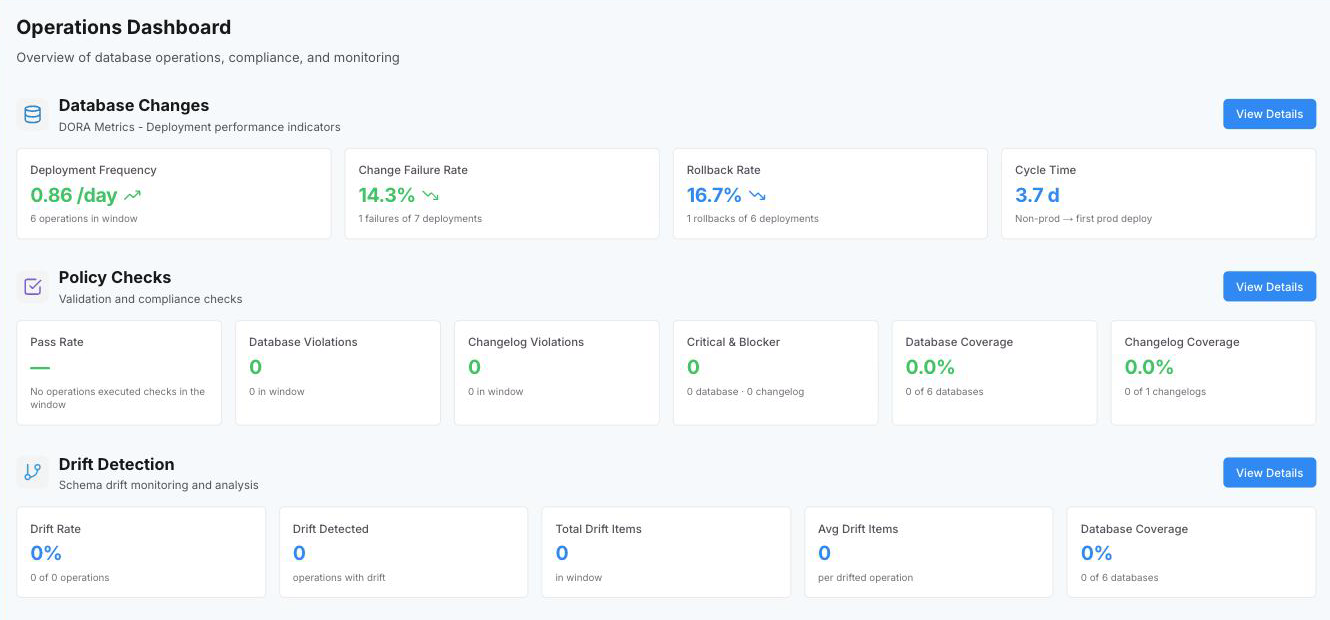
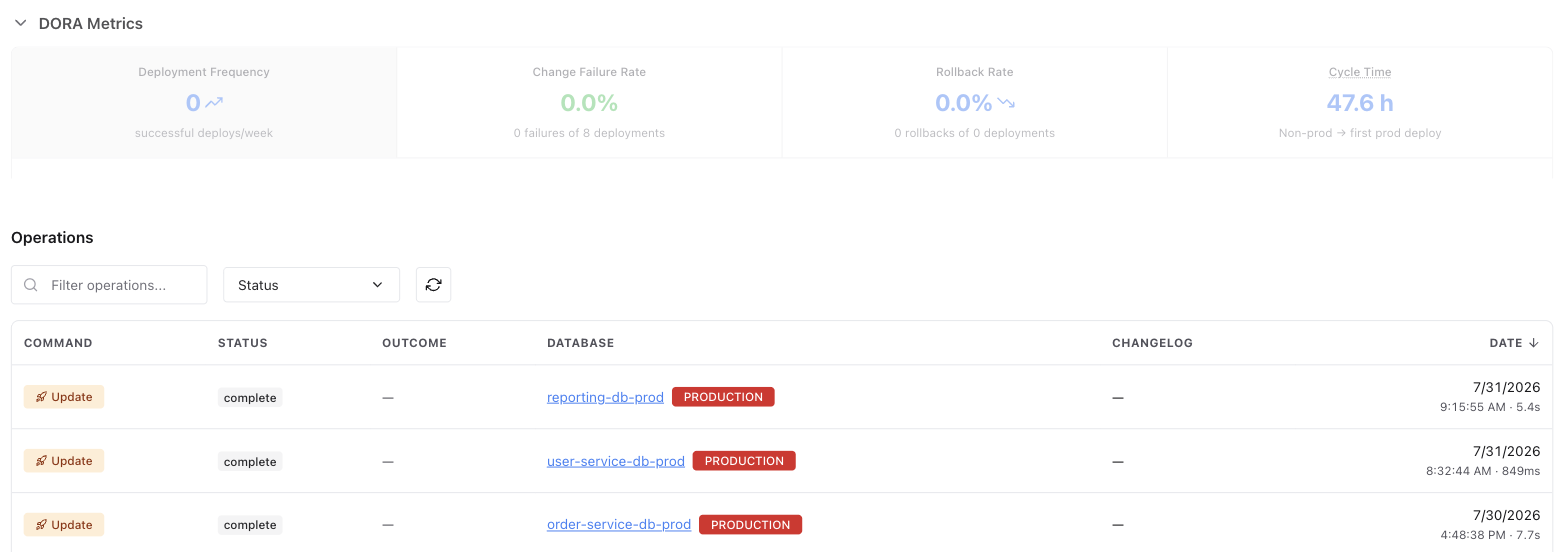
Drilling into Database Changes exposes the DORA trend over time and the underlying operation list, with filters by status, type, environment, and project.
Move from signal to root cause, fast
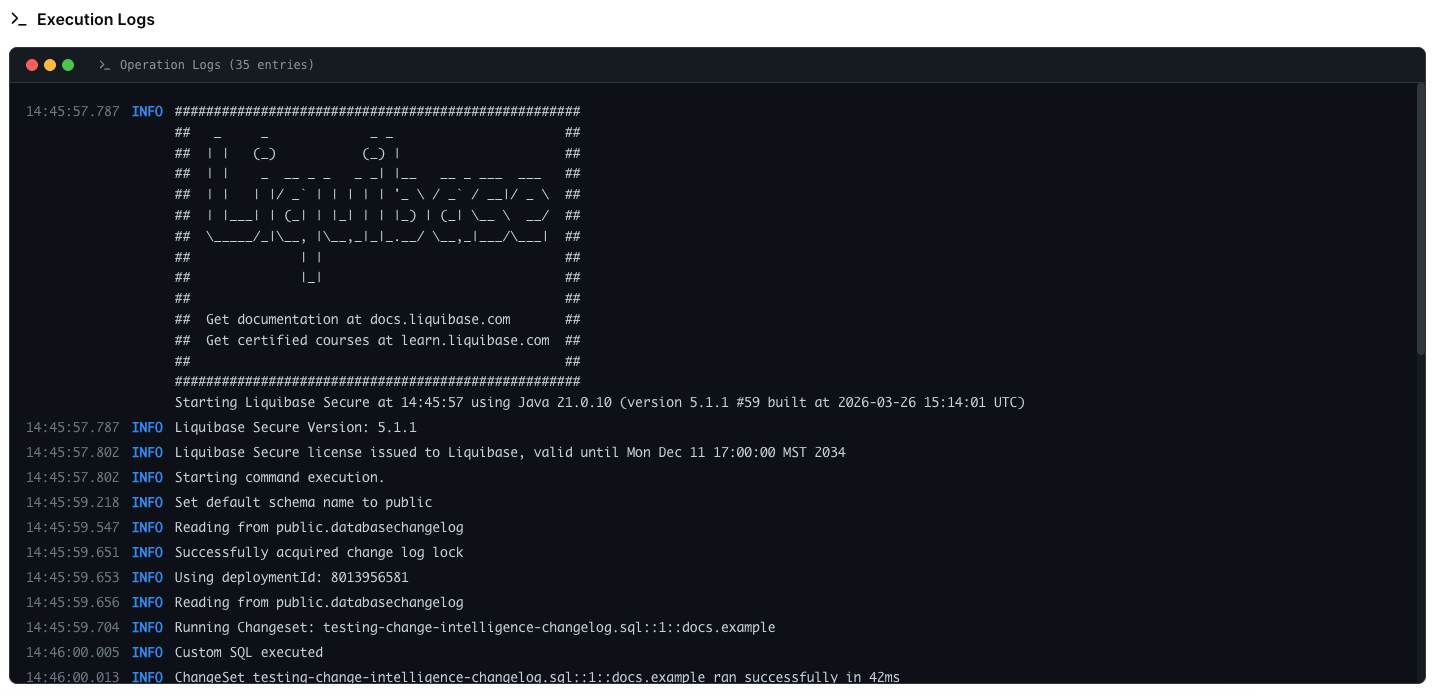
Investigate failed deployments with full operation history, structured execution logs, and environment context. On-demand AI analysis can summarize a failure, identify likely causes, and propose remediation steps without requiring you to move between disconnected systems.
Catch drift early
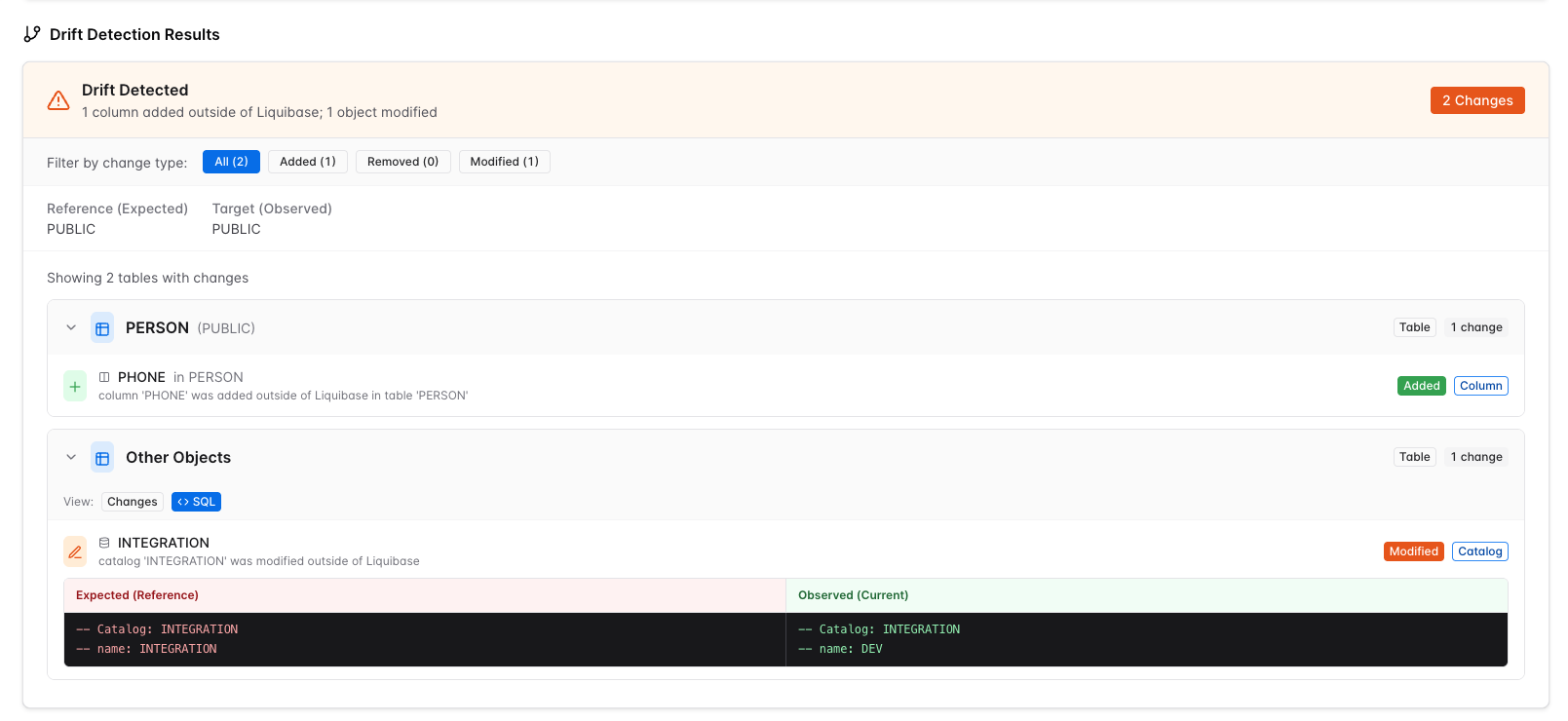
Monitor schema drift, policy outcomes, and operational patterns continuously, and identify out-of-process changes before they create delivery, security, or compliance incidents. Drift detection runs at the cadence you configure, typically as a scheduled CI/CD job, and the results populate a trend view alongside individual drift findings.
Each drift finding includes a side-by-side diff between expected and observed state, plus the execution log that produced the finding. The combination provides reviewable evidence for compliance teams and a fast investigation path for engineering teams.
Audit ready by design
Capture an immutable record of permission and configuration changes alongside operation evidence. A security reviewer answers questions like who had access to this project on a given date without needing elevated permissions on other systems.
Designed for enterprise personas
Platform leaders, DevOps engineers, DBAs, security reviewers, and compliance teams each have a default permission template tuned to their workflow. Permissions are governed centrally, audited continuously, and extended without forking the model.
What Change Intelligence is, and is not
Change Intelligence is the observability capability of Liquibase Secure server for Liquibase Secure change operations. It captures metadata from each Liquibase Secure CLI run, including deployments, policy checks, and drift detection results, and presents it through a web dashboard. Teams monitor, audit, and triage database change activity across environments, projects, and databases.
Change Intelligence is not a database client, and neither is Liquibase Secure server. The server never connects to your monitored databases. Every operational data point originates from the Liquibase Secure CLI running inside your existing pipelines and developer workflows. It is not a deployment tool either, since it records what the CLI did rather than driving it, and it is not a log aggregator, since it holds the structured record of an operation rather than raw output from every system you run.
This separation is intentional, and it has practical implications:
There is no path to query production data. Change Intelligence holds the metadata Liquibase already generates, and nothing else.
No inbound database connectivity is required. The server never opens a connection to a monitored database, so there is no firewall rule and no credential to grant it.
Exposure to your schemas is limited to what a Liquibase run already knows. Object names and changeset content reach the record.
Secrets never leave the originating host. Sensitive Liquibase properties are stripped at the extension before any data is sent, and the server applies a second, independent pass on ingest.
The record is derived, not asserted. Every operation comes from a run that actually happened, so coverage is a fact about your pipelines rather than a claim about your documentation.
Change Intelligence is also not a standalone application. It has no API, web tier, database, or authentication of its own. It runs inside Liquibase Secure server alongside the server's core services and Change Governance, and it is administered through the same workspace, groups, templates, and audit log.
Liquibase Secure architecture
Liquibase Secure is delivered as two components. Both run inside your trust boundary, and Change Intelligence is part of the second.
Liquibase Secure CLI. The command line tool that installs on developer workstations and CI/CD agents and implements Change Automation. It reads changelogs, previews SQL, runs policy checks, applies and rolls back change, detects drift, and writes reports and structured logs. It makes outbound connections only and holds no credentials beyond the moment of execution. The CLI also hosts the Change Intelligence extension, which is bundled in the distribution and disabled by default, and its checks commands can resolve policy configuration from Change Governance instead of a local file.
Liquibase Secure server. A self-hosted, containerized server that you deploy and operate. It never connects to a managed database. Everything it knows arrives from Liquibase Secure CLI instances running in your own pipelines or from users in the browser. The server hosts three functional areas behind one API and one web application:
Core services, present in every installation: account and workspace services; project management and the shared entity model of projects, database connections, changelogs, and pipelines; license management and tracking; role-based access control, meaning the permission catalog, templates, groups, overlays, grants and denies, and the resolver; and the other administration services, including users, service principals and API tokens, single sign on configuration, and the audit log.
Change Intelligence, the visibility capability. It receives operation metadata from the extension, files it under the shared entity model as operations, and presents deployment history, DORA metrics, policy check outcomes, drift findings, and on-demand AI analysis.
Change Governance, the policy capability. It holds your policy library as catalogs, packages, and checks with version history, and maps that library to projects, pipelines, connections, and changelogs through assignments that the Liquibase Secure CLI resolves when it runs checks.
The three areas are not separate applications. They share the server's API and web tiers, the data stores, the authentication layer, and the access control model. Each registers its own permission domain with the core permission catalog and contributes grants to the six default templates, so administering access to Change Intelligence uses the same groups, templates, and audit log as everything else in the server. A capability that is not enabled for the installation has its permissions made inert and its surfaces closed, while the core services remain fully administrable.
Within this architecture, Change Intelligence occupies two places: the extension in the Liquibase Secure CLI, which is the sole producer of operation data, and the Change Intelligence services in Liquibase Secure server, which store and present it. Everything between them, from authentication and access control to the data stores and the reverse proxy, is core infrastructure that Change Governance uses in exactly the same way.
Solution architecture
Change Intelligence consists of three cooperating parts, plus one optional external dependency. The first runs in the Liquibase Secure CLI, the second and third run inside Liquibase Secure server, and all of them run inside your trust boundary. The fourth, the model provider used for AI analysis, is optional and configurable.
Liquibase extension
The Change Intelligence extension ships bundled inside the Liquibase Secure CLI distribution and is disabled by default. Operators opt in by setting LIQUIBASE_PLATFORM_ENABLED=true and providing the connection details the extension uses to send operation data securely to the server. There is nothing to download and no manual install step. The extension hooks into the CLI lifecycle, captures operation metadata as JSON, strips sensitive properties, and posts the result to the Liquibase Secure server ingest endpoint. It is the sole producer of operational data for Change Intelligence; the server accepts ingest through no other path.
The extension reads the runtime license and disables itself when no valid Liquibase Secure license is present, leaving the underlying Liquibase command to run normally. The server can independently enforce the same rule, rejecting any batch that does not declare a licensed Secure client.
Compatibility: Liquibase Secure CLI 6.0 or newer. See which commands report.
Change Intelligence in the server API
The Liquibase Secure server API is a NestJS service written in TypeScript. Change Intelligence contributes the ingest endpoint and the operation, dashboard, drift, tag, environment, and AI analysis routes to that API. It validates and persists operation data under the shared entity model of workspace, project, pipeline, changelog, and connection, relies on the core services for tenancy and authorization, serves the REST endpoints consumed by the web application, and emits real time events over WebSockets via Redis pub/sub. The API tier is stateless and horizontally scalable behind your reverse proxy.
Change Intelligence in the server web application
The Liquibase Secure server web application is a Next.js application written in React, served by its own Node process behind a reverse proxy, either one you provide or the Nginx container the Liquibase Secure server Docker Compose configuration manages for you. Change Intelligence contributes the Operations dashboard, the drill down views for operations and drift findings, and the AI analysis surface. The surfaces for the shared entities, the audit log, and the permission management surfaces belong to the core services and are shared with Change Governance. The web application communicates with the API over HTTPS for REST traffic and over WSS for real time updates.
AI analysis, on demand
When you explicitly select Analyze issues on a specific operation, the API calls the configured model provider. Supported providers are OpenAI, Anthropic, Google, and any OpenAI-compatible endpoint, which is the path for self-hosted and local models. Important properties of this design:
The provider, model, and endpoint are set once per installation, so a single operator-controlled decision governs where inference happens. AI analysis is then enabled or disabled per workspace, and is off unless enabled.
There is no automatic outbound model traffic.
No inference runs on operations you have not intentionally requested.
Results are persisted with the originating operation, attributed to the provider, model, and timestamp that produced them.
Because Liquibase operations are immutable, prior analyses do not become stale relative to their subject and do not silently regenerate.
Operation ingest
Ingest is one directional, from producer to consumer. Sensitive properties are stripped at the extension before any network call. The extension does not decide this by name matching. It strips any argument Liquibase itself marks as obfuscated, plus connection URLs, and transmits them as a name with a null value and a sensitive flag, so the secret is never materialized on the sending host. The redacted payload is sent over HTTPS to the project scoped ingest endpoint of Liquibase Secure server, authenticated by a service principal token, and Change Intelligence validates, persists, and fans out a real time event over Redis to any connected dashboard sessions.
Logical architecture
The diagram and table below summarize the two components of Liquibase Secure, the trust boundary, and the small set of external dependencies. The Change Intelligence parts are highlighted.
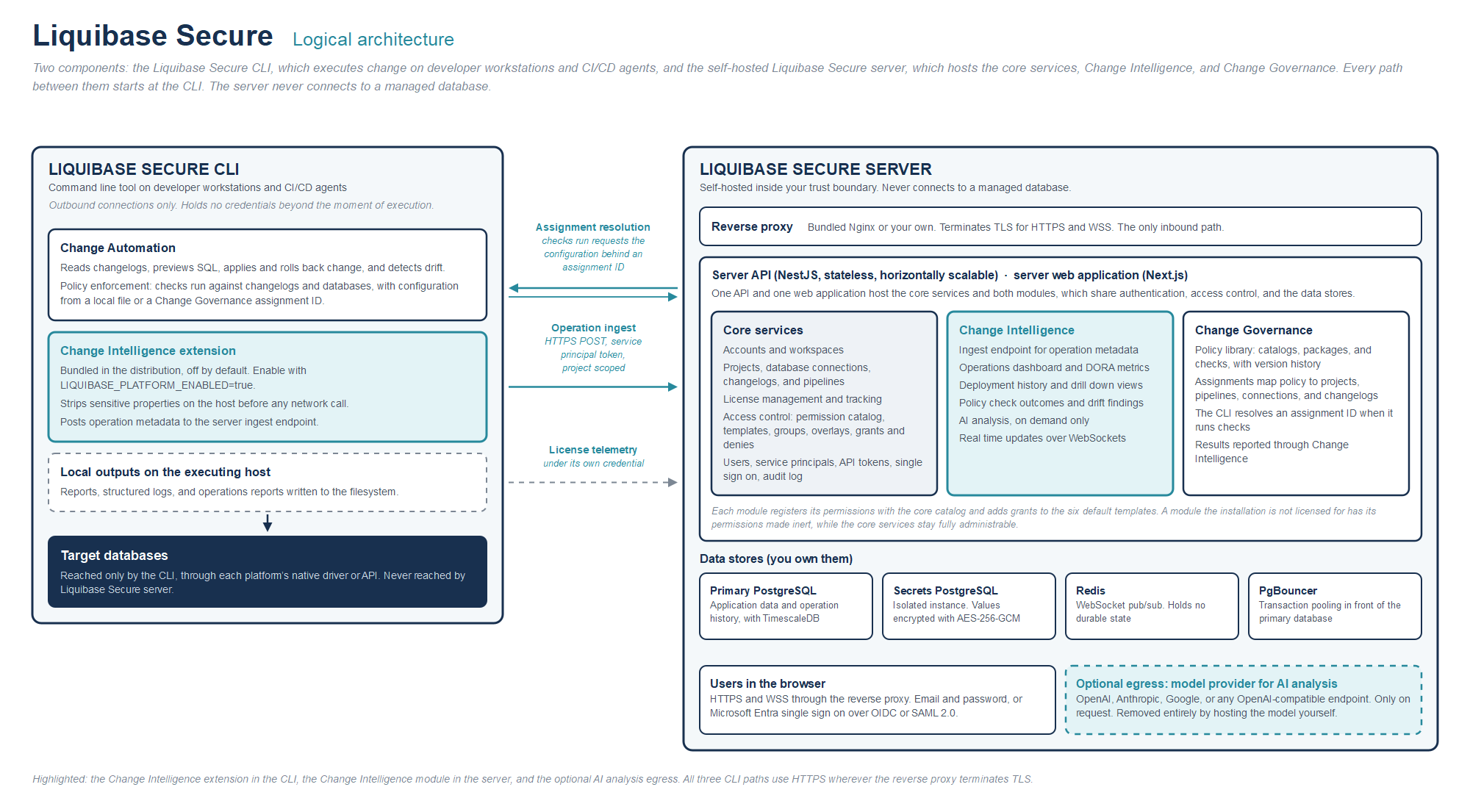
Tier | What runs there |
|---|---|
Producer | CI/CD or developer host running the Liquibase Secure CLI with the Change Intelligence extension. Sends an HTTPS POST to the ingest endpoint. |
Your trust boundary | Liquibase Secure server: the core services, Change Intelligence, and Change Governance behind one API and one web application, with primary PostgreSQL and the TimescaleDB extension, an isolated secrets PostgreSQL, a connection pooler, and Redis for WebSocket pub/sub. Serves HTTPS and WSS to the browser. |
Optional egress | A model provider you configure: OpenAI, Anthropic, Google, or any OpenAI-compatible endpoint. On demand only, and removable by hosting the model in your own environment. |
Three paths cross the boundary between the Liquibase Secure CLI and Liquibase Secure server, and the CLI initiates all three over HTTPS. The Change Intelligence extension posts operation metadata to the ingest endpoint. The checks commands request the check configuration behind an assignment ID from Change Governance. The license telemetry collector receives usage information under its own credential. Users reach the web application through the reverse proxy over HTTPS and WSS. The only optional egress from the server is the model endpoint you configure for AI analysis, and hosting the model in your own environment removes it entirely.
Deployment model
Change Intelligence runs in Liquibase Secure server, delivered as a self-hosted product. You own the deployment, the data, the network, and the egress posture. It runs on Docker Compose on any host you operate, on premises or on a cloud VM. Hosting options covers the common choices. There is no separate installation for Change Intelligence. The capability is part of the Liquibase Secure server images, so enabling it requires no additional container.
Components inside the trust boundary
All runtime components run within your environment. None require Liquibase managed infrastructure or external SaaS dependencies for normal operation. The components below are shared by the core services, Change Intelligence, and Change Governance.
Component | Role | Stateful |
|---|---|---|
Reverse proxy | Terminates TLS for HTTPS and WSS and routes to the web and API tiers. Either the Nginx container the Liquibase Secure server Docker Compose configuration manages, or your own standard (Nginx, AWS ALB, Azure Application Gateway, or equivalent) terminating TLS in front of it | No |
Web container | Next.js application served by its own Node process. Presents the core administration surfaces and the capability interfaces | No |
API container | NestJS service hosting the core services and the capability routes; validates and persists data, manages tenancy and authorization, serves REST and WebSocket endpoints to the web application and the Liquibase Secure CLI | No |
Connection pooler | PgBouncer in transaction pooling mode, in front of the primary database | No |
Primary PostgreSQL | Application data, with the TimescaleDB extension for time series operation history. Holds the shared entity model, access control configuration, Change Intelligence operation records, and Change Governance policy assets and assignments | Yes |
Secrets PostgreSQL | Separate, isolated instance for sensitive configuration values | Yes |
Redis | WebSocket pub/sub fan out for dashboard events | No, it is a cache |
Database migrations run as a separate, on-demand container rather than automatically at startup, so schema changes are an explicit operator action.
Network posture
Inbound: limited to the reverse proxy that fronts the API and web tiers. The proxy terminates TLS for HTTPS and WSS. Two kinds of clients arrive through it: users in the browser, and Liquibase Secure CLI instances on your CI/CD agents and developer hosts, which post operation metadata for Change Intelligence and request assignment configuration from Change Governance. No other inbound paths exist.
Outbound: required only when AI analysis is enabled, and only to the model endpoint you configure. If you point AI analysis at a self-hosted model you can operate Liquibase Secure server, and Change Intelligence with it, in a fully air gapped configuration.
Lateral: no connectivity is required or used from Liquibase Secure server to monitored databases. All Change Intelligence operational data arrives via the extension on the CI/CD path.
Data residency
All of your data, including operation records, properties, policy assets, assignments, and configuration, remains in databases you own. Nothing leaves your environment except traffic between your own Liquibase Secure CLI instances and the server and, optionally, a model provider call you have configured for AI analysis.
Security posture
The security posture described here belongs to Liquibase Secure server and applies identically to the core services, Change Intelligence, and Change Governance. Where Change Intelligence adds a control of its own, the text says so.
Transport security
TLS is terminated at your reverse proxy in front of the API and web tiers. Cipher suites and certificate management follow your policy at the proxy layer. WebSocket connections from the browser follow the same proxy, as WSS wherever TLS is terminated.
HTTPS is the recommended configuration for every deployment reachable over a network you do not fully control, and it is what these docs direct operators to. Plain HTTP is also accepted for local and fully isolated environments where encryption is not a requirement, so transport encryption is a deployment decision rather than a product constraint. Liquibase Secure CLI traffic to the server follows the same rule: HTTPS wherever the proxy terminates TLS.
Authentication
Authentication is a core service of Liquibase Secure server, built on BetterAuth. There are two ways a person signs in, and one way a machine connects.
Email and password authentication.
Single sign on against Microsoft Entra, using either OIDC, which is built on OAuth2, or SAML 2.0, configured per workspace.
Multi-factor authentication is delegated to your identity provider. Liquibase Secure server carries no native second factor of its own. Where the Entra tenant requires MFA or conditional access, those policies are enforced upstream and apply to every single sign on. This is a deliberate design decision, taken so the server has no separate authenticator enrollment to manage, no recovery-code custody, and no cryptographic surface of its own to bring into FIPS scope.
Operators can close self-service email and password registration for the whole installation. With registration closed, the sign-up route is refused at the server rather than merely hidden, existing accounts continue to sign in, and new users arrive only through single sign on or an administrator invitation.
API tokens authenticate Liquibase Secure CLI traffic. Ingest accepts service principal tokens only. Tokens are displayed once at creation, are stored only as a hash so they cannot be retrieved later, and can be rotated or revoked at any time.
Single sign on
Single sign on is configured per workspace by a workspace administrator, in the application, with no operator-level environment changes. The administrator chooses the protocol that matches their Entra enterprise app:
OIDC, configured with tenant ID, client ID, and client secret.
SAML 2.0, configured by uploading identity provider metadata, pointing at a metadata URL, or entering the entity ID, sign-on URL, and signing certificate directly. Liquibase Secure server publishes its own service provider metadata for registration in Entra.
One protocol is active per workspace at a time, and client secrets and signing certificates are held in the encrypted secrets store described below.
Sign-in is restricted to the configured tenant. Under OIDC, the tenant claim on the ID token is validated against the configured tenant. Under SAML, an assertion is accepted only when the issuer matches the configured identity provider entity ID and the signature validates against the configured certificate. A personal Microsoft account cannot sign in to a workspace bound to an organizational tenant, and a mismatch is refused with a message that names the cause without exposing configuration detail.
First-time arrivals are provisioned just in time. An invited user joins the groups named in the invitation, and anyone else is placed in the system Pending group with zero permissions, where they see an explicit awaiting-access screen until an administrator assigns them. Subsequent sign-ins resolve to the same user record through a stable identifier, without creating duplicates and without changing group membership.
Two lockout guards protect the installation from configuration mistakes. The last enabled single sign on provider cannot be disabled while self-service registration is closed, and the last remaining administrator cannot be removed. Disabling or deleting a provider revokes the active sessions it issued rather than leaving them to expire.
Scope for this release: user provisioning is just in time only, logout is local to Liquibase Secure server, and Entra group claims are not consumed, so group membership is assigned in Liquibase Secure server rather than inherited from the directory.
Secrets handling
Sensitive configuration values, including database connection credentials and single sign on client secrets and signing certificates, are held in a separate, isolated PostgreSQL instance. All values are encrypted at rest with AES-256-GCM using per-value key derivation. The master encryption key is supplied at deploy time as an environment variable or a mounted file, which you typically source from your KMS or vault, and is never stored alongside the ciphertext.
Redaction happens twice, independently. Sensitive Liquibase properties are stripped by the extension before any data leaves the originating host: it strips any argument that Liquibase itself marks as obfuscated, together with connection URLs, and transmits them as a name with a null value and a sensitive flag, so the secret is never materialized on the sending host. The API then applies a second pass on ingest, redacting by key name against the patterns password, secret, token, key, and credential, and stripping credentials embedded inside URL values. The second pass writes a distinct sentinel, so an operator can tell a value the API caught from one the extension stripped as intended. Neither pass is configurable, and both err toward redacting too much.
The interface displays a redacted indicator with no reveal control available under any user action.
Principle of least exposure
Change Intelligence ships with no interface affordance to reveal redacted properties. There is zero risk of accidental disclosure, even by administrators.
Pipeline authentication and principal separation
A single ingest endpoint accepts JSON from the extension. Ingest traffic is authenticated by a service principal token scoped to one or more projects. A service principal may ingest only for entities inside its assigned projects, and a batch naming anything outside that scope is refused. A batch naming an entity that does not exist and a batch naming an entity outside the principal scope are refused identically, so a CI token cannot be used to enumerate what exists.
Service principals are a distinct principal type from human users. They cannot sign in to the dashboard, cannot join groups, and can reach only the routes that explicitly admit them. Every other endpoint refuses a service principal token regardless of possession. Two routes admit them: the Change Intelligence ingest endpoint, where a service principal may write operation data only for entities inside its assigned projects, and the Change Governance assignment resolution endpoint, where its default view-and-use permission on assignments lets a pipeline retrieve the checks assigned to the assets it deploys, without any governance authoring rights. This separation eliminates the most common abuse path for pipeline credentials, which is repurposing them for read access. Tokens can be rotated in place and revoked, and both actions are recorded in the audit log.
Service principals cannot read any operation, dashboard, or permission data, regardless of token possession. The narrow scope is the point: a pipeline token that leaks from a CI log grants the ability to write operation records for one project's entities and nothing else. It cannot be turned into a read credential for the estate.
User-owned API tokens are not accepted for ingest. A pipeline that presents a user token to the ingest endpoint is refused, so operation records can only ever be written under a project-scoped service principal, and the identity behind every ingested operation is a machine identity you created for that purpose. The same service principal token also authenticates the Liquibase Secure CLI when it resolves a Change Governance assignment during a checks run, so a single pipeline credential serves both capabilities. Issue a service principal for every CI/CD pipeline.
AI analysis controls
All model calls originate from the API container, not from the browser. Browsers never call model providers directly, and operation data is never proxied through the browser to an external service.
The provider, model, and endpoint are set once for the installation, so where inference happens is a single operator-controlled decision rather than a per-workspace one. AI analysis is then enabled or disabled per workspace, and is off unless enabled, which lets an operator hold it off for workspaces handling regulated data. If you have strict data exfiltration concerns you can point the installation at a local or self-hosted OpenAI-compatible endpoint and operate with no outbound model traffic at all.
AI results are persisted with the originating operation. Because Liquibase operations are immutable, prior analyses do not become stale relative to their subject and do not regenerate silently on revisit. Each analysis is a durable, auditable artifact attributed to the provider, model, and timestamp that produced it.
Audit log
The audit log is a core service. An immutable audit log captures every permission changing action in Liquibase Secure server, across the core services, Change Intelligence, and Change Governance. Each entry records the actor, the timestamp, the target, and the before and after state. Logged events include:
User invitation, deactivation, and reactivation.
Group create, rename, and delete operations.
Group membership changes.
Template assignment, scope change, and unassignment.
Overlay changes.
Direct grant create and revoke.
Direct deny create and revoke.
Entity ownership added, removed, and transferred.
API token lifecycle events: create, rotate, revoke.
Service principal lifecycle events: create, rotate, revoke.
Single sign on configuration changes, including enabling and disabling it, protocol changes, tenant and endpoint changes, and secret or certificate rotation. Secret rotations record a reference such as a certificate fingerprint, never the value itself.
The log is searchable by actor, target, and date range, and entries are exportable for handoff to a reviewer or an evidence package. Access is gated by the audit view privilege, which is bundled into the Security Reviewer template by default. See becoming audit ready for how this fits a wider compliance practice.
For Change Intelligence, the audit log complements the operation record. Operations themselves are immutable once ingested, and AI analyses are persisted with the operation they describe, attributed to provider, model, and timestamp.
Authorization model
Liquibase Secure server ships with a permission model designed from a blank sheet against the access control patterns observed in regulated environments. The model is a core service: one permission catalog, one set of persona-shaped templates, one resolver, and one fixed precedence order. Change Intelligence and Change Governance implement the model rather than inventing their own. Change Intelligence brings no principals, groups, scopes, or precedence of its own. What it adds is a permission domain and a set of default grants that enrich the six templates.
The model is built on the concepts of principals, groups, templates, overlays, ownership, and direct overrides. It governs access to the records Liquibase Secure server holds about database change and governance configuration, and never access to the databases themselves. Who can connect to a database, and with what rights, remains the province of the database's own privilege system.
Principals
Two principal types exist.
Users: human principals authenticated by password or single sign on, with multi-factor authentication wherever their identity provider enforces it.
Service principals: non human principals authenticated by API token, used by Liquibase Secure CLI instances in CI/CD. They cannot sign in to the dashboard, cannot join groups, and can reach only the ingest and assignment resolution routes that explicitly admit them. Ingest accepts service principal tokens only.
Groups, templates, and assignments
Access is granted to groups by default. An individual user can also hold access through three specific paths: ownership of an entity, a direct grant, or a direct deny, each of which names one principal and one entity. Groups are workspace scoped collections of users that mirror the organization. A user can belong to multiple groups, and effective permissions are the union of all sources, modulated by direct grants and direct denies.
A template assignment applies one template to one group at one scope: the whole workspace, a list of projects, or a list of specific database connections. Workspace-scoped assignments cover everything in the workspace. Project-list assignments cover a named list of projects, so one group can hold one policy across a dozen applications. Connection-list assignments follow specific databases across every project they appear in, which is how database owners see the change record for their databases. A template assignment is not the same as a Change Governance assignment, which maps policy packages to project assets.
Six persona shaped templates ship in every workspace. Each defines the scope it may be applied at and a default privilege bundle drawn from the core services and from every capability in the installation. Templates are immutable: they cannot be renamed, edited, or deleted. You begin from these rather than from an empty permission list.
Template | Also known as | Scope | Default posture for core services and Change Intelligence |
|---|---|---|---|
Customer Admin | Workspace administrator | Workspace | Full administrative access to everything in the workspace, including user, group, template, and overlay administration, API tokens and service principals, direct grants and denies, the view permissions surface, and the audit log. Excludes ingest, which belongs only to service principals. |
Application Developer | Application lead, team lead | Project list | Operational read plus changelog create and update in assigned projects; all Change Intelligence views, including raw logs. |
DBA | Policy author, data architect | Connection list | Operations and drift on specific databases, with project view derived upward from those databases. No changelog modification, nothing administrative. |
Platform/DevOps Engineer | Release manager | Workspace | Project, connection, changelog, and pipeline creation and viewing across the workspace; the API token lifecycle; service principal creation and scoping; the operation views needed to debug a pipeline. Excludes user, group, and permission management. |
Security Reviewer | Governance lead, compliance lead, auditor | Workspace | Workspace-wide read only across core and Change Intelligence records, plus the view permissions surface and the audit log. |
Service Principal | None | Project list | Ingest only. No dashboard session and no view permission over core or Change Intelligence records. |
Change Governance contributes its own default grants to the same six templates. What is Change Governance? describes them.
Overlays customize a group assignment without forking the underlying template. An overlay is an additive and subtractive permission delta attached to a single template assignment, and the overlay editor lists every registered permission, including those the capabilities contribute. When Liquibase ships a template update, your overlays are preserved and the new template version applies cleanly beneath them.
Direct grants and direct denies at the entity level handle exceptions, such as temporary cross project investigation rights or containment of sensitive data exposure on a specific operation. They are reachable from the entity's detail page.
Ownership is an independent source of access. Projects, connections, changelogs, catalogs, packages, checks, and governance assignments are ownable. Whoever creates an entity owns it initially, an entity can have many owners, groups may own, and an entity is never left ownerless. Owners hold full control of the entities they own even where their template alone would not grant it, which is what lets a platform engineer create a database connection, hand it to the database owners' group, and step away. Deactivating a user or deleting a group that solely owns an entity is blocked, with ownership transfer offered in the same flow, so offboarding never silently orphans a database connection.
Permission resolution
Permissions are resolved per principal, permission, and entity using a three layer priority.
Direct grants: explicit allow at the entity level. Highest precedence.
Direct denies: explicit deny at the entity level.
Baseline: everything the principal is allowed before grants and denies adjust it. Each template assignment contributes its template plus its overlay, composed per assignment first and only then unioned across every applicable assignment. Entity ownership contributes the owner bundle, and an enabled capability contributes its own grants. The baseline is a most-permissive union across contributors, never a precedence contest among them.
The effective rule is that a direct grant wins outright, a direct deny overrides the baseline, and the baseline governs everything else. Making a deny beat the baseline is what makes containment possible. Making a grant beat a deny is what makes a named exception possible, for example re-admitting an incident responder to a contained operation. One consequence reads as a defect until explained: a subtraction on one template assignment cannot remove a permission that another assignment grants, because the baseline is most-permissive by definition. The only mechanism that overrides it is a direct deny.
Ownership contributes to the baseline rather than sitting above the precedence order, so a direct deny still overrides an entity's own owner, and a direct grant can restore them. Ownership is a source of access, not an exemption from the model.
One deliberate exception: denies do not apply to workspace administrators. A direct deny cannot be used to strip an administrator of access, which prevents a configuration mistake or a malicious deny from locking an organization out of its own installation. A deny is the one statement in the model with no in-product recovery, so without this exception a deny placed on everyone would leave an entity visible to nobody. Administrators here are the members of the workspace's system Administrators group. Holding the Customer Admin bundle by some other route confers no exemption, and the exemption is scoped per workspace. It is enforced on both paths: the write path refuses a direct deny naming the Administrators group or an individual administrator, and the resolver drops any remaining deny in a workspace the asking principal administers. An administrator is removed by removing that group membership, which is itself audited, and the last administrator of a workspace cannot be removed.
Every permission check happens at a scope, and containment flows downward, never upward. A workspace assignment reaches the projects, pipelines, and connections inside it, a list-scoped assignment never reaches beyond its listed targets, and a check made with no scope matches no assignment and is denied. Failing closed turns a forgotten scope into a visible denial during testing rather than a silent workspace-wide grant during an incident.
Authorization is always evaluated against a permission, never against a template name, so you can restructure templates, overlays, and groups without changing how any endpoint is enforced. Nothing is materialized: there is no precomputed effective-permissions table, so no stored artifact can drift from the configuration that produced it.
Change Intelligence permissions
Every permission is a three-part name, domain:action:resource, and every authorization decision resolves one exact name at one scope. Wildcards are not part of the grammar. Domains are reserved namespaces, each owned by exactly one functional area. Change Intelligence permissions live in the ops namespace. They are chiefly views over the operation record, plus the tags and environments that organize it and the right to run AI analysis on an operation. The record itself is written only through the core ingest domain, by service principals.
Permission | What it allows |
|---|---|
| Access the operations area and read the operation list and detail. |
| View update and rollback operations. |
| View policy check operations. |
| View drift operations. |
| View AI failure analysis on operations. |
| View raw operation logs. |
| Run AI failure analysis on an operation. |
| Read the workspace's tags. |
| Create a tag. |
| Rename or recolor a tag. |
| Delete a tag. |
| Read the workspace's environments. |
| Create, edit, and reorder environments. |
Sensitivity is graded by permission, not by page. Raw execution logs are reached through their own permission, ops:view:raw-logs, separate from the operation record that contains them. It is granted to every human template by default and can be removed from any group by overlay where you want a narrower posture. A direct deny on a single operation contains one incident's record even from principals whose template allows the view, and a direct grant re-admits a named responder. An operation is contained, granted, owned, and audited with exactly the same mechanics as any core entity.
Connection properties you choose to store in Liquibase Secure server are the one place a secret can exist in the record. They are encrypted at rest and revealed only to a principal holding the core permission ops:view:connection-secrets, which by default only the Customer Admin template carries and which can be removed by overlay. Access control and secret handling are separate defenses, and the second does not depend on the first being configured correctly.
Governance
Governed reads throughout. Every read endpoint that returns operational, configuration, policy, or permission data enforces a corresponding view permission, and list endpoints filter to what the caller may see rather than refusing the whole page.
A small set of deliberately unauthenticated routes. The health and version probes, the pre-sign-in settings the login page reads, the single sign on routes themselves, the invitation preview a new user opens from an emailed link, and the license telemetry collector, which carries its own credential. None of them return operational, policy, or permission data.
View permissions surface. A Security Reviewer, or any principal with the view grants privilege, can open a who has access to this project view from any project, and a who has direct grants or denies on this entity view from any entity detail page. Seeing who has access is a separate permission from reading operational data, bundled into Security Reviewer and Customer Admin rather than into the operational templates. These surfaces produce audit evidence on demand.
Compliance evidence, and its boundary. The audit log and the view permissions surface together produce reviewable evidence of who could see which Liquibase Secure server records at any point in time, suitable for SOC 2, HIPAA, and similar review activities, answerable from inside the product by a reviewer whose own access is read-only. It is not evidence about access to the databases themselves, and presenting it as an answer to that question would misrepresent the control.
Extending the model
The authorization model is a registry rather than a fixed set of permissions, and extending it is a shipped capability.
Permissions are declared in reserved namespaces, each owned by a named functional area. Three owners are registered today: the core services, Change Intelligence, and Change Governance, each contributing its own permissions and its own additions to the default templates without forking them. A namespace collision fails the build rather than surfacing at your boot, and registration is validated at startup, so a malformed name, a duplicate registration, or a second capability claiming an existing domain stops the service rather than letting it boot with a silently wrong catalog.
A capability that is not enabled for the installation has its permissions made inert: template assignments, overlays, and direct grants referencing them resolve to nothing, are shown in the view permissions surface as coming from a currently disabled capability, and are preserved rather than deleted, so enforcement resumes automatically if the capability is enabled again. The core namespaces can never be made inert, so the permission model can never disable the ability to administer itself.
Deployment guidance
Liquibase Secure server ships as a set of containers and a Compose configuration that runs all of them. That configuration is how the server runs, and it is the supported baseline. It stands up the application tiers, the databases, the connection pooler, the cache, and the reverse proxy together, with the server CLI generating configuration, managing secrets, and running database migrations. If you want the product running, you do not assemble it from parts. Change Intelligence requires no additional container. It is part of the API and web images.
Liquibase Secure server runs its databases, connection pooler, and Redis as the bundled containers in this configuration.
The default deployment
Every component runs as a container on a single host.
Container | Role | Stateful |
|---|---|---|
Reverse proxy | Terminates TLS and routes to the web and API tiers | No |
Web | Liquibase Secure server web application: a Next.js application served by its own Node process | No |
API | Liquibase Secure server API: a NestJS service hosting the core services and the capability routes, including ingest, assignment resolution, REST, and WebSocket endpoints | No |
Connection pooler | PgBouncer, in transaction pooling mode, in front of the primary database | No |
Primary PostgreSQL | Application data, operation history, policy assets, and access control configuration | Yes |
Secrets PostgreSQL | Encrypted configuration values, isolated from the primary | Yes |
Redis | WebSocket pub/sub fan out | No, it is a cache |
Database migrations run as a separate, on-demand container rather than automatically at startup, so schema changes are an explicit operator action.
Evaluation and small teams
Suitable for evaluation, pilots, and small teams, with every container on one host. The minimum is what the server needs to start. The evaluation figures leave headroom for real operation volume.
Component | Minimum | Evaluation and small teams |
|---|---|---|
CPU | 2 cores | 4 vCPU |
RAM | 4 GB | 8 GB |
Disk | 10 GB | 100 GB SSD |
Storage | Docker volumes on the host | Docker volumes on the host. Back up the volumes or take database dumps |
TLS | A certificate at the bundled reverse proxy | Your own certificate at the bundled reverse proxy |
Production
Suitable for production deployments with multiple projects, multiple environments, and active use of the web application. The starting point is the same Compose configuration on a larger host, with the database volumes on dedicated storage. Hosting options covers where to run the host.
Component | Resource |
|---|---|
Host | 8 vCPU and 16 GB RAM to run the application tiers, the connection pooler, and the cache. Size storage from retention, below |
Primary PostgreSQL | 4 vCPU, 16 GB RAM, and 200 GB SSD to start. Runs as the bundled container, with its volume on dedicated storage |
Secrets PostgreSQL | 2 vCPU and 4 GB RAM, isolated from the primary. The encryption master key is supplied at deploy time and held outside both databases |
Redis | Redis 7, bundled. Holds no durable state. Losing it drops live updates until it returns and loses no operation or policy data |
Connection pooling | PgBouncer in transaction mode, bundled. Defaults allow 200 client connections against a pool of 95 server connections. Raise the reserve pool to absorb spikes |
Reverse proxy | The bundled reverse proxy, which serves HTTPS with your certificate. You can also put your own proxy or load balancer, such as Nginx, AWS ALB, or Azure Application Gateway, in front of it. Connect it to the bundled proxy over HTTPS, because the bundled proxy redirects plain HTTP to HTTPS |
Backups | Regular backups of both databases, for example |
Egress | Only to the configured model endpoint when AI analysis is enabled. Hosting the model in your own environment removes it entirely |
These figures are starting points for a deployment of this shape, not the output of a published benchmark. Actual sizing depends on operation volume, retention, and how many users are active at once. Storage is the component most sensitive to retention: operation history and execution logs accumulate in the primary database, so if you keep several years of history across a large estate, plan storage from your own volume rather than from the starting figure above.
Liquibase Secure CLI hosts
Every CI/CD agent and developer host that reports to the server needs:
Liquibase Secure CLI 6.0 or newer.
Java 11 or newer, to run the CLI and the bundled extension.
Network access from the host to the server over HTTPS.
Scaling
The default Compose deployment runs on one host. It does not cluster across nodes, fail over automatically, or replicate its databases, and the primary database is the component that limits throughput. It scales vertically: give the host, or the primary database, more CPU, memory, or disk as operation volume grows.
Not required
Direct connectivity from Liquibase Secure server to monitored databases is not required and is not used. All Change Intelligence operational data arrives through the extension on the CI/CD path. There is no shared filesystem between containers, and no scheduler or job runner beyond what Docker Compose already provides.