- Concept
- Choose your capability
What is Change Automation?
Last updated: September 29, 2026
Change Automation is the command line tool at the center of Liquibase Secure and the engine that applies database change. It installs on the developer workstations and CI/CD agents that already perform deployments, connects to more than sixty database platforms, and converts a proposed schema change into a governed operation. The change is previewed as exact SQL before it runs, checked against policy, applied under a lock, recorded in a tamper evident ledger on the database itself, reversible one changeset at a time, and evidenced in a report a reviewer can read.
Change Automation runs entirely inside your trust boundary. It makes outbound connections only and holds no credentials beyond the moment of execution. Integration with Liquibase Secure server adds centralized visibility through Change Intelligence and centralized policy governance through Change Governance, without changing how a deployment executes.
New capabilities and new terms
Changeset: A single unit of database change with an identifier and an author, such as add a column, create an index, or deploy a stored procedure. A changeset may carry preconditions that gate it on the state it expects to find, an explicit or generated rollback, and contexts and labels that scope where it applies.
Changelog: An ordered file of changesets, written in Formatted SQL, XML, YAML, or JSON and kept in version control alongside the application code it supports. The changelog is the standard for describing database change in Liquibase Secure and the central artifact of Change Automation.
Tracking tables: The ledger resident on each managed database. DATABASECHANGELOG records applied changesets, DATABASECHANGELOGLOCK serializes concurrent runs, and DATABASECHANGELOGHISTORY records every operation, including those that changed nothing.
Policy checks: Deterministic rules evaluated against changelogs and live databases, each with a configured severity that determines whether a violation stops or merely annotates a run.
Flow file: An as-code definition of a sequence of Liquibase commands, so the standard steps of a database change are defined once and run identically everywhere.
Assignment: The mapping of centrally governed policy to the entities a team operates. An assignment carries an immutable ID that a Change Automation run passes in place of a local checks settings file path. See Define policy assignments.
Change Automation is the current name for the component that was called Secure Automation in the previous generation of Liquibase Secure. The two names describe the same command line tool and the same capability set, and this page uses Change Automation throughout.
Liquibase Secure is a distinct commercial product with its own distribution and license, not the free open source Liquibase Community tool with a key applied. The two are not designed to be used interchangeably on the same changesets or environments, so standardize on one per environment.
Executive summary
At the center of a Change Automation operation is the changelog, the standard, version controlled description of database change that every other capability consumes. It can be authored in an IDE, produced by an external tool, captured from an existing database, or generated by an AI assistant through Liquibase's own APIs. Whatever its origin, Change Automation treats it identically.
Three properties distinguish the tool in practice. Nearly every command that changes a database has a paired command that emits the exact SQL instead of running it, so approval happens on statements rather than on intent. The record of what has been applied lives on the managed database rather than in the pipeline, so it survives a CI platform migration. And policy checks evaluate a change against the same rules, held locally or governed centrally on Liquibase Secure server, whether a person or an AI assistant wrote it.
Key outcomes for enterprise teams
Review the exact statements before they run. Every update and rollback command has a
-sqlcounterpart, so change boards approve SQL, not a description of intent.Enforce standards in the tool, not in a person's head. Policy checks run identically on a developer workstation and a build agent, from a local configuration or from a centrally governed policy set.
Keep a durable record on the asset. Tracking tables on each managed database hold every applied changeset with checksum, author, order, and deployment identifier, independent of the CI platform.
Reverse one mistake without unwinding a release.
rollback-one-changesetremoves a single bad change and leaves the correct work that shipped behind it standing.Produce the audit evidence as a by-product of deploying. Operations reports and structured logs are written by the run that made the change, at the moment it ran.
The governance problem in database change
The question for a team responsible for database change is not whether they can deploy a schema change without a human touching it. Many already can. It is whether they could demonstrate, eighteen months from now and after a CI platform migration, exactly which statements ran against a given database, on what date, and who reviewed them first. When that answer lives inside a system scheduled for replacement, the record was never really a record.
Automated is not governed
Most enterprises have automated their database deployments. Far fewer have governed them, and the distance between those two words is where a surprising share of production incidents still lives. The difference shows up under three questions. Who read the statements before they executed against production? For most teams the answer is a person's name rather than a process. What was applied to the staging database three releases ago? Usually a search through pipeline logs that have since rotated away. How would one bad column change be removed without unwinding the four good ones that shipped behind it? It would not be. The team would restore from backup and lose a day.
None of that reflects poorly on the people involved. The DBA who carries the replication topology in their head is not a bottleneck to be removed. They are the compensating control the organization built because nothing else was doing the job. What most organizations have is a process that is scripted rather than governed. A scripted process executes statements in order, holds no opinion about whether they are safe, keeps no durable record of which already ran where, and produces nothing a compliance reviewer would accept. It automates the execution but removes the one point where human judgment could catch a risk.
What governed automation requires
For a database deployment to run unattended and still satisfy a change board, five things must be true of the tool performing it. The exact statements must be reviewable before they run, against that specific target, in its current state. Organizational standards must be enforced by the tool rather than by whoever happens to be reviewing that afternoon. What was applied where must be recorded somewhere durable and queryable. A single bad change must be reversible without sacrificing the correct work that followed it. And the evidence an auditor will eventually request must fall out of the deployment itself rather than being reconstructed later.
These five are not a feature list. They are the difference between a tool that types faster than a human and a tool an enterprise can hand a production database to. Every capability described below exists to deliver one of them.
Where the record lives
Record keeping is an architectural decision, and the one that matters most over a ten year horizon. Aviation offers the reference model. An aircraft's technical log travels with the airframe, not with the airline's maintenance system, because the airframe outlives every carrier and every software system that ever serviced it. Database change history usually lives in the deployment system instead, in GitHub Actions, in Jenkins, in whatever preceded Jenkins, or in a ticketing system. Change CI vendors and that history becomes an archive nobody can query, while the database keeps running and outlives the pipeline that changed it.
Liquibase puts the record on the database. Tracking tables on the managed database itself hold every changeset applied to it, each with a checksum, an author, an execution order, and a deployment identifier. Rewrite the pipeline, change CI platforms, or lose the workstation, and the ledger remains bolted to the asset, backed up alongside it, readable by anyone with database access. That is why the architecture places Change Tracking at the foundation rather than filing it under reporting.
Set up Change Automation for your team
Change Automation is a single command line tool. Installing it gives you the whole capability set, with certified drivers, extensions, and integrations included, so there is no work assembling and version matching drivers across a mixed estate.
What you need
A supported operating system and a supported Java runtime. See System requirements.
Credentials for the target database, supplied at execution time from arguments, environment variables, a defaults file, or a secrets vault reference.
A changelog, either one you author or one you capture from an existing database.
If you want to try the commands before pointing them at a real database, run Liquibase against the H2 sandbox.
Install Liquibase Secure
Pick the distribution that matches how the machine is already managed. Every distribution gives you the same commands.
Install with Homebrew, or install manually if you manage the version yourself.
Then apply your license key and confirm the installation with liquibase --version.
Install from a package manager, either Debian or Ubuntu with APT or Red Hat or CentOS with YUM, so upgrades follow the same path as the rest of the host.
Where a package manager is not available, install manually.
Then apply your license key and confirm the installation with liquibase --version.
Install Liquibase on Windows, then apply your license key and confirm the installation with liquibase --version.
Run Liquibase from the official Docker image, which is the usual choice on a build agent because it pins the Liquibase version alongside the rest of the pipeline definition.
What support does Liquibase have for Docker? covers the supported surface.
Create a custom image with Docker is the path when you need an extra driver or extension in the image.
Use environment variables in Docker explains how configuration reaches the container.
Build tooling is also supported directly, through Maven and Spring Boot.
Connect to your database
Configuration properties can be provided as command arguments, as environment variables, and in a defaults file, resolved in a documented precedence, so environment differences are handled as parameters rather than as code branches. A minimal liquibase.properties looks like this.
Keep the password out of the file. Supply it as the LIQUIBASE_COMMAND_PASSWORD environment variable, or better, as a vault reference. Liquibase secrets management extensions let a property hold a reference to a vault path instead, with support for AWS Secrets Manager, Azure Key Vault, and Google Secret Manager. The common credential exposure is not an exotic attack. It is a password in a repository or a CI variable that forty people can read, and the vault integrations exist to remove it.
Configure connection settings covers the general case, and Connect your database has a page per platform, including Oracle with SSL/TLS, Snowflake, and MongoDB Atlas.
Create or capture a changelog
If you are starting a new project, use init to start your project and then create your changelog. If the database already exists, generate-changelog captures it into the model, which is the entry point for bringing an existing estate under governance.
Either way, decide the format and the structure early. Use SQL or modeled changelogs settles the format question, How should I structure my changelog? settles the layout, and Connect your changelogs using include or includeAll assembles the pieces. One changelog serves development, test, and production through contexts and labels rather than through forked copies, which is the mechanism behind setting Liquibase up for multiple environments. Change types lists everything a changeset can carry.
Give every changeset a rollback. What automatic rollbacks does Liquibase support? lists the change types where the inverse is well defined and generated for you, and Create custom rollback statements in Liquibase covers the rest.
Preview the SQL before you run it
Nearly every command that changes a database has a paired command that writes the exact SQL instead of running it. update-sql for update, rollback-sql for rollback, and so on through the family. Approval therefore happens on actual statements, generated against the specific target in its current state, rather than on a description of intent. This is separation of duties implemented inside the tool rather than as a process beside it.
Run validate first to catch a malformed changelog, then status to see what is pending, then generate SQL to update database schemas to produce the statements for the approval record. Validate and preview a change walks the whole sequence.
Check the change against policy
Policy checks run against changelogs and against live databases. Liquibase Secure ships a library of built-in checks and supports custom checks scripted in Python for organization specific rules. Each check carries a configurable severity, so a violation can fail a pipeline stage, warn, or merely annotate, and the same configuration drives checks run on a developer workstation and on a build agent. Automation is the only reliable way to apply standards consistently. At scale no DBA can be expected to remember every policy on every review.
Policies can be sourced from two locations, and the enforcement behavior is identical in both cases.
A checks settings file, and any package files it references, held in the repository or on the executing host and passed to checks run by path. This is the self contained mode and requires no external dependency.
Configure policy checks and customize a policy check so the rules match your standards.
Run a policy check locally, then integrate policy checks with automation so the same rules gate the pipeline.
Policy assets defined once on Liquibase Secure server under Change Governance and mapped to pipelines, connections, or changelogs through an assignment.
Change Automation is configured with the assignment ID, the server URL, and an API token. When checks run or checks show executes, it requests the check configuration for that assignment over HTTPS, receives the resolved checks and their settings, and runs them exactly as it would from a local file.
Because the assignment ID is immutable, policy authors can add, remove, or tune checks and retarget the assignment without any change to pipeline configuration. Run policy checks covers the operation, and Browse the policy catalog covers the library the assignment draws from.
Deploy, track, and roll back
update deploys pending changesets under a lock and records each in the tracking tables with its checksum. Deploy your changes with update is the walkthrough, and Understand deployment status explains how to read what status reports.
Running update a second time does nothing, because the tool compares the changelog against the tracking tables to determine what has already run and deploys only what is pending. That sounds unremarkable and is precisely what makes the operation safe to place in an automated pipeline.
tag marks the release so you can return to it. rollback reverses deployed changesets, to a tag, by count, to a date, or one changeset at a time. Granularity is the point. rollback-one-changeset reverses a single mistake without costing the release that shipped around it. What are targeted rollbacks? explains when to reach for which.
Run the same commands unattended
Anything you can run by hand you can run in a pipeline, with the same commands and the same configuration. Design your deployment pipeline decides the stages and gates, and Set up the automation prerequisites covers what must be in place first. Liquibase runs natively in GitHub Actions, Azure DevOps pipelines, and AWS task definitions.
A flow file sequences a deployment into stages such as validate, check, preview, deploy, tag, and report, with shell steps, conditionals, and error handling. A flow runs identically from a single command on any automation platform or on a workstation, so the standard steps of a database change are defined once and cannot be skipped by omission. What is a Liquibase flow? is the starting point, and What are advanced flow files? covers the larger cases.
Compare environments and catch what arrived outside the process
snapshot captures structure, diff compares two databases or a database against a snapshot, and diff-changelog expresses the difference as a changelog you can deploy. Compare a single database's current state against a previous state and Synchronize two environments using diff-changelog are the two common shapes.
Monitoring for drift matters because any difference between actual and expected state means a change happened without going through the governed path. Use drift reports in your CI/CD pipeline makes that a pipeline step, and What is the Drift report? explains the output.
Keep the evidence
Observability produces two outputs for two audiences, both written to the filesystem of the host that executed the operation. Structured logs are machine readable records of every command, changeset, and check outcome, suitable for retention alongside the pipeline's other artifacts. Operations reports are HTML documents, rendered by the run that made the change, thorough enough to attach to a change ticket and readable by a reviewer without access to the tool. Both are produced by default and require no additional infrastructure. See How do I enable operation reports? and Enable structured logging. Global report parameters and operation report parameters control what each run writes and where.
One change, end to end
The capabilities are easier to retain as a sequence. A single column addition, from keyboard to production.
A developer adds a changeset to the changelog in the application repository, from the VS Code extension, an external tool, or an AI assistant through the Liquibase AI Changelog Generator.
Before committing, the developer runs policy checks locally and corrects what they flag. The checks come from the local configuration or from Change Governance on Liquibase Secure server.
The change goes through pull request and review like any other code change.
The pipeline invokes a single flow.
The flow runs validate, then policy checks as a build gate, then update-sql to produce the exact statements for the approval record.
A DBA or change board approves those statements. Nobody approves a description.
The flow runs update. Changesets apply under a lock and are recorded in the tracking tables with their checksums. tag marks the release, and an operations report and structured logs are written to the host. Operation metadata, with secrets stripped, is reported to Liquibase Secure server if configured.
A scheduled diff runs against expected state to catch anything arriving outside this path.
Should the change prove wrong, rollback-one-changeset reverses it and leaves the rest of the release standing.
Every step is the same tool, driven by artifacts held in version control, producing a record as it proceeds.
What Change Automation is, and is not
Change Automation is the command line execution engine of Liquibase Secure. It reads a changelog, compares it against the tracking tables on the target database to determine what has already run, and deploys only what is pending. The same binary previews SQL, runs policy checks, inspects live databases for drift, orchestrates multi step flows, and writes reports and logs.
Change Automation is not a hosted service and not a control plane. It has no inbound network surface, no persistent daemon, and no Liquibase managed runtime in the deployment path. It is also not the authoring environment. Changelogs are produced by developers and tools upstream of it, and the tool consumes them from version control or the filesystem. Visibility across pipelines and centralized policy governance are provided by the complementary Liquibase Secure server, not by the tool itself.
Solution architecture
The changelog sits at the center of the tool as the artifact every capability consumes. Around it are the capability families described below. Beneath it are the target databases and the ledger they carry. Beside it is the optional Liquibase Secure server integration, alongside the equivalent local configuration and outputs the tool uses when no server is present.
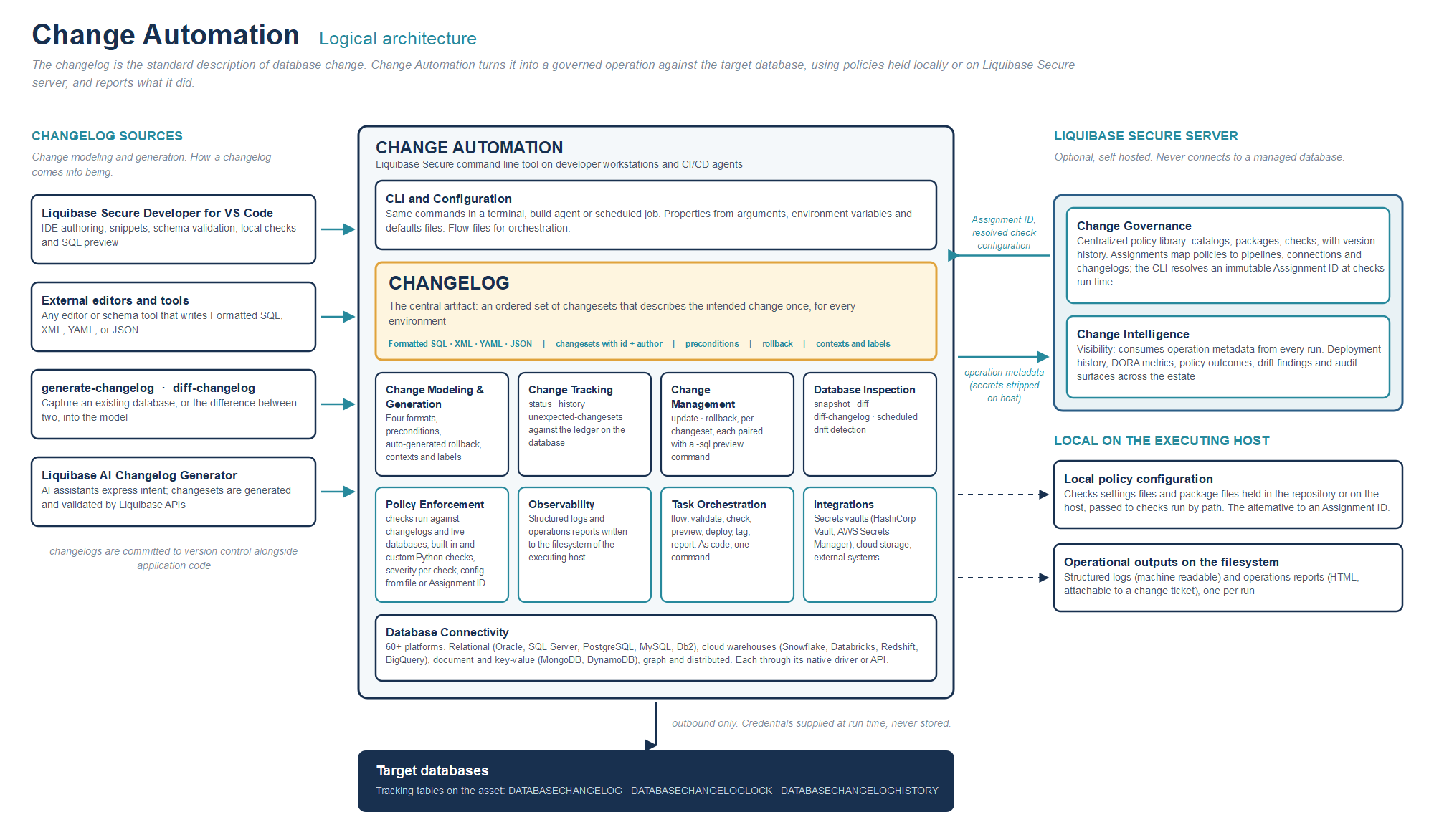
Solid arrows show the Liquibase Secure server integration. Dashed arrows show local operation without the server.
The changelog as the central artifact
Everything Change Automation does is an operation on, or a consequence of, a changelog. Because it is a file in the application repository, it flows through the same pull request, review, and branch protection controls as application code, and because it carries identifiers and checksums, the tool can prove later which of its changesets were applied where.
Changelogs can originate from any of four paths, and Change Automation treats the resulting artifact identically regardless of source.
IDE authoring. Liquibase Secure Developer for VS Code creates changelogs in all four formats with format aware snippets and bundled schema validation, and makes the operational commands available from the editor. Use developer, IDE, and AI authoring tools places it in the wider 6.0 authoring workflow.
External editors and tools. Any editor, schema design tool, or code generator that writes Formatted SQL, XML, YAML, or JSON produces a valid changelog. Nothing in the format is proprietary to the IDE extension.
Capture from a live database. generate-changelog captures an existing database into the model, and diff-changelog expresses the difference between two databases, or between a database and a snapshot, as a changelog.
AI assisted generation. The Liquibase AI Changelog Generator lets AI assistants and coding agents request changesets in natural language. The model expresses intent and calls a tool with structured parameters. The changeset itself is generated by Liquibase's native Java change classes and validated against an in memory database before it is returned, so the assistant never writes changelog syntax from memory.
Once a changelog exists, its lifecycle is the same on every path. It is committed to version control, checked against policy, previewed as SQL, deployed, tracked, and reported on.
CLI and configuration
The command line is the primary entry point. The same commands run in a terminal, a build agent, and a scheduled job. Configuration properties are resolved from command arguments, environment variables, and a defaults file in a documented precedence. General Liquibase parameters is the full list.
Change modeling and generation
This capability family determines how change is expressed. It comprises the four changelog formats, preconditions that gate a changeset on the state it expects to find, automatically generated rollback for change types where the inverse is well defined with explicit rollback blocks for the rest, and contexts and labels so one changelog serves every environment. It also includes the generation commands that produce changelogs from live databases.
Change tracking
Change Tracking is the ledger. status reports what is pending, history reports what has run, and dbcl-history reads the operation level record. This is the fundamental mechanism for knowing what should be present in a database, what is pending, and what is an anomaly, and because the ledger lives on the database, the answer is available to anyone with database access, without the pipeline.
Change management
Change Management applies and reverses change: update and its variants, rollback and its variants, tag, and the paired -sql preview for each. update-testing-rollback deploys and immediately exercises the rollback path, which is the cheapest way to find out that a rollback block is wrong.
Database inspection
Database Inspection reads live state. snapshot captures structure, diff compares two databases or a database against a snapshot, and diff-changelog expresses the difference as a changelog. Include and exclude database objects narrows the comparison to what you actually govern.
Policy enforcement
Policy Enforcement runs checks against changelogs and against live databases, from a local checks settings file or from a Change Governance assignment. Checks Targeting narrows or exempts what a run inspects, and Severity and exit codes in policy check automation maps an outcome onto a pipeline result.
Observability
Observability writes structured logs and operations reports to the executing host. What is Liquibase observability? is the overview, and What are structured logging keys? documents the fields.
Task orchestration
Task Orchestration sequences a deployment into a flow file, an as-code definition of the stages a change passes through, with variables, conditionals, and shell steps.
Database connectivity
Change Automation covers the relational estate (Oracle, SQL Server, PostgreSQL, MySQL, Db2, and others), cloud warehouses (Snowflake, Databricks, Redshift, BigQuery), document and key value stores (MongoDB, Amazon DynamoDB), and graph and distributed platforms. Depth matters as much as breadth. Platform specific objects such as functions, triggers, and packages are modeled rather than flattened, and each platform is addressed in its own terms: relational engines through JDBC drivers or native executors, warehouses through their specific drivers, document stores through their own APIs. This matters because newer data platforms often sit outside whatever process governs the relational estate, and that gap is where audit findings originate. Connect your database has the per platform pages.
Security integrations
Integrations connect Change Automation to systems adjacent to the deployment: secrets managers so that a property holds a reference to a vault path rather than a credential, and cloud storage for changelogs and reports through S3 and Azure blob storage.
Liquibase Secure server integration
Liquibase Secure server is a self hosted component that extends Change Automation in two directions. It never connects to a managed database and holds no credentials for one. Everything it knows arrives from Change Automation instances running in your own pipelines.
Change Intelligence is the visibility direction. Change Automation reports operation metadata outbound to the server after each run, with sensitive properties stripped on the originating host before any network call. Change Intelligence consumes that metadata and presents deployment history, DORA metrics, policy check outcomes, drift findings, and audit surfaces across every pipeline and environment. Connect to Liquibase Server is the setup, and Which Liquibase commands report to Liquibase Server? lists the commands that produce a record.
Change Governance is the policy direction. It holds an organization's policy assets as a searchable, shareable library of catalogs, packages, and checks, and maps those assets to the entities teams already operate through named assignments. Change Governance is not a policy engine and does not execute checks. Change Automation remains the execution point. It requests the configuration behind an assignment ID, authenticated by an API token scoped to the requesting group, and enforces the result on the executing host.
Both directions of the integration are additive. A Change Automation instance that is not connected to Liquibase Secure server operates fully from local configuration and writes its outputs locally. Connecting it adds visibility and central governance without altering how a deployment executes.
Deployment model and runtime posture
Change Automation installs in one step on the hosts that already perform deployments, with certified drivers, extensions, and integrations included. That eliminates the work of assembling and version matching drivers across a mixed estate, which otherwise consumes unbudgeted weeks and produces environment specific failures.
Aspect | Posture |
|---|---|
Runs on | Developer workstations and CI/CD agents, as a command line process under the identity of the invoking user or service account |
Network | Outbound only: to target databases, to secrets managers, and optionally to Liquibase Secure server. No inbound path, no listening socket, no Liquibase managed runtime in the deployment path |
Credentials | Supplied at execution from arguments, environment variables, defaults files, or a secrets vault reference. Never required in a changelog and never persisted by the tool |
State | Held on the managed database in the tracking tables. Outputs, meaning reports and structured logs, are written to the executing host's filesystem |
Policy source | A local checks configuration, or Change Governance on Liquibase Secure server |
Usage and licensing | When connected to Liquibase Secure server, operation metadata gives the organization an understanding of how license capacity and product capabilities are used across pipelines and environments. Sensitive properties are stripped on the host before anything is sent |
A less visible part of the runtime posture is that Change Automation is commercially maintained enterprise software. Liquibase Secure carries SLA backed support with named technical account management and available professional services, and receives frequent security patches, with critical vulnerability fixes committed inside fourteen days. For software that deploys database changes in every pipeline, the support and patch commitment is a security control in its own right.
Governing change that an AI wrote
Developers already ask coding assistants to write migrations, and that practice has become the default very quickly. The question for an organization is where to put the controls. An agent's judgment is not a control. An agent writing a changelog from memory is likely to produce changes that appear correct and are not, using invalid attributes, unsupported types, or silently omitting rollback logic.
Liquibase Secure places the control on the change rather than on the author. Policy checks are deterministic and do not distinguish a human authored changeset from a generated one. Upstream, the Liquibase AI Changelog Generator narrows the model's role to expressing intent. The changeset is generated by Liquibase's own API and validated before it is returned, so a model that misunderstands a request produces a wrong but valid changeset the developer can see and reject, never invalid syntax that fails in a pipeline. Downstream, the SQL preview, the tracking tables, and the operations report apply unchanged. The governance path for AI written change is the same path as for any other change.
Audit readiness as a by-product
The expensive part of an audit is rarely the finding. The cost is the preparation: locating logs, reconstructing history, and filling gaps in the record. Liquibase Secure inverts that sequence. Tracking tables hold a tamper evident history in which every applied changeset carries a checksum and later modification is detectable. Operations reports are generated by the deployment that made the change, at the moment it ran. Structured logs are written alongside them on the executing host and can be retained under your existing log retention practice.
Governance regimes such as SOX, HIPAA, and PCI DSS all ask a version of the same question, who changed what, when, and under what authority, and Change Automation accumulates the answer through its standard operation. Become audit ready turns that into a practice, with companion guides on documenting all database changes, change authorization, access controls and separation of duties, and producing the database change reports.
Where it sits in Liquibase Secure
Change Automation is the execution engine that delivers defined changes to target databases. The other components of Liquibase Secure either help define the change or govern and report on its execution.
Component | Role | Relationship to Change Automation |
|---|---|---|
Change Automation | Command line execution engine: preview, check, deploy, track, roll back, report | This page. Known as Secure Automation in the previous generation |
Deployment history, DORA metrics, drift findings, and audit surfaces across the estate | Consumes operation metadata emitted by Change Automation | |
Centralized policy governance and enforcement configuration | Supplies policies that Change Automation enforces on the host | |
Changelog authoring, local operations, and policy checks in the editor | Produces changelogs, and invokes Change Automation locally as a child process | |
Deterministic, API generated changesets from natural language for AI assistants over MCP | Produces changelogs. Holds no database connectivity |