- Task
- Version · 6.0
- Govern
Define policy assignments
Last updated: September 29, 2026
An assignment connects the checks you have organized to the work you deliver. Until a package is in an assignment, that package enforces nothing. An assignment names the governance you want, as packages and checks, and the assets that governance covers, chosen from your workspace. Your pipeline then selects the assignment by its ID when it runs checks.
Before you begin
Organize the checks you want to enforce into a package in a catalog your team owns.
Procedure
Open the Assignments page
In the left navigation, select Assignments under Govern. The breadcrumb above the list shows your scope as a workspace and All Projects, and both are menus, so you can narrow the list to a single project. Search matches assignment names and descriptions.
Create an assignment
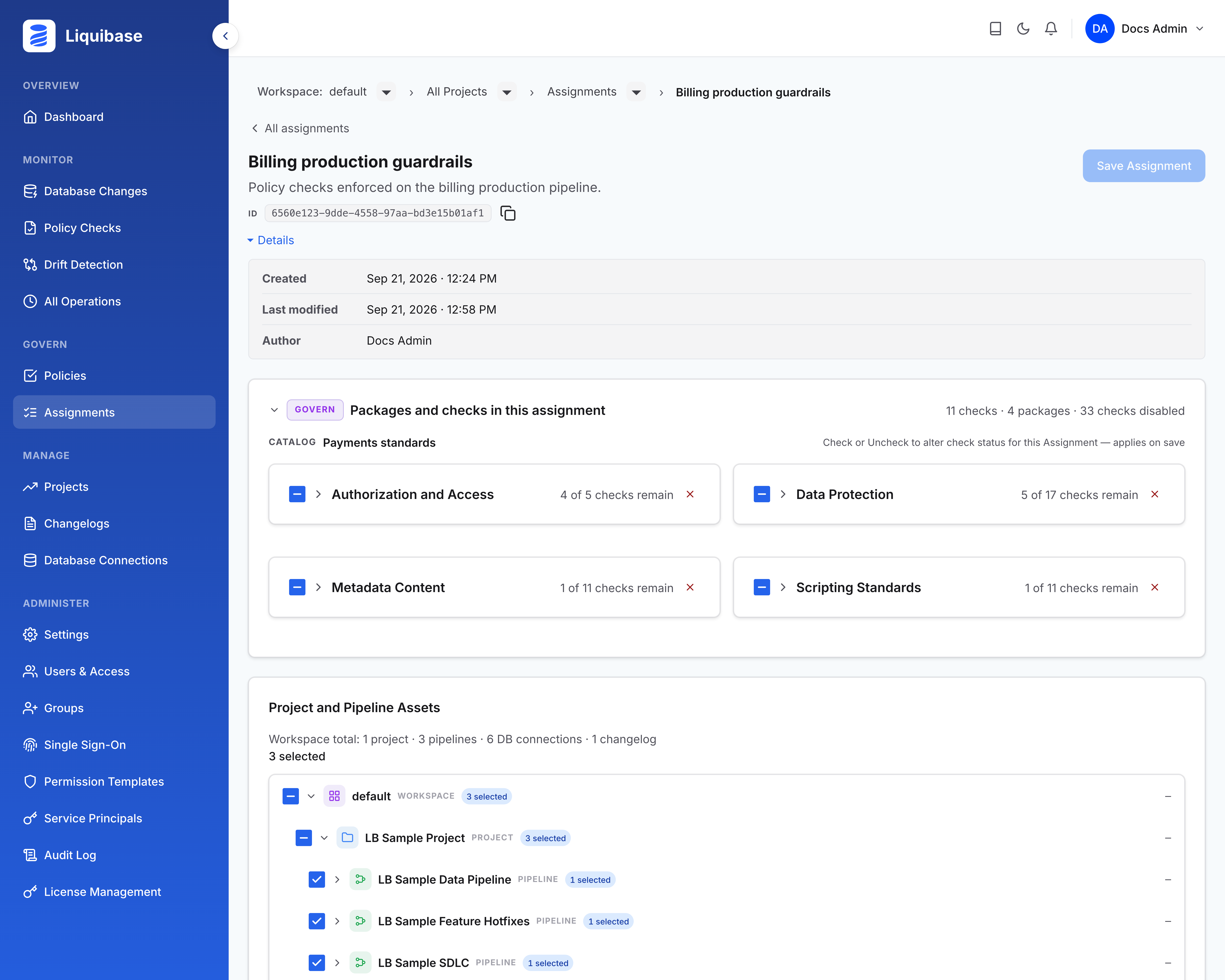
Select + New Assignment, enter a Name, and optionally add a Description covering what the assignment governs and why. A name that says what it governs and where, such as Billing Production Guardrails, is more useful later than a short label. Select Create Assignment. You land in the new assignment straight away, and its detail page shows:
Name and ID: The name, and an ID below it with a control to copy it. That ID is what connects this assignment to your pipeline.
Details: An expander carrying when the assignment was created, when it was last modified, and who authored it.
Packages and checks in this assignment: The governance the assignment enforces. A new assignment has none, and says so.
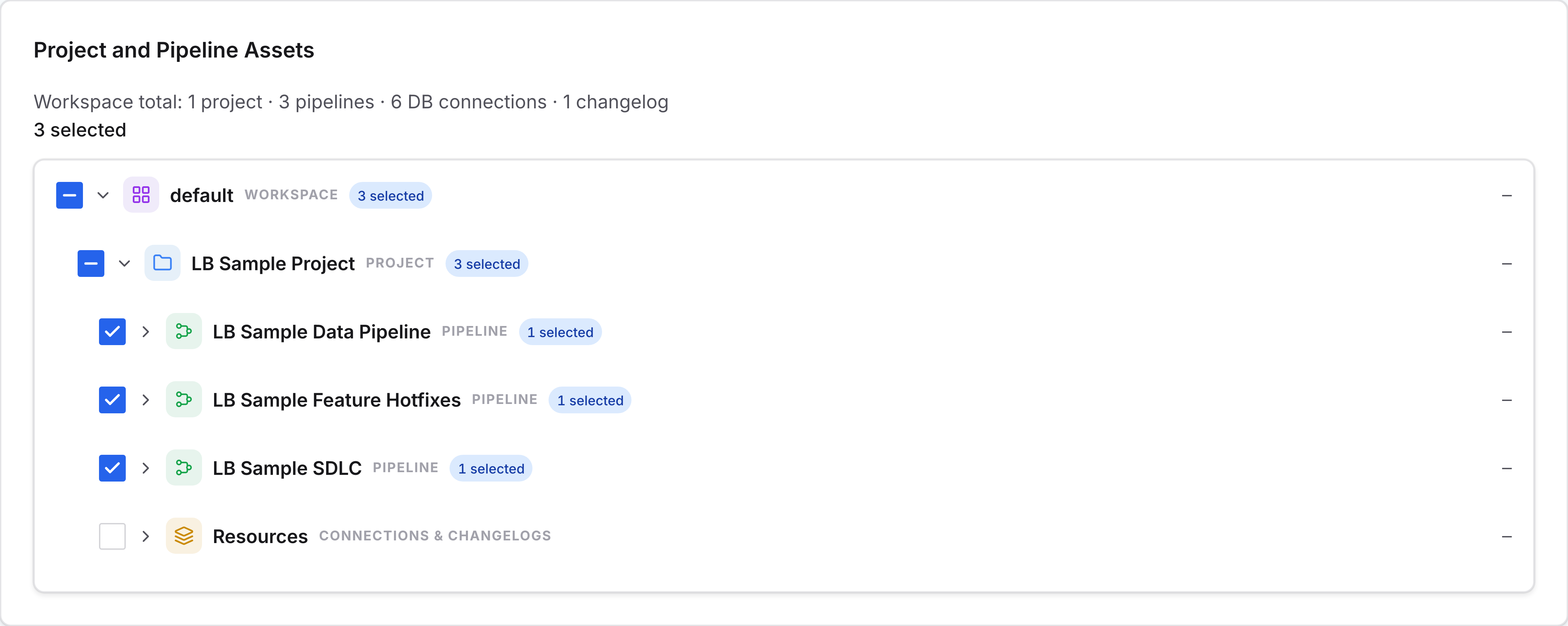
Project and Pipeline Assets: What the assignment can cover, summarized as a count line and shown as a tree of your workspace, its projects, and each project’s pipelines, database connections, and changelogs.
Add packages and checks
Packages and checks arrive through Policies, not from inside the assignment. On the Policy Checks Packages page, each package card has a gear icon on its right. Select it and choose Assign. Selecting individual checks, in a package or in search results, offers the same Assign action for that selection, but assigning a check adds its whole package to the assignment, with the package’s other checks present but disabled for that assignment. You enable or disable checks per assignment from there.

Assign carries your selection into assign mode, where you pick the destination assignment, or create one, and your selection is staged against it as a pending change. Staged items are marked, with a count of the checks they add, and nothing applies until you save.
To remove governance later, uncheck packages or checks in the assignment’s governance panel. Removals are marked until you save.
Select what it covers
In the asset tree, select the assets the assignment governs. Selecting a project covers what is under it, and the count line keeps a running tally of pending changes against the last save. Assets you can view but not assign appear without a checkbox and are never captured by selecting a parent.
Save the assignment
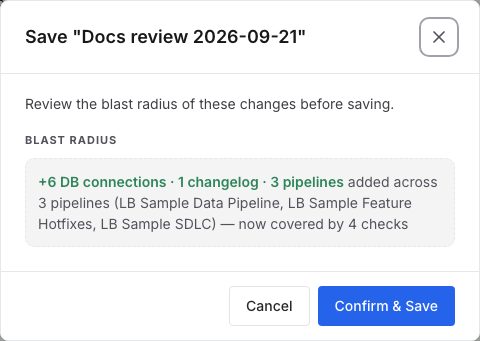
Select Save Assignment. Nothing you staged is enforced until you do.
Select Confirm & Save. The save applies as one change, and it is recorded in the audit log with who changed what.
Results
Your assignment names the checks it enforces and the assets it covers, and its ID is ready to copy into your pipeline, where liquibase checks run --assignment-id selects it. Enforcement starts on the next policy checks run, and editing the assignment changes what runs after that without touching the pipeline.
What to do next
Your assignment ID is ready. Put it next to your pipeline's server settings and run checks with a policy assignment. Review policy coverage shows which assets the assignment reaches and which are still ungoverned.