- Concept
- Version · 6.0
- Deliver
Integrate policy checks with automation
Last updated: September 29, 2026
Policy checks and severity levels can be configured per environment. Organizations may have different requirements as database changes advance through the pipeline. For example, DROP statements may be allowed in the build environment but not permitted during a production deployment.
Incorporating policy checks with Liquibase flow provides standardization, best practices, and governance for all teams throughout an organization.
Liquibase flows and policy checks should be housed in a centralized repository controlled by administrators, to prevent unauthorized access.
1. Build flow
Require pull request reviews before merging into shared code branches. Most source control systems can run processes and checks as a prerequisite to a code merge.
As a best practice, add a Liquibase flow containing changelog policy checks to your team's branch protection rules. Database policy checks can also be used as part of a merge check, but note that those require connectivity to a database, which a merge check may not have.
A changelog policy check called from a flow file:
See the sample pre-merge flow file.
2. Deploy flow
Configure your CI/CD pipeline using Liquibase flow to call the checks file for the target environment.
Ensure the pipeline fails if any policy checks are violated, preventing non-compliant changes from deploying.
Use warnings where changes require teams to take follow-up actions rather than stop.
Database checks may be called on a schedule, or after a deployment, to confirm the integrity of the database outside the deployment itself.
A database policy check called from a flow file:
See the sample deploy flow file, which runs changelog checks before the deployment and database checks after it.
3. Monitor and review policy checks
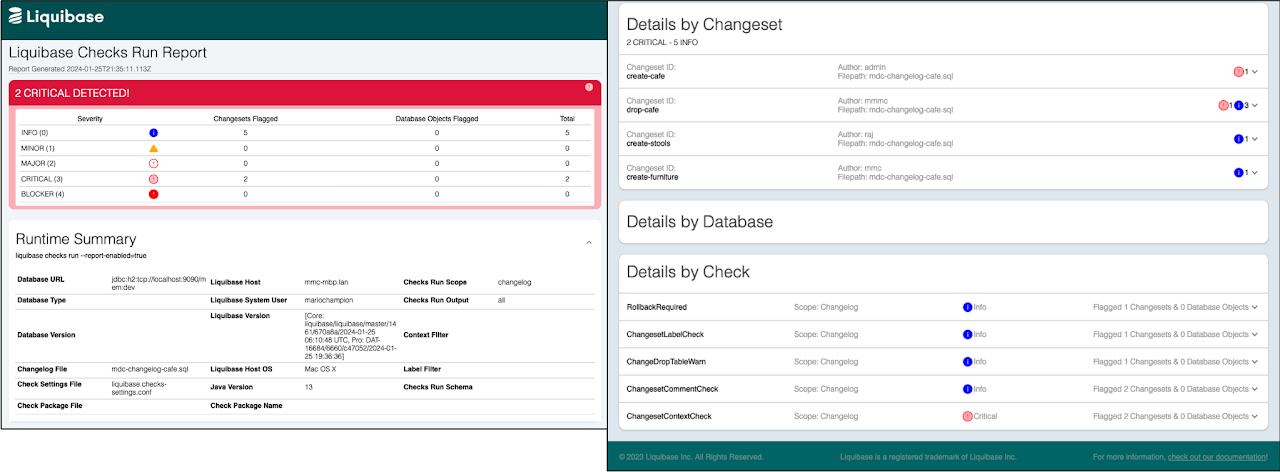
The output of policy checks appears in three places: the console, the policy checks operations report, and the structured logging sent to your observability infrastructure.
Set liquibase.reports.enabled=true in your liquibase.properties file to enable the report.
For changelog-scoped checks, the summary identifies the changelogs and changesets that triggered the check, their content, and any attributes.
For database-scoped checks, the summary contains entries for the specific objects that triggered the check, and a count of the object types checked.
4. Collaborate with your teams
Implementing policy checks helps maintain the integrity and quality of your database changesets, catching issues early and improving overall development efficiency.
Ensure your team knows all the policy checks in place, with training and clear documentation.
Regularly review the results to identify and address issues, improving processes, database schema, and changesets.
Periodically update your check policies and rules based on new best practices, changes in standards, or evolving project requirements.
Vary severity by environment
The example above points every environment at one checks file. Once the same change has to pass different standards in build and in production, you need a checks file per environment and a flow that selects between them. See Policy check roll out best practices. How each severity maps to an exit code in automation is covered in Severity and exit codes in policy check automation.