- Concept
- Version · 6.0
- Deliver
What is the update report?
Last updated: September 29, 2026
The update report is a Liquibase operation report that informs you of system, runtime, operation, and changeset information about your database deployments.
In Liquibase 4.25.1 and later, you can automatically generate a database update report using the Liquibase update family of commands: update, update-sql, update-count, update-one-changeset, and update-to-tag. In Liquibase 4.28.0 and later, you can also generate an update report as part of the update-testing-rollback command.
The update report gives you a human-readable summary of the state of your database and changelogs, any generated SQL for changesets, whether the operation was successful, any error messages, and other useful data.
What is the update report?
Uses
Using Liquibase update reports can help developers, DBAs, DevOps engineers, and managers in the following ways:
Easily scan and understand the changes made to your database with the summary section, then dive deeper with the execution details.
Audit and report on the changes to your database without needing to analyze or interpret logs.
Collaborate with your team with shareable reports.
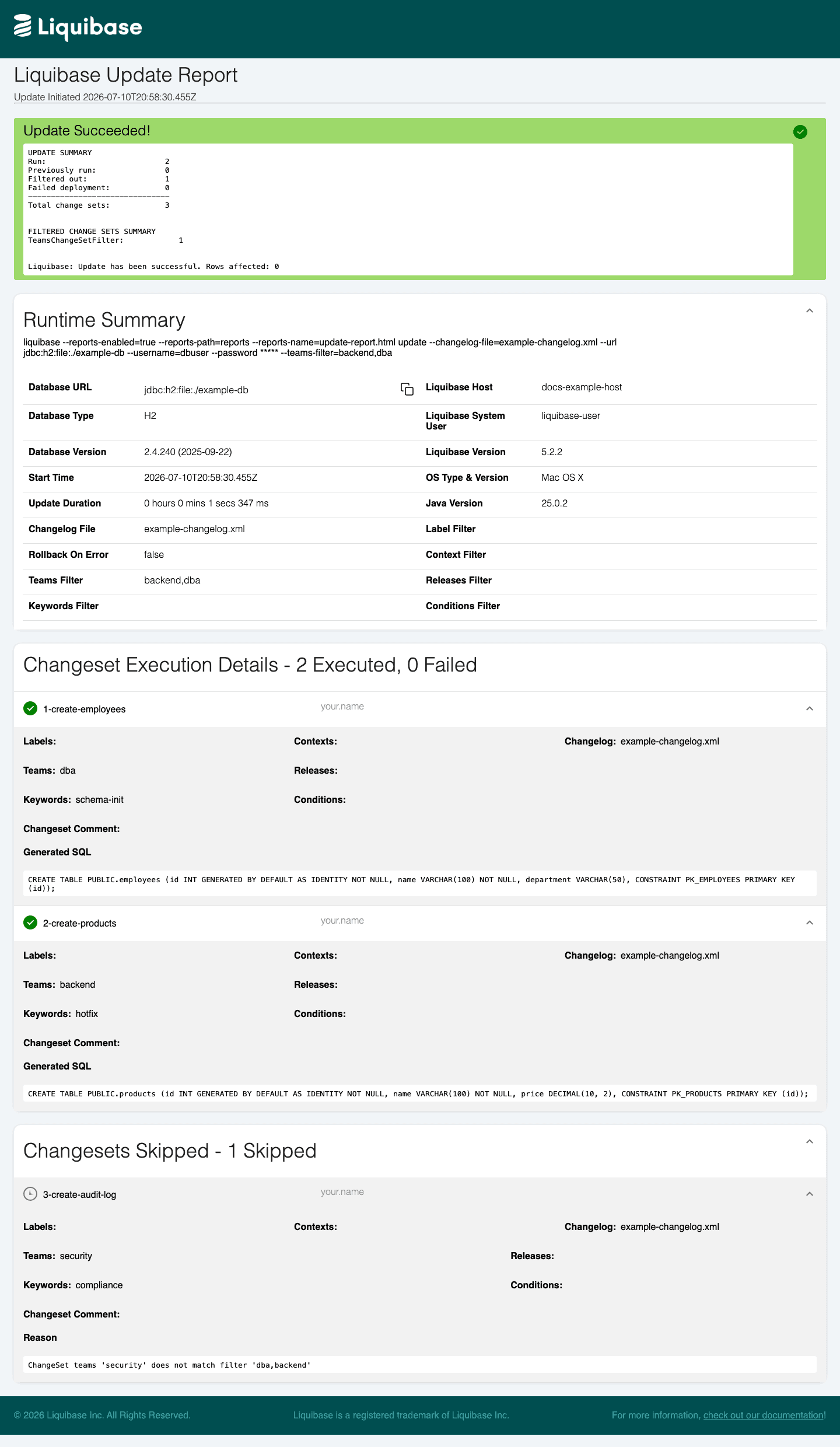
Changeset attributes and filters in the report
The Runtime Summary section displays a row for each changeset filter argument you can supply at runtime: Label Filter, Context Filter, Teams Filter, Releases Filter, Keywords Filter, and Conditions Filter. For example, if you run liquibase update --teams-filter=backend,dba, the Teams Filter row displays backend, dba. Rows for filters you did not use are blank.
The changeset execution details display each deployed changeset's own labels, contexts, teams, releases, keywords, and conditions attribute values. Attributes the changeset does not set are listed with no value.
The Changesets Skipped section shows each excluded changeset with the reason, for example: ChangeSet teams 'security' does not match filter 'dba,backend'. The update summary at the top of the report lists only the filters that excluded changesets, with a count for each. For example: TeamsChangeSetFilter: 1.
Note: The teams, releases, keywords, and conditions attributes and their filter arguments require Liquibase Secure 5.2.2 or later. See teams-filter, releases-filter, keywords-filter, and conditions-filter.
To keep the report readable when many changesets are filtered out, set --reports-suppress-skipped=true (or --report-suppress-skipped=true for a single command) to hide the detail rows for skipped changesets. The report still shows the total number of skipped changesets in its summary.
Setting parameters
You can modify the update report output with the parameters listed in the tables on this page. In the CLI, global parameters go to the left of the command, and command parameters go to the right of the command.
liquibase \
    --reports-enabled=true \
    --reports-path=reports \
    --reports-name=update_report.html \
  update \
    --changelog-file="example-changelog.xml"
Note: For readability, this page shows parameters on new lines. If you type in the commands on a single line, do not include the backslashes \ shown in the examples.
You can also set parameters in your liquibase.properties file, as environment variables, or in a flow file. For a list of parameters and their syntax in each format, see What parameters can I use with operation reports?
Disable reports by default; enable only the update report
If you want to keep reports disabled by default and enable only the update report, you can use the command parameter --report-enabled (singular) on an update family command.
Note: The flow file example uses reports-enabled (plural) within globalArgs to enable all operation reports. To enable this specific kind of report, but not other reports, you must instead set report-enabled (singular) in cmdArgs.