- Concept
- Version · 6.0
- Create
Review your scope and infrastructure
Last updated: September 29, 2026
Infrastructure
Infrastructure requirements are a critical consideration for any automation initiative.
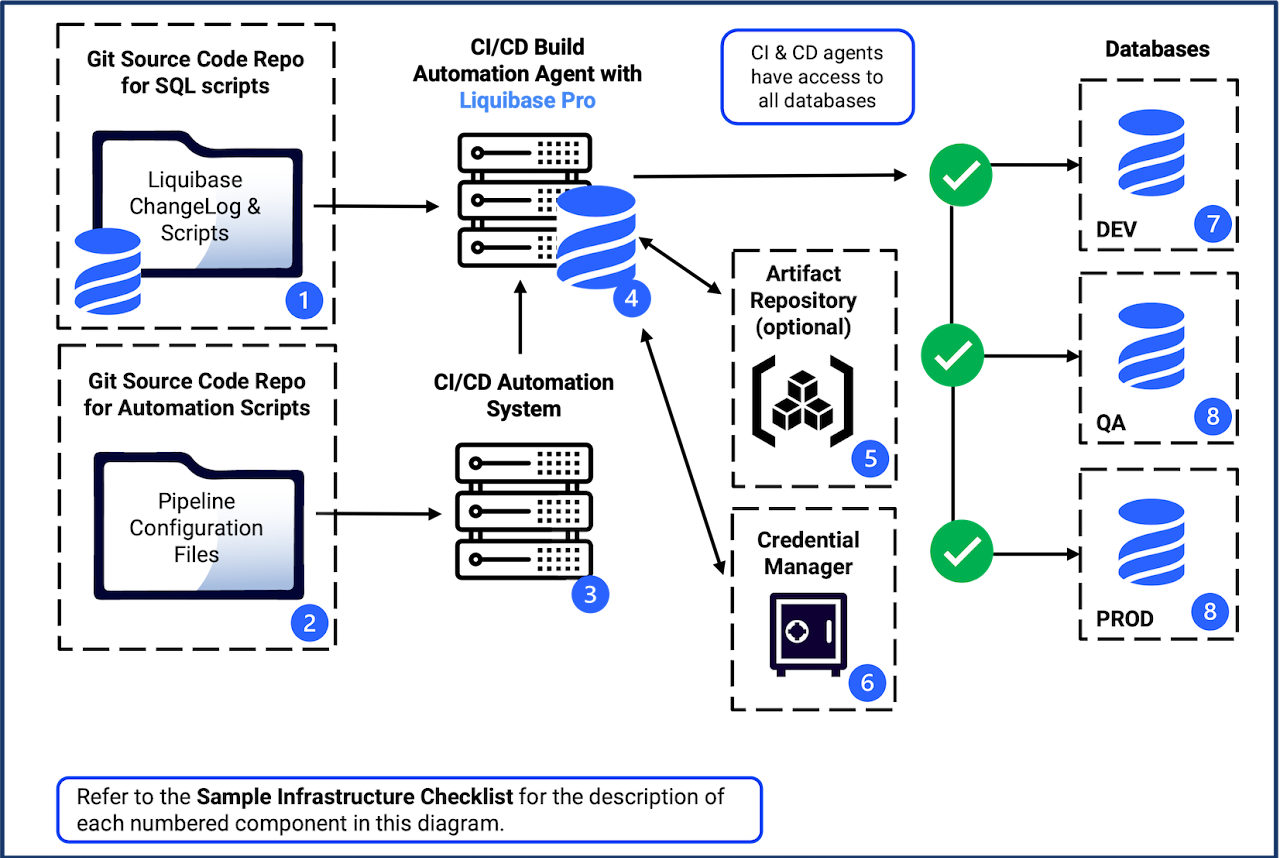
Below is a sample infrastructure diagram to help your teams understand the architecture generally involved when automating database schema changes.
Sample infrastructure checklist
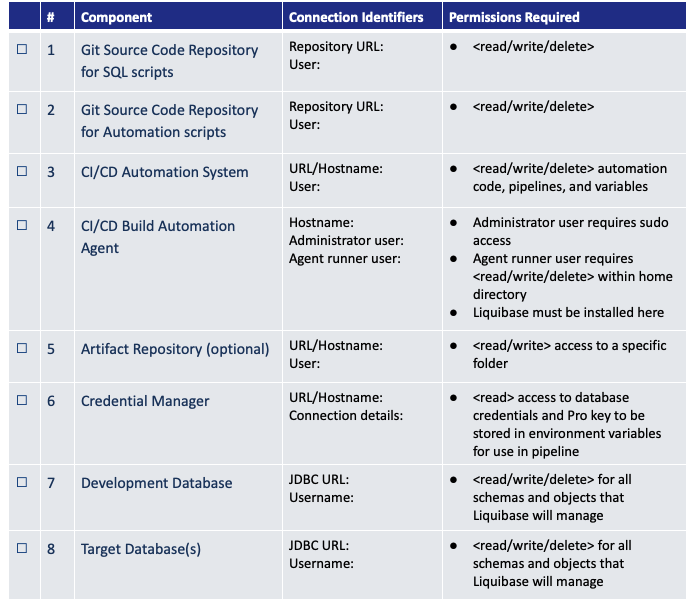
Your organization can use this checklist when scoping out the necessary components for your implementation. Each row matches a numbered component in the diagram above.
# | Component | Connection identifiers | Permissions required |
|---|---|---|---|
1 | Git source code repository for SQL scripts | Repository URL, user | Read, write, delete |
2 | Git source code repository for automation scripts | Repository URL, user | Read, write, delete |
3 | CI/CD automation system | URL or hostname, user | Read, write, delete on automation code, pipelines, and variables |
4 | CI/CD build automation agent | Hostname, administrator user, agent runner user | Administrator user requires sudo access. Agent runner user requires read, write, and delete within its home directory. Liquibase is installed here |
5 | Artifact repository (optional) | URL or hostname, user | Read and write on a specific folder |
6 | Credential manager | URL or hostname, connection details | Read on the database credentials and on the Liquibase Secure license key, both stored in environment variables for use in the pipeline |
7 | Development database | JDBC URL, username | Read, write, delete on all schemas and objects that Liquibase will manage |
8 | Target databases | JDBC URL, username | Read, write, delete on all schemas and objects that Liquibase will manage |
Download the sample infrastructure checklist as a PDF
It is recommended that the Liquibase implementation team work together to complete the recommended planning outlined in this guide. That way, you will have all the credentials, permissions, and prerequisites required to progress quickly toward your implementation goal.
Checklist rows that stall implementations
Four rows on the checklist are the ones that stall implementations, because each depends on a request to someone outside the team.
The build agent needs a network path to every target database. This is the most common surprise, because the agent usually sits in a different network segment than the workstation the DBA tested the connection from. Confirm it before you commit to a date.
Each database platform has its own connection requirements. Check yours in Connect databases, and confirm the platform, version, and Java version against System requirements before you order anything.
The credential manager choice shapes the pipeline. Liquibase reads secrets from environment variables, from your CI/CD tool's own secret store, or through a secrets management extension. See Liquibase secrets management extensions and Connect your database.
The database accounts need the right grants. Several platforms have a grants guidance page of their own in Connect databases. Ask for the accounts early; grants are usually the slowest approval in the list.
Note what is out of scope for the first pass as deliberately as what is in it. Legacy databases nobody wants to touch, the reporting warehouse, the vendor-managed application. Writing them down as "not now" stops them being reopened every week.
What the server adds to your checklist
Liquibase Secure 6.0 adds Liquibase Secure server to this picture. Plan for these components alongside the pipeline items above:
A host for Liquibase Secure server: an on-premises server, a private cloud VM, a VPN-protected host, or an internal Kubernetes cluster, with Docker 24+ and Docker Compose v2.
A network path from every machine that runs Liquibase to the server, over HTTPS in production. Reporting is non-blocking: if the server is unreachable, deployments still complete.
Browser access to the web application URL for everyone who reviews operations, and an API token for each user who connects their runs.
The server distribution bundle and container image registry URL, provided by your Liquibase account team.
For what you deploy and how the components communicate, see What is Liquibase Secure server?.
Summary
Addressing these components can help you create a comprehensive and effective Liquibase implementation plan that minimizes risks and maximizes the benefits of using the tool for database change management.
Once you have planned your implementation, you should be ready to start building. The rest of this guide covers the following setup phases: