- Concept
- Version · 6.0
- Deliver
What reports does Liquibase produce?
Last updated: September 29, 2026
Liquibase Secure generates reports for automation operations such as update, checks run, rollback, and drift detection.
Reports can be emailed to users, delivered to storage such as AWS S3, or downloaded as a pipeline artifact. Discuss with your teams their preferred method for delivering the report content.
Below are sample reports for the update and rollback commands. Since Liquibase 4.29.0 these reports are enabled by default.
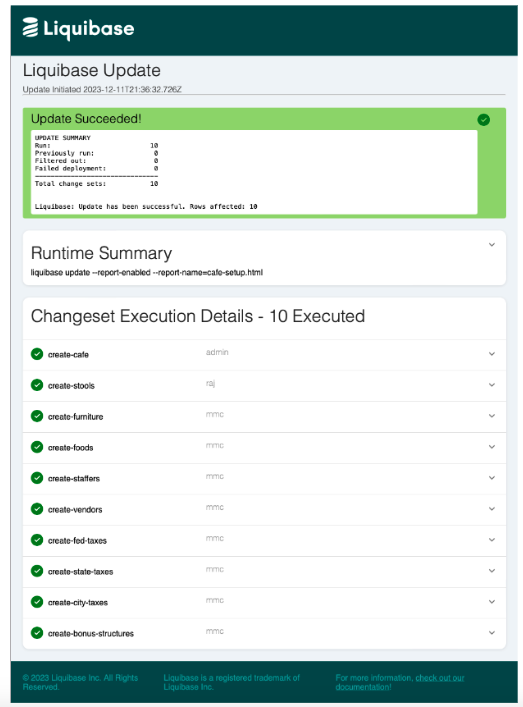
Update report
The update report provides system, runtime, operation, and changeset information about a team's database deployments.
It is generated automatically when you use the update family of commands.
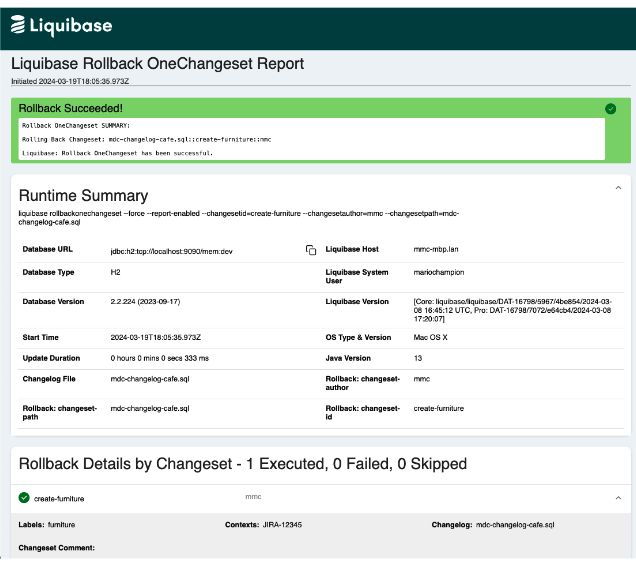
Rollback report
The rollback report provides system, runtime, operation, and changeset information about a team's database rollbacks, in a human-readable format.
It is generated automatically when you use the rollback family of commands.
Why this matters beyond convenience
An operation report is the artefact that answers "what actually changed, where, and when" without anyone reconstructing it from logs. If you are subject to an audit regime, keeping the report as a pipeline artifact turns every deployment into its own evidence, produced by the deployment rather than written up afterwards.
That is the cheapest compliance win in an implementation, and it is on by default, so the only decision left is where the reports go and how long you keep them.