- Concept
- Version · 6.0
- Create
Secure setup using Azure Key Vault
Last updated: September 29, 2026
If Azure DevOps runs your deployments, keep the connection details in a variable group and link that group to the pipeline. One group per environment keeps a pipeline targeting QA from reading production credentials.
1. Create a variable group
Go to Pipelines > Library, open the Variable groups tab, and choose + Variable group.

2. Name the group and add the variables
Give the group a name that says which connection it holds, and add a variable for the URL, the username, and the password, named to match the Liquibase environment variables:
LIQUIBASE_COMMAND_URLLIQUIBASE_COMMAND_USERNAMELIQUIBASE_COMMAND_PASSWORD
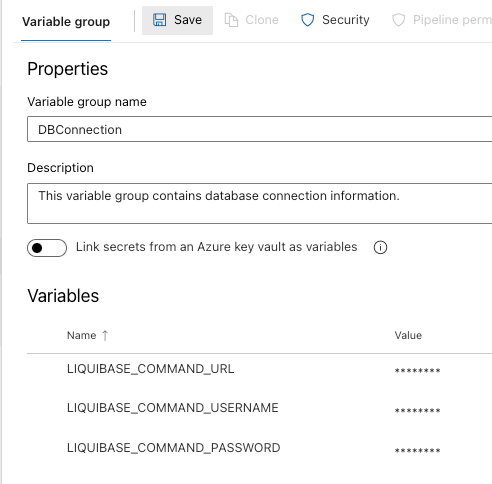
If your organization already runs Azure Key Vault, turn on Link secrets from an Azure key vault as variables instead of typing values here. The group then holds references and the vault stays the single source of truth, which is what you want when credentials rotate.
3. Lock every value
This is the step to get right. A variable that is not locked is stored and logged in plain text, so an unlocked password appears in build output.
Newly entered variables are unlocked. Only the password row below carries a padlock:
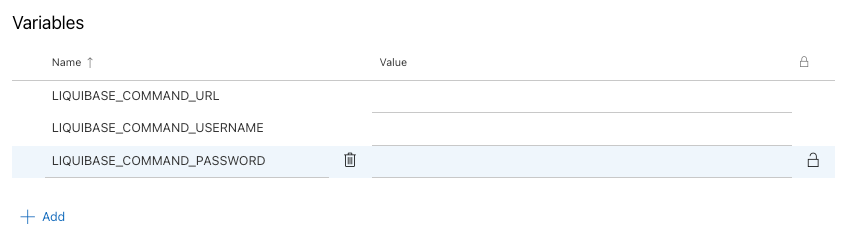
Click the lock on each of the three. All three values then display as asterisks:
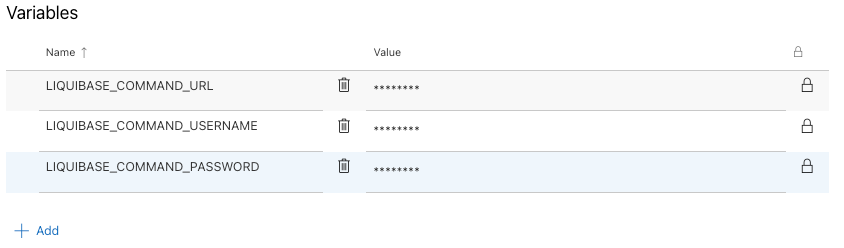
Lock the URL and username as well as the password. The URL names your host and database, which is not something to publish in a build log even though it is not a credential.
4. Link the group and map the variables explicitly
Secret variables are not passed to scripts automatically. That explicit env: block is required, and this is the mistake that costs people an afternoon: locking a variable is exactly what stops Azure from injecting it, so step 3 and step 4 have to be done together. Omit the mapping and Liquibase receives an empty password and reports an authentication failure, which looks like a credentials problem rather than a pipeline one.
Where to go next
Set up Azure DevOps pipelines for the full pipeline, not just the credentials
Secure setup using environment variables for the variables these map onto