- Concept
- Version · 6.0
- Deliver
What are policy checks for?
Last updated: September 29, 2026
Liquibase policy checks are designed to analyze changesets and SQL for specific patterns, commands, and conditions, to ensure database changes adhere to an organization's security and compliance standards. They also help maintain code quality and consistency.
Checks integrate into a team's build and deployment automation to catch non-compliant changes early in the process, making it easier to address issues before changes advance further in the pipeline.
Policy checks overview
How checks fit into an automated pipeline.
How checks fit into a pipeline
Below is a high-level policy checks flow diagram for reference.
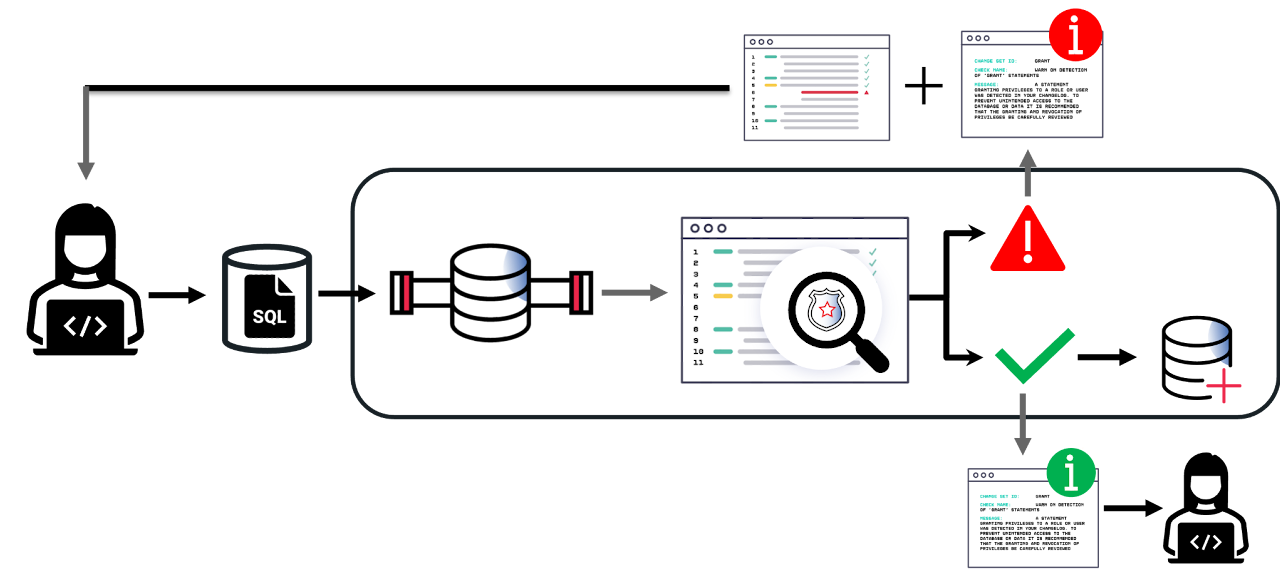
Each SQL change is checked for compliance with established policy as part of an automated Liquibase process. Non-compliant code is returned to the author, while compliant code is pushed to the database as an update. In either case an informational report is generated and made available to team members.
Familiarize yourself with policy checks
Liquibase offers a library of available checks in the default checks file, which can be enabled or disabled. These default checks can also be customized using Java regular expressions.
Liquibase also enables organizations to enforce compliance using custom policy checks written in Python. Check chains combine default and custom checks, allowing multiple checks to function together as a single policy check.
The three decisions this step makes
Reading the next three pages in order settles them:
Which checks are on, and how severely they fail. Configured in a single
liquibase.checks-settings.conffile.What each check runs against. Changelog-scoped checks read your changesets. Database-scoped checks read the objects in a live database, so they need a connection.
Where in the pipeline they run. Pre-merge, pre-deployment, post-deployment, or on a schedule. This is the decision that determines whether checks are a gate or a report.