- Concept
- Version · 6.0
- Monitor
Identify policy violations
Last updated: September 29, 2026
Find the checks that fired, what triggered them, and where.
A violation is a check that fired. The result names the check, its severity, and the changeset or pattern that triggered it. Narrow the policy views to failed outcomes to see violations across teams, then open one for the full message and target.
Scan severity across runs
Each operation in the list shows a Severity column with five pills, one per severity bucket, in a fixed order of Info, Minor, Major, Critical, and Blocker. Each pill shows the number of violations at that severity for the operation. Pills with a count of zero stay in place, muted, so a given severity is always in the same position.
Find the exact violation
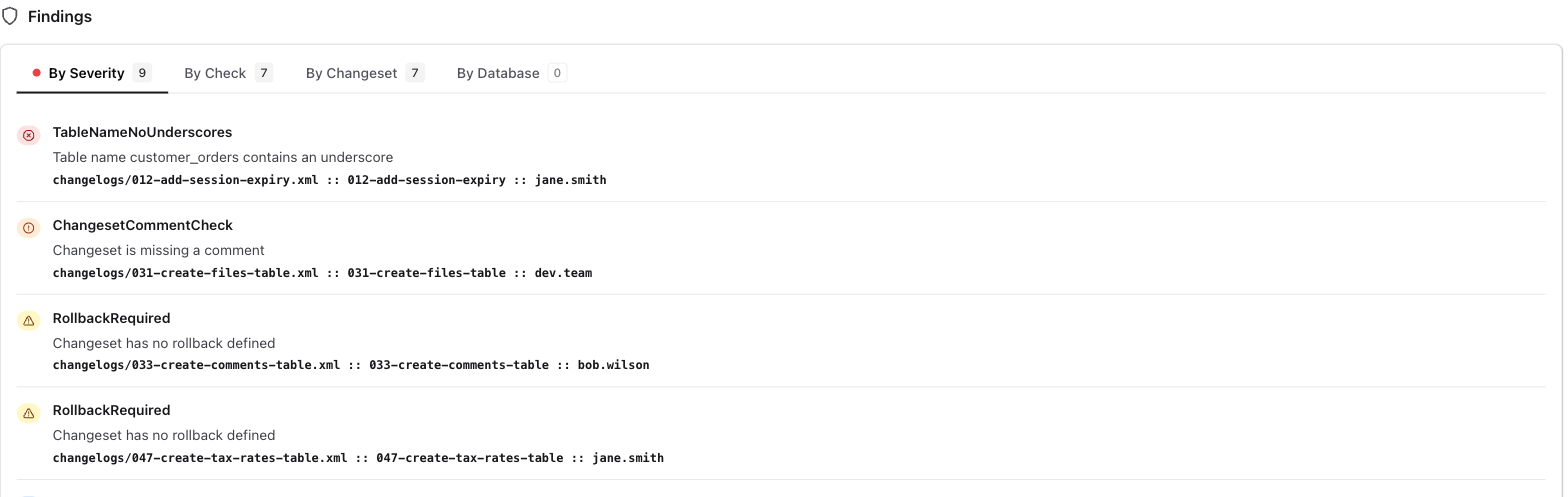
Open the operation and start on the By Severity tab in Findings. Each violation identifies the check that triggered, the severity, and the exact changeset or database object responsible, along with the source file and line. Read the description to understand what the check requires, then locate the changeset in your changelog and update it to meet the requirement.
From a violation, the next step is usually a fix. See Investigate a policy check failure to work from the blocked pipeline back to a passing change.