- Concept
- Version · 6.0
- Manage
Audit permission changes
Last updated: September 29, 2026
Review the record of every change to users, groups, permissions, and tokens on Liquibase Secure server.
Liquibase Secure server records every change to who can do what. The audit log is the evidence trail for a compliance review: it answers who made a change, when, what it applied to, and what the setting was before and after.
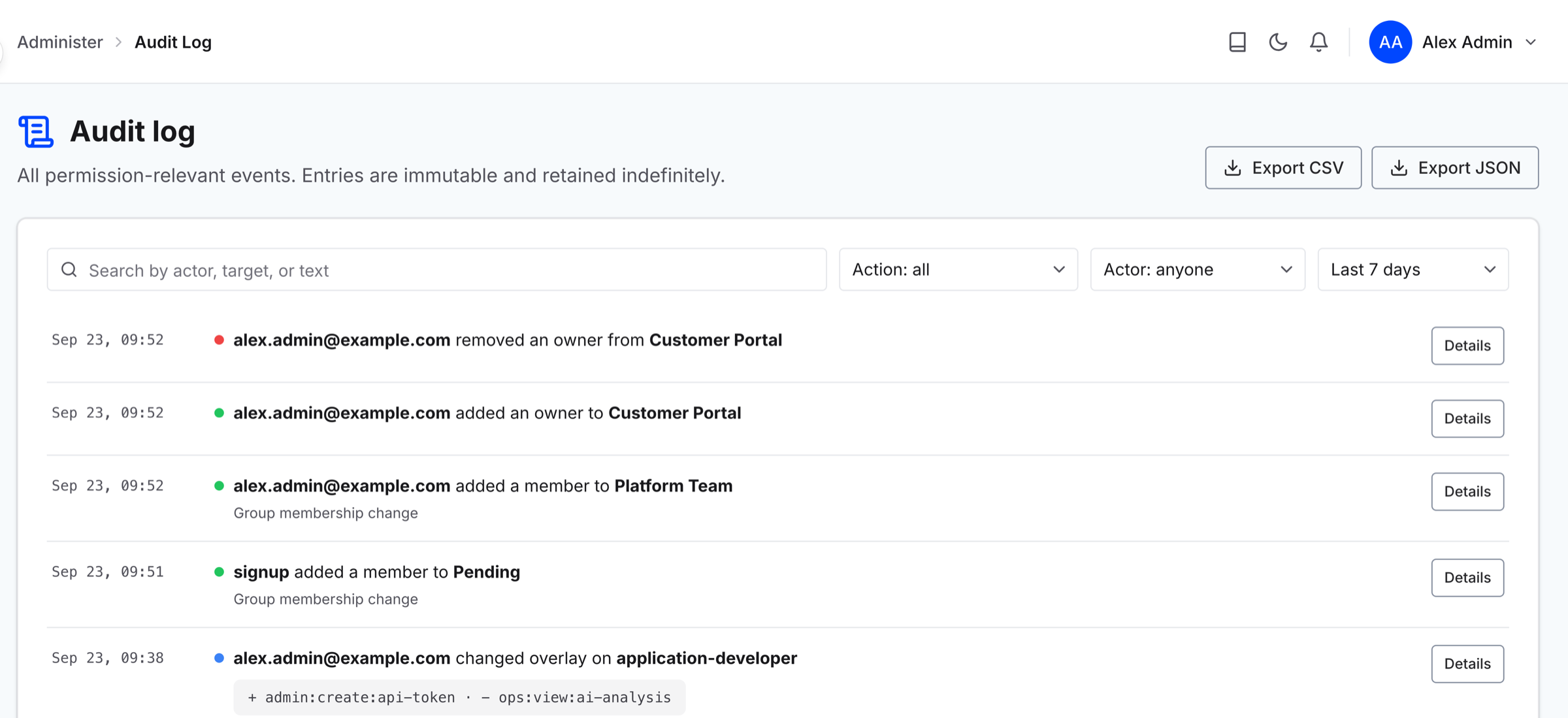
To open it, go to Administer and select Audit Log. The log is stored in the server's own database, so there is no log file to find and nothing to configure.
Who can see the audit log
Reading the audit log needs a permission of its own, separate from the permissions that let someone use a project. The Customer Admin and Security Reviewer templates carry it. Anyone else does not see Audit Log in the sidebar at all, so a reader who cannot find it is missing the permission rather than looking in the wrong place.
What is recorded
An entry is written for each of the following.
Users: inviting a user, revoking an invitation, deactivating a user, reactivating one, and deleting one.
Groups: creating, renaming, and deleting a group, and adding or removing a member.
Assignments: creating an assignment, changing its targets, removing it, and changing what it customizes.
Direct grants and denies: creating one and revoking one.
Ownership: adding an owner, removing an owner, and transferring ownership.
API tokens and service principals: creating, rotating, and revoking each.
Note: A grant and a deny are the same kind of entry, and which one it was is part of the entry's detail rather than its name. Filtering by action alone does not separate them.
What an entry contains
Every entry names the actor, the time it happened, the target it acted on, and the state before and after the change. The before and after are the fields that make that particular action meaningful, not a copy of the whole record, so a setting that has nothing to do with the change does not appear.
Two details matter when you are reading an old entry. The target's name is stored with the entry, so it stays readable after the target has been renamed or deleted. And the actor can be the server itself rather than a person: promoting the first administrator and placing a new user in the Pending group both happen with nobody signed in, so they are recorded with the server as the actor rather than with a blank.
Entries are never edited or removed. They are kept indefinitely in the initial release.
Find an entry
Search runs across the actor and target names, their identifiers, and the action. You can also filter by action, by actor, by target, and by a date range, and entries are listed newest first.
The list shows the last 7 days until you change the date range. To keep a copy outside the server, select Export CSV or Export JSON. An export includes the entries your filters match, up to the 10,000 most recent, so narrow the filters to export more than that.
SSO configuration changes
Changes to a single sign-on provider are recorded in this same log rather than in a separate one. An entry is written when a provider is created, enabled, disabled, renamed, removed, or has its credentials rotated.
Note: A secret is never recorded as a value. A rotation entry tells you that credentials changed and when, not what they changed to.