- Task
- Version · 6.0
- Manage
Hand off what a departing user owns
Last updated: October 15, 2026
Keep every project, connection, and changelog owned when someone leaves by moving what they solely own to someone else as you deactivate them.
Before you begin
You must be a member of the Administrators group to deactivate users. The account that set up the server is a member.
Note: Groups are blocked the same way, but without a way to transfer what they own. A group that is the only owner of something cannot be deleted until you add another owner to each of those items.
Procedure
Open the user
Go to Administer and select Users & Access, and then select the user who is leaving.
Deactivate the user
Select Deactivate, and then select Deactivate again to confirm.
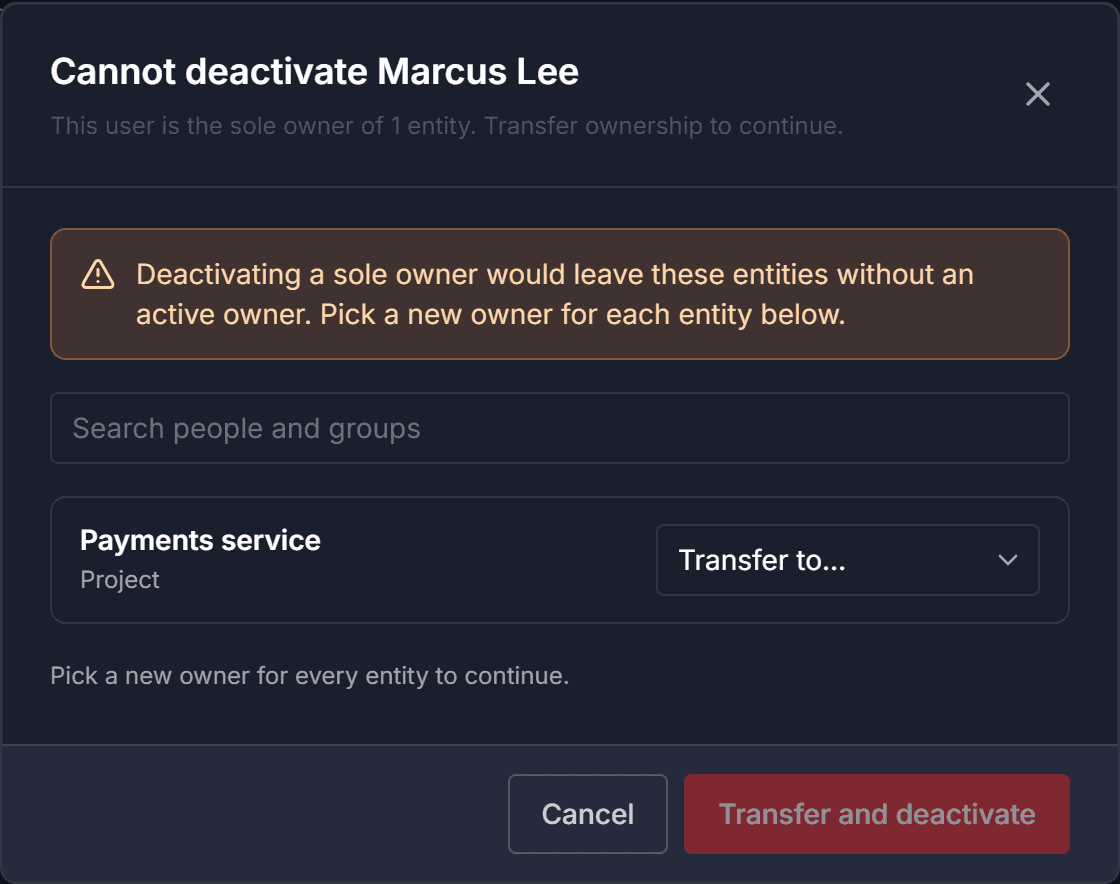
A user who is the only owner of something cannot be deactivated, because it would leave those items with no active owner. If the user solely owns anything, the dialog changes to Cannot deactivate and lists those items.
Choose a new owner for each item
Choose a new owner for each item from its Transfer to… list, which offers both groups and people.
To find a person, type part of their name or email in the search box above the items, and every list narrows to the people who match. When a workspace has more people than a list can show, the dialog says it is showing only the first matches, so search for the person rather than scrolling.
Transfer and deactivate
Once every item has a new owner, select Transfer and deactivate.