- Task
- Version · 6.0
- Govern
Configure a policy check
Last updated: September 29, 2026
A policy is a check with your values in it. The parameters decide what the check flags, and the severity decides what happens when it fires. You configure checks on the Policy Checks Packages page, in a catalog your team owns.
Before you begin
Copy the check you want to configure into a package in a catalog your team owns. Checks in the Liquibase Default Catalog are read-only.
Procedure
Open the check’s configuration panel
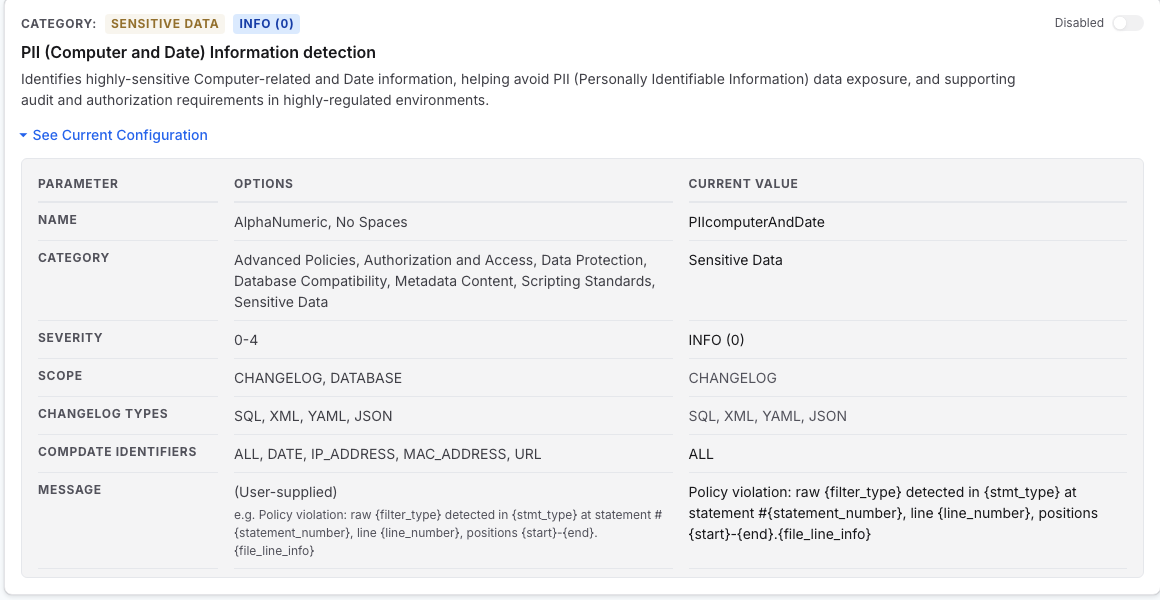
Under Govern, select Policies, then select Manage on your catalog to open Policy Checks Packages. Open the package holding the check, then select See Current Configuration at the bottom of the check’s row. The panel expands in place, so you can hold several open at once while you compare checks.
Read what the check accepts
The panel is a table with three columns.
Parameter: Names each setting.
Options: Documents the values it accepts.
Current Value: Shows what is saved.
An optional parameter with no value reads (not set).
Edit the values
Select Edit in the panel, or the check’s Configure action, which opens the panel already in edit mode. The Current Value column becomes controls matched to each parameter.
Severity: A choice from
INFO(exit code 0) toBLOCKER(exit code 4).List parameters: Dropdowns and checkbox chips.
Toggles: A true-or-false switch.
Patterns and messages: Text fields.
Scope and Changelog Types are fixed by the check type and render dimmed. Cancel discards every unsaved edit.
Set the category, if you want to regroup the check
A check carries a Category, shown under its name. Categories are free text with suggestions as you type, and saving a new value creates that category and moves the check into that category’s group.
Save
Select Save… and choose Save to commit your edits to this check.
Note: To keep the original check as it is and put your values on a copy instead, use Save As rather than Save.
Results
The check now carries your values, and every assignment that already includes its package enforces the new configuration on the next policy checks run.
What to do next
The check carries your values. When it has earned your trust, set policy check severity and exit codes to raise it. Tune your policy checks covers what else to adjust and when.