- Concept
- Version · 6.0
- Govern
Adjust policies, assignments, and scope
Last updated: September 29, 2026
The governance changes available when the rule is the problem, and when to use each one.
When the problem is the rule rather than the teams, these are the governance changes available to you. Each one has a procedure in the Govern guides. What this page adds is when to use which.
Change a check’s parameters when the rule is right and its threshold is wrong. The row limit that fires on routine batch jobs, or the naming pattern that rejects a sanctioned convention. See Configure a policy check.
Change a check’s severity when the rule is right and blocking is wrong, or the reverse. A rule that always gets overridden should warn instead. A warning nobody reads on a real risk should block. See Set policy check severity and exit codes.
Change what a package contains when a rule does not belong in the bundle it ships in. Teams adopting that package get the rule whether it suits them or not. See Organize checks and packages.
Change what an assignment covers when the rules are right but applied to the wrong assets. A production-grade package enforced on a sandbox, or a critical database with no assignment at all. See Define policy assignments and Review policy coverage.
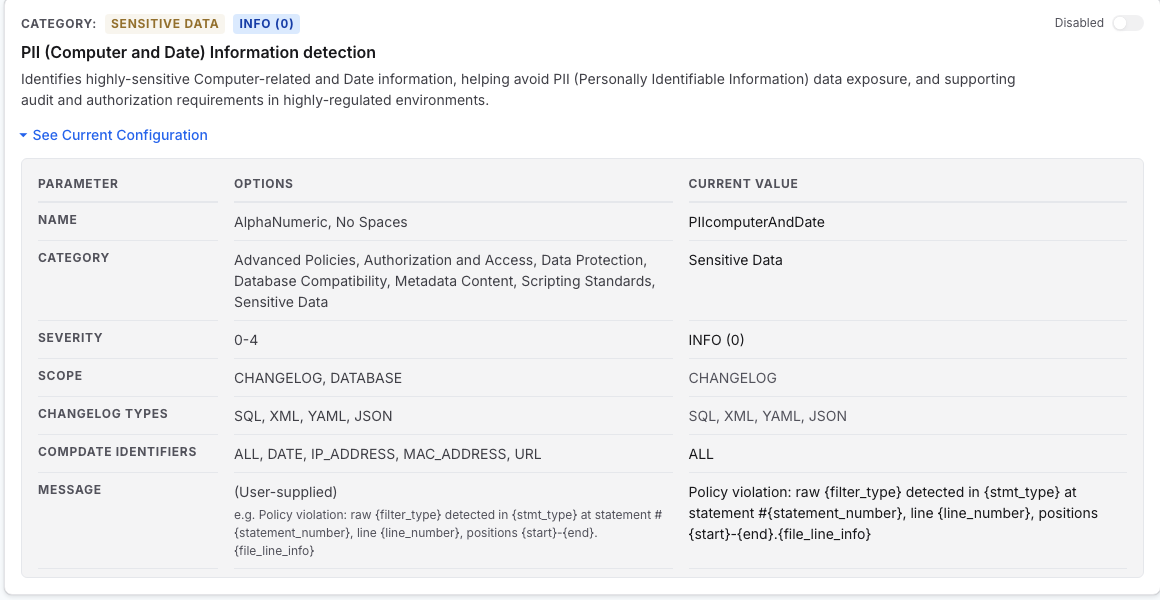
A check’s configuration panel is where the first two happen. It shows the parameters you can change, the severity, and the scope the rule applies to.
Before you make the change
Make one change per cycle, so the next reading can tell you what caused what.
Tell the affected teams before it reaches any pipeline. See Communicate the change to affected teams.
Write down what you expect to be different, for Verify the effect on the next measurement cycle to check against.